FriendlyURL : A new and exciting feature of ASP.NET

This is going to be the last post of 2012 by me. I am very happy that I am writing about a very exciting feature that is coming with ASP.NET.

I am really excited to learn and write on this. I really hated the ugly URLs and the extensions of the page that always visible when one opens the application unless and until you write your own custom url processor. With ASP.NET 4.0, Routing was introduced, which provided the capability to ASP.NET to have easier, manageable and SEO friendly urls, I wrote a post on it. You can click below to have a look on it.

URL Routing with ASP.NET 4.0

But that is little tidy to write. And it looks like writing extra code that does not produces any business functionality.

FriendlyURL as the name suggests gives a clean and SEO friendly URL.Currently it is available via NuGet and in pre release version.

So For this post, I have used my Visual Studio 2012 IDE. I created a new project as File-> New -> Website -> ASP.NET Empty Website.

Once the project got created. I require to install the NuGet for my application. So got to Tools-> Library Package Manager-> Package Manager Console
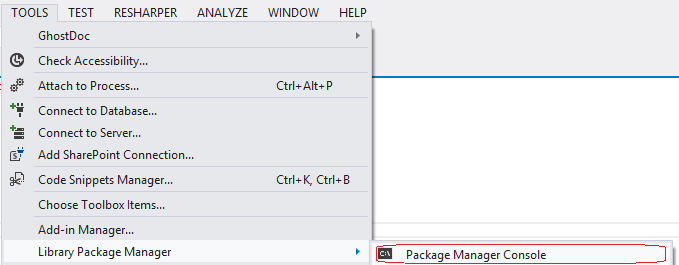
Package Manager Console

It opens a console then type Install-Package Microsoft.AspNet.FriendlyUrls -Pre and press enter as
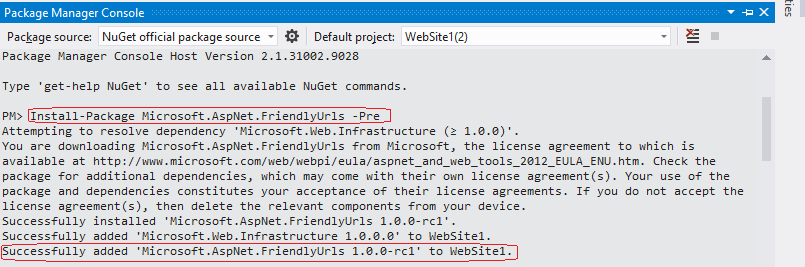
FriendlyURL NugetInstallation

As you can see, I typed the command and can be seen in  the first red encircled area and press enter. It’ll install the NuGet and you can see the last red encircled area which shows FirendlyUrl is successfully added.

This can be used with two ASP.NET versions: ASP.NET 4.5 and ASP.NET 4.0.

Now you are ready for working with friendly URLs.

If you have  read the Readme.text. It gives a clear  idea how to start with. But I’ll take you through the steps. So let’s start

Step 1-> Add and Create a Class name preferably RouteConfig.cs ( You can have any name. I used MyRouteConfig.cs) and make it static. Also add the name space in the class Microsoft.AspNet.FriendlyUrls

Step 2-> Create a static Function in the class preferably named as RegisterRoutes with a Parameter of type RouteCollection and add  a line  routes.EnableFriendlyUrls() in the method as

public static class MyRouteConfig
{
    public static void RegisterRoutes(RouteCollection routes)
    {
        routes.EnableFriendlyUrls();
    }
}

Step 3-> Add Global.asax file and add the following line in Application_Start as

  void Application_Start(object sender, EventArgs e)
    {
        MyRouteConfig.RegisterRoutes(RouteTable.Routes)
    }

Now you can start the development of your application. I have created two pages First.aspx and Second.aspx in my solution

That’s it. Now your code is ready for run.

First PageIf you see the above circled area in the above pic, it does not contain page extension (aspx). So now the url looks pretty. As an end user, I don’t care about the page extension and even some time it just irritates me.

Now if you want to redirect to another page, you can redirect by typing URL without page extension as

Response.Redirect("~\\Second");

There is one caveat here. You can not have a folder and Page with same name at the same level. If you have the name of a folder and the name of aspx page at same level, you would not be able to access the page without extension. So please keep it in mind.

Now you must have a question in Querystring. What will happen with Querystring?

You don’t need to worry at all. QueryStrings will work as earlier . Let’s have a look to the URL http://localhost:57353/First?Id=1001 then you can read the QueryString as below similar as earlier

string Id = Request.QueryString["Id"] as string;

Next point, if I have a URL say http://localhost:57353/First/Products/NewProduct and there is no page as NewProduct. What will happen It’ll open First.aspx.

But, How it works?

It starts from last segment (NewProduct) and will check if there is any NewProduct.aspx. If not then it moves to next segment and continue till it finds the exact aspx page.

Let’s explore more. Go to the server side of the page and include the namespace Microsoft.AspNet.FriendlyUrls. You’ll get bunch of methods that will be very useful at certain times.

  • Request.GetFriendlyUrlSegments() – It returns a collections of string which represents the URL segments. So if I have a URL http://localhost:57353/First/Products/NewProduct and the page exists First.aspx then it returns.
    URLSegments
    So you can see above, there is two segments and one can iterate through it. These url segments can be used to pass the values to a page via URL instead of QueryString. It also looks pretty.
  • Request.GetFriendlyUrlFileVirtualPath() – It returns the File virtual path. For the URL, discussed in the above example it will show as

    File Virtual Path
    You can see it shows the Virtual path of the file.
  • Request.GetFriendlyUrlFileExtension() -It returns the extension of the file. For the above url, it will be shown as File Extension

    As you can see, the extension of the page. As now with friendly url, the page extension is not shown. You can get the extension by the above method.

There are other important methods/features available that can be used to generate the URL etc. I’ll discuss some of those here

An available class FriendlyURL provides few static functions/properties that is very useful. Let’s see

  • FriendlyUrl.Segments ; Returns the segments of of the current URL similar as returned by Request.GetFriendlyUrlSegments()
  • FriendlyUrl.Resolve : This can be used to resolve the FriendlyUrl
    • FriendlyUrl.Href – It takes few parameters virtual path and list of url segments and generate the friendly URL out of it. And it is very useful while generating the URL in data binding and several other places. We can write
      FriendlyUrl.Href("~/First", "Product", 1001);
      

      And what it will return
      FriendlyURLgeneration

Hope you must have liked this new coming feature of ASP.NET. This will will let you get rid of aspx extension at URL , Frankly speaking, during my earlier days of career, I used to see the extension to check if the website is developed in asp.net.

I find this feature as one of the most of the exciting features of ASP.NET. Hope you all enjoy it and also like the post.

Enjoy and Love ASP.NET. And A very Happy New Year to all.
Cheers.
Brij

Winners of the contest “Win a Free Copy of Windows Identity Foundation book by Packt”

Hello Friends,

I started a  contest on my blog on 10th July and details are http://brijbhushan.net/2012/07/10/win-a-free-copy-of-windows-identity-foundation-book-by-packt/

I know, I am announcing late the result of the contest. Due to some unforeseen issues, I could not announce result earlier.  So lets come to the point and declare the results.
And the three lucky winners are

  • Suvendu (@Suvendu_Giri)
  • Sajjan Kumar
  • Uday Vaswani (@MastermindUday)

Congratulations to all winners!!!  Our Sponsor will directly send an e-copy of the book for you of worth Rs 924/-. It’ll help you a lot while learning Windows Identity Foundation (WIF).

Again heartiest congratulations to all of you. Hope you’ll enjoy the book.

Thanks,

Brij

Strongly Typed Data Controls and Modal Binding in ASP.NET 4.5- Part 2

Last week, I wrote the first part of the post Strongly Typed Data Controls and Modal Binding in ASP.NET 4.5. In the first post , I discussed about Strongly typed data control, Model Binding, filtering data, Value Providers and about writing own Custom value provider. Please find the link of earlier post below.

http://brijbhushan.net/2012/07/01/strongly-typed-data-controls-and-modal-binding-in-asp-net-4-5-part-1/

Model Binding feature also supports editing feature. Control’s like Gridview has three properties

  • InsertMethod
  • UpdateMethod
  • DeleteMethod

you can assign a method that has been written at code behind and the method takes a single parameter with the associated type. And the value of the parameter holds the value to be updated. As say if my Control is associated with a Type say Product then the delete method could be as

public void DeleteProduct(Product p)
{
//Write the logic of deleting the passed product p
}

Now, I’ll talk about Model Validation and custom validation attribute. So let’s start.

We all have used ASP.NET validators many times for validating lot of controls and of course used the same of data controls like GridView also. But Model Binding provides another way of implementing validation.

So now you can use System.ComponentModel.DataAnnotations and apply the validation at your model level. And if your control is bound to some model that validation would be taken care. So let’s start with an example. See how can we put different Validation attribute to our class as below

public class Speaker
{
[Required()]
public int Id { get; set; }
[Required(), StringLength(30)]
public string FirstName { get; set; }
public string MiddleName { get; set; }
[Required(), StringLength(30)]
public string Lastname { get; set; }
[Required(), StringLength(30)]
public string ExpertArea { get; set; }
[Url ()]
public string blogURL { get; set; }
[Required(), Range(5,1000)]
public int LastYearSessionCount { get; set; }
public string Email { get; set; }
}

As I put Id as required attribute, it means it is required and if it is not provided it’ll throw an error.

DataAnnotations provides other kind of validations like Range,  StringLength etc as well. Also we can have multiple attributes as well on any property to have multiple validations on same Value as you can see above.

I have used a DetailsView and used this class as model for that DetailsView control as

<asp:DetailsView ID="detailsViewSpeaker" runat="server" SelectMethod="GetSpeakers" InsertMethod="InsertSpeaker" AutoGenerateInsertButton="true"
ItemType="Speaker"></asp:DetailsView>

You must have used ValidationSummary control earlier. Now this control has one more property called ShowModelStateErrors which need to be set as true. This will be enable the page to display all model related errors as

<asp:ValidationSummary ID="validationSummary" runat="server" ShowModelStateErrors="true"/>

Now let’s run the page

You can see the above screen, all the validation errors are Mode state errors.

This is not at all, if your requirement does not get fulfilled by the in built validation attribute then you can write your own custom attribute as well. To create a custom attribute, you need to implement ValidationAttribute and override IsValid method and need to put own custom logic in this method only. lets create a custom validation attribute.

In my example, I have written custom logic for validating an email. Let’s have a look

public class MyCustomValidation : ValidationAttribute
{
public override bool IsValid(object value)
{
string MatchEmailPattern =
@"^(([\w-]+\.)+[\w-]+|([a-zA-Z]{1}|[\w-]{2,}))@"
+ @"((([0-1]?[0-9]{1,2}|25[0-5]|2[0-4][0-9])\.([0-1]?
[0-9]{1,2}|25[0-5]|2[0-4][0-9])\."
+ @"([0-1]?[0-9]{1,2}|25[0-5]|2[0-4][0-9])\.([0-1]?
[0-9]{1,2}|25[0-5]|2[0-4][0-9])){1}|"
+ @"([a-zA-Z]+[\w-]+\.)+[a-zA-Z]{2,4})$";
Regex regex = new Regex(MatchEmailPattern);
return regex.IsMatch(value.ToString());
}
public override string FormatErrorMessage(string name)
{
return String.Format(CultureInfo.CurrentCulture,
ErrorMessageString, name);
}
}

We can also tweak the default validation message by overriding FormatErrorMessage as I have done above. Now Let’s use it in my model. As

public class Speaker
{
[Required()]
public int Id { get; set; }
[Required(), StringLength(30)]
public string FirstName { get; set; }
public string MiddleName { get; set; }
[Required(), StringLength(30)]
public string Lastname { get; set; }
[Required(), StringLength(30)]
public string ExpertArea { get; set; }
[Url ()]
public string blogURL { get; set; }
[Required(), Range(5,1000)]
public int LastYearSessionCount { get; set; }
[MyCustomValidation(ErrorMessage = "{0} field custom validation failed. Your email is not in proper format.")]
public string Email { get; set; }
}

Now Let’s run the application

As you can see, I have entered a wrong formatted email. And when clicked on Insert button, the custom validation is error is thrown.

Hope you all have enjoyed this post.

Thanks,

Brij

Win a Free Copy of Windows Identity Foundation book by Packt

Hello friends,

This post is something different and something new to all. You have read my blog several times and gave your precious comments. Now you have a chance to win a free e-copy of Microsoft Windows Identity Foundation Cookbook of Rs 924/-. Three lucky blog readers stand a chance to win an e-copy

This contest is sponsored by Packt Publishing. This contest starts from today (10th July 2012) and will end on 25th July 1st August 2012. The winner will be announced in three days after contest ends.

The Last date of this contest has been extended to 1st August 2012. Make the most use of it.

Windows Identity foundation is a .NET Technology which plays a pivotal role on Cloud based system.It provides a framework to work with Identity aware applications. ACS is based on Identity framework which provides Authentication and Authorization services for applications hosted on Azure.

About the Book:

  • Gain a firm understanding of Microsoft’s Identity and Access Control paradigm with real world scenarios and hands-on solutions.
  • Includes step-by-step recipes on easy-to-implement examples and practical advice on real world scenarios.

Read more about this book and download free Sample Chapter: www.packtpub.com/microsoft-windows-identity-foundation-cookbook/book

How to Enter?

You just need to follow few steps.

Cheers,
Brij

Microsoft Windows Identity Foundation Cookbook – Review

Hello All,

In this Post, I am reviewing a book on Windows Identity Foundation by Packt Publishing.

The content of this includes basic to advance topics of Windows Identity foundation. It has full of hands on examples with explanation which can give fair enough knowledge for working with Windows Identity Foundation.

But I feel, It could contain more explanation on the basics of Claims based Authentication, Windows Identity Foundation and some other topics as well. But as a developer, there is enough sample based examples that one can study and so some hands on. Being a developer, It is one of the key point that I need.

So if you have basic knowledge current Authentication and Authorization mechanism and also read n heard a lot about Claim based Authentication. And now if you want to hands on working knowledge then this bo0k will be very helpful for you.

Access control Service (ACS) is main component of Windows Azure and it provides the feature of Authentication and Authorization for Application hosted on Cloud. This book contain step by step examples for working with ACS 2.0.

Also I need to mention the system requirement for working with WIF. These are

  • Microsoft Windows Vista® SP1, Windows 7, Windows Server 2008 (32-bit or 64-bit), or Windows Server 2008 R2 (32-bit or 64-bit)
  • Microsoft Internet Information Services (IIS) 7.0 or 7.5
  • Microsoft .NET Framework 4.0
  • Microsoft Visual Studio® 2010 (excluding Express editions)
  • Windows Identity Foundation

You can get a book from here

http://www.packtpub.com/microsoft-windows-identity-foundation-cookbook/book

Thanks,
Brij

Recieved Microsoft MVP (ASP.NET/IIS) award second time in a Row

Thanks a lot to all my Readers and supporters. I received MVP award second time in a Row. It’s really a great achievement for me and all the kudos goes to my Readers and supporters.

I also would like to take names of few of my friends Abhijit Jana, Abhishek Sur, Kunal Chaowdary, Ravi, Srinandan and many more. and some other blog friends Daniel,  Pete O Hanlon, Alan Beasley, Petr Pechovic and many others. They always gave their candid feedback which helped me a lot. I would also like to thank Mr Tanmay Kapoor (MVP lead).

I’ll continue blogging and speaking in coming years with the same enthusiasm and will always need you support and feedback.

Again Thanks a lot to all.

Cheers,

Brij

Strongly Typed Data Controls and Modal Binding in ASP.NET 4.5- Part 1

Recently, I took  a session on KolkataGeeks and discussed on  ASP.NET 4.5 enhancements. I mainly discussed on changes in data controls and model binding feature added in ASP.NET4.5.

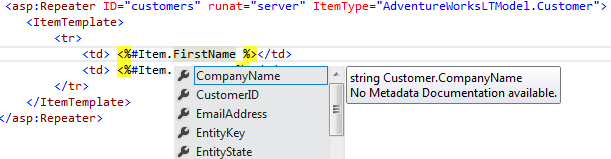
I am going to write a series of post on the same feature here also. Till date, you all must have  had a look on the enhancement and new features introduced in ASP.NET 4.5. The main change in data control that now it provides intellisense support at aspx pages. You need to assign the ItemType property to model that is going to be associated with the data controls. As

Strongly Typed Data Control

These controls are also referred as Strongly Typed Data Controls.

There are also other major changes took place, in the way we provide the DataSource to the our DataControls. Here in my example, I have taken a GridView.

Earlier, we used to provide DataSource to our Data Control and then call DataBind. We used multiple Data Sources like SQLDataSource, ObjectDataSource etc. But now, you have another option which allows us to not set DataSource property and call the DataBind specifically.

There is a property got introduced named as SelectMethod. We can write our own method at server side and assign the method to this property. One thing, we need to take care that it must return the collection of objects and it should be either IEnumerable or IQueryable. Server side method could be as

public IQueryable<Product> GetProducts()
{
return dbcontext.Products.AsQueryable().OrderBy(i => i.Name);
}

And my gridview at aspx

<asp:GridView ID="gridProducts" runat="server" ItemType="AdventureWorksLTModel.Product" AutoGenerateColumns="false"
SelectMethod="GetProducts" >
<Columns>
<asp:TemplateField HeaderText="Product Name" SortExpression="Name">
<ItemTemplate>
<%#Item.Name %>
</ItemTemplate>
</asp:TemplateField>
<asp:TemplateField HeaderText="Price" SortExpression="ListPrice">
<ItemTemplate>
<%#Item.ListPrice %>
</ItemTemplate>
</asp:TemplateField>
<asp:TemplateField HeaderText="Product Color" SortExpression="Color">
<ItemTemplate>
<%#Item.Color %>
</ItemTemplate>
</asp:TemplateField>
</Columns>
</asp:GridView>

Now why this method should return only IEnumerable or IQueryable . Controls like GridView provides many features like Paging, Sorting etc. As soon as you assign the method to SelectMethod property. You don’t need to write any special code for Paging, Sorting.. feature. For that it creates Linq  queries on the fly and it can be written only on the collection that implements IEnumerable or IQueryable.

That’s not it, in many cases we provide some kind of filter criteria to the users, based on user can view only filtered data.

ASP.NET4.5 provides many Value Providers that can be used and these value providers are

  • Querystring
  • Session
  • Cookie
  • Control Value
  • Form Value etc..

These value provider can be directly used to filter the data. But how?

These value providers must be passed as a parameter in the method, that is going to be assigned to Select method. Let’s if we want Query String as value provider so we can pass it as

public IQueryable<AdventureWorksLTModel.Product> GetProducts([QueryString("key")]string parameter)
{
AdventureWorksLTEntities dbcontext = new AdventureWorksLTEntities();
return dbcontext.Products.Where(p => p.Color == parameter).AsQueryable().OrderBy(i => i.Name);
}

where key is the Query String parameter and it can access the value directly in the method as above.

Similarly other value providers can be used. One more example, we can have some control’s value as value provider. For that in my example, I have created a drop down and I want to use drop down’s selected value for filtering the data it can be used as

<asp:DropDownList ID="ddlColors" runat="server" SelectMethod="GetColors" AutoPostBack="true" ></asp:DropDownList>

Above one is my dropdown. And as you can see, It also has SelectMethod, I have assigned it a GetColors method and it is also written as

public IEnumerable<string> GetColors()
{
var colors = (from c in dbcontext.Products
where c.Color != null
select  c.Color).Distinct();
return colors.ToList();
}

Now my SelectMethod method for gridview is

<pre>public IQueryable<AdventureWorksLTModel.Product> GetProducts([Control]string ddlColors)
{
AdventureWorksLTEntities dbcontext = new AdventureWorksLTEntities();
return dbcontext.Products.Where(p => p.Color == ddlColors).AsQueryable().OrderBy(i => i.Name);
}

You can see the parameter name and it is ddlColors is Id of the dropdown.

Now this is not all. You can also create your own custom value provider. To create your very own Value provider, you need to implement IValueProvider. Here you need to implement a method GetValue which takes a key (string) as a parameter. It returns an instance of ValueProviderResult . It contains the value returned by the ValueProvider.

I created a value provider which takes a value from querystring based on it fetch some data from database and return it. As

public class MyCategoryProvider : IValueProvider
{
private HttpContextBase context;
private string value;
private int limit;
public MyCategoryProvider(HttpContextBase hcb, string val)
{
context = hcb;
value = val;
}

public bool ContainsPrefix(string prefix)
{
throw new NotImplementedException();
}

public ValueProviderResult GetValue(string key)
{
string category = context.Request.QueryString[this.value] as string;
GetPriceLimit(category);
return new ValueProviderResult(limit, limit.ToString(), System.Globalization.CultureInfo.CurrentCulture);
}
}

Now this can not be used directly. Because ValueProvider is used as an Attribute. So now, you need to create a custom attribute which returns the your Value provider.

To Create a Custom attribute you need to inhert from ValueProviderSourceAttribute which is available in namespace System.Web.ModelBinding . Here override the method GetValueProvider which returns the valueprovider. It is wrtitten as

[AttributeUsage(AttributeTargets.Parameter)]
public class CategoryAttribute : System.Web.ModelBinding.ValueProviderSourceAttribute
{
private string code;
public CategoryAttribute(string _code)
{
this.code = _code;
}

public override IValueProvider GetValueProvider(ModelBindingExecutionContext modelBindingExecutionContext)
{
return new MyCategoryProvider(modelBindingExecutionContext.HttpContext, this.code);
}
}

Now your custom value provider is ready for use. Let’s use this

public IQueryable<Product> GetProducts([Category("cat")]int parameter)
{
AdventureWorksLTEntities dbcontext = new AdventureWorksLTEntities();
return dbcontext.Products.AsQueryable().Where(p => p.ListPrice <= parameter).OrderBy(i => i.Name);
}

So, you can see that I have used Category as a Value Provider.

Hope you all have enjoyed the post. I’ll discuss more on Validation and other things in my next post.

Cheers,
Brij

Visual Studio 2012 RC is Out.

Hello All,

I just like to know you all that Visual Studio 2012 RC got released on 31st May 2012. It is the last version before final release.

So now, you have kind of final version of Visual Studio 2012 and play around it.

One point, I would like it emphasize that VS11 has been renamed to VS 2012. So don’t get confused.

So if you are using beta version or even first developer preview version then it’s time to download Visual Studio 2012 RC. It is available as Web Installer as well as offline ISO format. You can find the links below.

Also, details are available at the link below

http://www.microsoft.com/visualstudio/11/en-us

Microsoft also released it Release preview version of Windows 8 on the same day 31st may 2012. You can details from here

Hope you all enjoy these versions.

Happy Learning,

Brij

Explore and Learn ASP.NET 4.5

I have written few posts on ASP.NET 4.5 and Visual Studio 11 that . All the post featured as Article of the day at Microsoft official website http://www.asp.net/community. I mainly focused Web development.

If you want to learn about new version of ASP.NET 4.5 and Visual Studio 11(Now Visual Studio 2012).

This post is part 1 of 2 series on Strongly Typed data controls and Model Binding in ASP.NET 4.5. In this post, I discussed about Strongly typed data control, Model Binding, filtering data, Value Providers and about writing own Custom value provider.

This is second and last of on the series of Strongly Typed data controls and Model Binding in ASP.NET. In this post I discussed the editing feature and custom validation attributes.

In this article, we discussed the support of Unobtrusive validation in ASP.NET 4.5. This reduces the rendered page size dramatically. Instead using  java-script function and other client side libraries. It uses HTML5 data-* attributes for all these validation.

In this post, we discussed the Request Validation enhancement made in ASP.NET 4.5. There are several times nowadays, we require to allow the user to script tag as Input. This is the backbone of many blog site. But if proper validation is in place then “A potentially dangerous request..”. Now ASP.NET 4.5 allows to partial unvalidated request to be submitted.I also discussed Lazy/Differed validation..

In this post, I discussed the enhance made in .NET 4.5 and ASP.NET 4.5 which allows you to write Asynchronous modules in very simple steps in the way you write the synchronous way. Asynchronous modules can be come a boon at certain situations for your Application performance..

As in Asynchronous HTTPModules, Asynchronous  HTTPHandlers can be written very easily with the version ASP.NET 4.5. It also can be a boos t for application performance..

This is one of the best things I like in Visual Studio 11. Page Inspector is integrated with VS 11 and provides the capabilities of web development tools and apart from this directly navigates you to the corresponding aspx/ascx/master… files also.

Hope you all will have fun while learning ASP.NET 4.5

Cheers,
Brij

Speaking on ASP.NET 4.5 new features

Hello friends,

I will be speaking on ASP.NET 4.5 new features in an online session organized by http://kolkatageeks.com/.

This would be a one hour session, In which I’ll be discussing on the enhancement made in Data Controls and the ModelBinding feature. It will be fully demo oriented session and you’ll enjoy it.

This is an online event and you can join from anywhere if you have PC/Laptop with internet connection.

If you have not registered yourself on http://kolkatageeks.com/ then Register and you’ll get the details.

Time : 20th May 2 PM to 3 PM

 This is absolutely free event.

Session details: http://kolkatageeks.com/WebCast.aspx

Online meeting details will sent registration.

Hope you’ll enjoy it..

Thanks,

Brij