[Video] Learn Garbage Collector (Part -4) : Internals of Finalization

Today, I am going to post fourth part of the series on Garbage Collector. I have published three videos earlier. In first part of the series, I discussed about the basics of Object Creation and it’s life cycle. In second, I talked about the basics of Garbage Collector and How does is run and the steps involve in it. In the third part of the series, I discussed one of the very important concepts of Garbage Collector that is Finalization. Please find the links of earlier part below

[Video] Learn Garbage Collector (Part -1) : Object Creation and it’s life cycle

[Video] Learn Garbage Collector (Part -2) : How Garbage Collector runs

[Video] Learn Garbage Collector (Part -3) : What is Finalization

In today’s Video, I’ll be discussing about the Internals of Finalization. This is little complex but very interesting as well. One similar advice again, prefer watching earlier parts of the video before watching it.

Cheers,
Brij

[Video] Learn Garbage Collector (Part -3) : What is Finalization

Hello All,

This video is third part in the series on Garbage Collector. I have published two earlier parts of the video. In the first part of the video, we discussed how the object gets created, used and destroyed. There are multiple steps involved in it which you must know to understand the Garbage Collector. Please go to the first part of the using the below link.

[Video] Learn Garbage Collector (Part -1) : Object Creation and it’s life cycle

In second part of the video, I discussed about the Garbage Collector and its processing. I discussed the various steps during garbage collection. Please use the below link for second post.

[Video] Learn Garbage Collector (Part -2) : How Garbage Collector runs

In today’s post, I have discussed one of the important concepts of Garbage Collector Finalization and it’s importance. I’ll advise you watch the earlier parts of the video to gain most of the today’s video.

Cheers,
Brij

[Video] Learn Garbage Collector (Part -2) : How Garbage Collector runs

Hello All,

This is second part of the series on Garbage Collector. In my last post, I shared first part of the series. In that video, I talked about the basics of Object creation and talked about it’s life cycle. It is very important for understanding the whole Garbage Collection topic. You can find the link of last post below

[Video] Learn Garbage Collector (Part -1) : Object Creation and it’s life cycle

In today’s video, I have talked about when the Garbage Collector triggers and discussed about it’s processing.

Cheers,
Brij

[Video] Learn Garbage Collector (Part -1) : Object Creation and it’s life cycle

Hello All,

Garbage Collector is one the basic concepts in .NET framework and ironically one of most misunderstood concepts as well. Also, It is also one of the most asked interview questions. To understand the whole concept, one need to understand Object creation and it’s life cycle life cycle and memory management from the application point of view.

I am going to post a series of videos on Garbage Collector and hope this will help you in learning the basics of Garbage Collector. In my first video, I have talked on Object creation and about it’s life cycle.

Hope you’ll enjoy the video and don’t forget to share your feedback.

Cheers,
Brij

Reinventing myself after attending #CSharpConf14

C# Corner hosted the C# Corner Annual Conference (#CSharpConf14) during 11-13th April at Noida. I privileged to get a chance to attend the event as an attendee and as a Speaker. The event was a huge success where around 850+ people joined from various cities across India. Everybody got a chance to learn from some of the most popular speakers from India and abroad.

This year speakers list was full of legends like Pinal Dave , Mahesh Chand , Prabhjot Singh Bakshi, Gaurav Mantri, Chris Eargle, Jason beres.There was 18 sessions delivered by around 10 speakers and I feel honored to be one of them. This list cannot be complete without taking a name DJ who worked tirelessly for months to make the event grand and successful.

For me, 11-13 April was few of the best days of life where I enjoyed every moment and got a chance to meet lots of people from different part of the country and it was awesome experience interacting with them. Everyone was talking on various topics which includes technologies, startups, ideas, jokes as well 🙂 and enjoying every bit.

I would like to thank four people whom I met at the event who changed my life professionally and personally.

Mahesh Chand – Mahesh Sir is the ultimate visionary who roped the sapling of C# Corner more than a decade back. The knowledge power and experience he has and shares, always enlighten and push me further to work hard and do more towards community. In one of the conversation during event, he made a terrific point to make the life better and said “Life is a party”. When we are in a party and enjoying it. During that time, we forgot every other thing of life and enjoy it most. According to him, It should apply everything that we do in our day to day life. Whatever we do it should let you forget every other thing. If we are not enjoying, it means that we are not justifying our life. His smile is awesome and makes you forgot everything.

Pinal Dave – Pinal sir needs no introduction. He is just a synonym to SQL. If you talk about speaking, he turns the hall into full of energy where every single attendee just become part of that.The passion about technology and the energy he carries, I haven’t seen ever. I got a chance to meet him first time during this event. I remember that he had to had to take a flight for Delhi at 6 in the morning and he was working on the presentation till 4 in the morning. When he reached Delhi, he was looking a fresh, talked to the C# Corner members and other community guys for the whole day. Again the next day, took three session and rocked the stage. You are awesome Sir!!  I learnt a lot of things during the event from you. Also  I got a chance to accompany him in a taxi while he was traveling back to Airport, he shared lot of experiences and gave many tips.

Gaurav Mantri – Gaurav Sir is one of the finest and loved person in the tech community. He worked on many startup and sold one to RedGate three years back. Although of being such a great stature, he is very polite and down to earth person. I get a chance to meet him quite a few times and the thing always excites me that even after having around 20 years of experience, his eagerness to learn, devotion to community and politeness.

Prabhjot Singh Bakshi – He is one of the best technology trainers from India and people love to hear him on various topics. I met him also first time in the event. Talking to him is like a bliss.One thing I like to share, He had to take a session during the event in afternoon and he was working on his demo for making better and more engaging since morning. A person who has taken hundreds of sessions in top events and organizations, was so keen for learning, working for making the things better, it was really inspiring for me.

I got re-energised after attending the event and planned to reinvent myself and the activities that I do. Yesterday, I met with my buddy Mr DJ again and did a brainstorming together. After that, I have taken first step and registered a brand new URL to my blog (www.codewala.net) and also updated my twitter handle to @code_wala. Now I’ll be more active on social sites and share my learning on my blog more frequently. You all will see some more new things in coming days. Thanks to DJ.

(For official recap of event Click here)

Cheers,
Brij

Exploring Enums support in ASP.NET MVC 5.1 – Part 2

This is second part of the series of exploring enums support in ASP.NET MVC 5.1 that was recently got released with Visual Studio 2013 Update 2. The first part of the series can be read from the below link

Enums support in ASP.NET MVC 5.1- Part 1

In last post we discussed that how the new scaffolding works fantastic for enum types as well. But there are other different scenarios where we need to customize it before displaying on UI. We discuss the issue in one of the sceanio in last post. To handle these scenarios, few other new helper methods got introduced. A new class EnumHelper got added which has two methods :

GetSelectList – which has four overridden method and it returns a list of SelectListItem which can be used to further populate the dropdown in UI.

IsValidForEnumHelper– This method also has two overridden method that tells whether the passed type is enum. This should be used to check the type of passed value and GetSelectList should be used if IsValidForEnumHelper returns true.

So let’s jump to the example and use the above methods.

In part-1 of the series, we used the following enum in the example

public enum ExpertiseArea
{
    ASPNET,
    Csharp,
    WindowsAzure,
    WCF
}

but as we know that enum properties can not include space or some special characters. Say, if we want to display WindowsAzure as Windows Azure or ASPNET as ASP.NET etc. In this scenario, we need to create custom views for edit and display purposes.

First let’s change the enum itself and add the display attributes as

    public enum ExpertiseArea
    {
        [Display(Name = "ASP.NET")]
        ASPNET,
        [Display(Name = "C#")]
        Csharp,
        [Display(Name = "Windows Azure")]
        WindowsAzure,
        WCF
    }

Now let’s create the partial view for display scenario.  Here we need to cater multiple scenarios like

– If there are some items which has some selected value for enum property then find the selected text/vale. SelectedText represent the display attribute

– If nothing is selected then show the empty value. (Empty value cannot be converted in enum type)

– If the type itself is not an enum then use the normal value.

We can write it as

@model Enum

@if (EnumHelper.IsValidForEnumHelper(ViewData.ModelMetadata))
{
    string displayAttrName = null;
    foreach (SelectListItem item in EnumHelper.GetSelectList(ViewData.ModelMetadata, (Enum)Model))
    {
        if (item.Selected)
        {
            displayAttrName = item.Text ?? item.Value;
        }
    }

    // displayAttrName is not assigned to any value
    if (String.IsNullOrEmpty(displayAttrName))
    {
        if (Model == null)
        {
            displayAttrName = String.Empty;
        }
        else
        {
            displayAttrName = Model.ToString();
        }
    }

    @Html.DisplayTextFor(model => displayAttrName)
}
else
{
    @Html.DisplayTextFor(model => model)
}

Make sure that above Partial View enum.cshtml is created in EditorTemplates folder under the Shared directory.

So if we see the above code, then we find that EnumHelper.IsValidForEnumHelper is used to check that whether the passed value is of enum type and the other one EnumHelper.GetSelectList which returns the list of items in SelectListItem type as discussed.

Now let’s us create the partial view for Edit purposes as

@model Enum

@if (EnumHelper.IsValidForEnumHelper(ViewData.ModelMetadata))
{
    @Html.EnumDropDownListFor(model => model, htmlAttributes: new { @class = "form-control" })
}
else
{
    @Html.TextBoxFor(model => model, htmlAttributes: new { @class = "form-control" })
}

This partial view also should be in EditorTemplates folder under the Shared directory. Here again the new helper method EnumHelper.IsValidForEnumHelper which tells whether the provided model data is of type enum or not. When it is of type enum then it uses @Html.EnumDropDownListFor else uses normal @Html.TextBoxFor

Now let’s see the Create/Edit views and here we have not used
@Html.EnumDropDownListFor instead used normal @Html.EditorFor which uses the display and edit templates that we created

   @Html.EditorFor(model => model.Area)

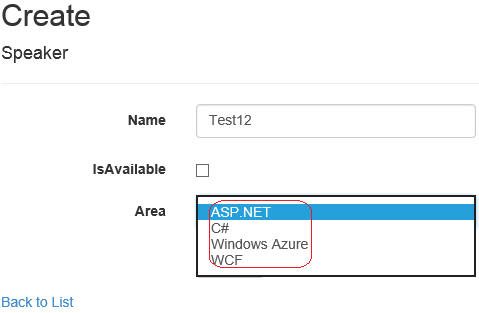
Now let’s run the application, in create page looks like
Part2-1

and after adding Index look as

part2-2Here the earlier issue is resolved and we are able to see the consistent values on diffrent CRUD screen. We can write the similar custom code in other scenarios as well.

Happy learning,
Brij

Enums support in ASP.NET MVC 5.1- Part 1

Hello All,

Recently Microsoft releases a second update for Visual Studio 2013 named Visual Studio Update 2 RC. Here RC means that it is in Release candidate version  and you may expect few changes in the final version. But there are a list of changes they provided in ASP.NET MVC and Webforms that will be going to help a lot in your day to day coding. The new version of ASP.NET MVC is named as ASP.NET MVC5.1. In few of my coming posts, I’ll be discussing the major changes in ASP.NET MVC with examples.

So in this post, We’ll discuss few features of ASP.NET MVC5.1. ASP.NET MVC provides scaffolding that enables us to create the controller and views for our model. The controls on views are rendered based on the type of properties in the model but it is not true for all types. Say if you have property in your which is of type Enum then the UI generate the normal textbox for it which allows to enter free text which may become brutal to your application if it is not handled properly. To handle this scenario, I discuss that in one my old post, how you can extend EditorFor for custom type. You can refer the link

Html.EditorFor – Extend for custom type

But it requires lots of steps and require to handle various scenarios like displaying, editing etc which is error prone as well. Let’s take the same earlier example, I took a class as

    public class Speaker
    {
        public int Id { get; set; }

        public string Name { get; set; }

        public bool IsAvailable { get; set; }

        public ExpertiseArea Area { get; set; }
    }

The enum type ExpertiseArea is defined as

    public enum ExpertiseArea
    {
        ASPNET,
        Csharp,
        WindowsAzure,
        WCF
    }

Now when I created the Controller and Views via scaffolding as

Controller

and

addcontroller

and It created the controller and related views. Now lets run the application so it looks like as

page

Great!! Now you can see that expertise area is rendered as dropdown without any specific code. That’s fantastic.

Now let’s have a look on the cshtml page itself

 @Html.EnumDropDownListFor(model => model.Area, htmlAttributes: new { @class = "form-control" })

So here, we find that there is a new helper method EnumDropDownListFor got introduced that is used for enum types. And this is used for on Create and Edit views because these views only allows user to edit or enter new data. Rest of the views are same as earlier.

This is very good feature that will help a lot to developers.For simple scenario it is fine, so let us discuss another scenario, where we dont want to show the actual enum value but we want to show some different value on the UI. So let’s add display attribute in enum as

    public enum ExpertiseArea
    {
        [Display(Name = "ASP.NET")]
        ASPNET,
        [Display(Name = "C#")]
        Csharp,
        [Display(Name = "Windows Azure")]
        WindowsAzure,
        WCF
    }

Now again, let’s run the application and see the create page

part1-1It seems great, the value that populated in dropdown is what we put in display attribute. That’s what we want. Let’s add it and see the index page

part1-2Ohh.. this we did not expect. We expected that it should be C#. It means that it cannot be handled without just by simple scaffolding but it is required some custom code.

We’ll discuss this scenario in next part. Stay tuned!

Cheers,
Brij

How to Override Finalize method in C#

Being a .NET Developer, you must have basic information about Garbage Collector. Garbage Collector is a boon for .Net developers which takes care of memory management for .NET programs in the background.

But as we know that there are some limitations as well. Garbage collector can collect only managed object. So what about unmanaged objects. Garbage collector cannot clean up unmanaged object properly because these object are not limited to .NET framework and CLR does not have complete control on it. So it is developer’s responsibility to clean up unmanaged resources. It is advised to override the Finalize method (that is a virtual method in Object class) to clean up the unmanaged resources. Garbage collector calls the finalize method of each object (which has overridden Finalize method) while collection process.

So have you ever tried to override the Finalize method in C#? Let’s do that

 public class MyClass
    {
        protected override void Finalize()
        {
            // Do unmanaged resource clean up
        }
    }

For simplicity, I just override the Finalize method. Now let’s build the code.
Ohh.. The above code does not build. It gives the following errorErrorSo if you see the error, it says that do not override Finalize. Instead use destructor.

It means We cannot override Finalize directly in C#.

So what is other way? As in error it suggests to provide destructor. So let us write the destructor (destructor in any class starts with tilde (~)). So now my class looks like

    public class MyClass
    {
        ~MyClass()
        {
            // Do unmanaged resource clean up

            Console.WriteLine("In destructor");
        }
    }

Now let’s build it.
It builds successfully. Now let’s see this class using assembly Reflector.
destuctorSo here our destructor turned into Finalize method. So it means that destructor and Finalize are same in C#. But obviously while writing code in C#, it does not allow to override the Finalize method so we have only option to write destructor for that.

So don’t get confused ever if you see somewhere that say to override Finalize and you are not able to override it. Instead use destructor for that purpose.

Cheers,
Brij

Speaking on ASP.NET MVC5 at C# Corner Annual Conference 2014 – Apr 12

Hello All,

csharpcornerI am very excited to share you all that I’ll be speaking in C# Corner Annual Conference 2014. C# Corner Annual Conference is North India’s largest conference and hosted by http://www.c-sharpcorner.com/ from last four years.

It is a full day event and you’ll get ample opportunity to learn from renowned International/national speakers. For more details Click here

I’ll be speaking on the latest version of ASP.NET MVC (5) and discuss how it solves your real time issues and make our life easier. The agenda of my session will be

  • One ASP.NET
  • Know the power of Attribute routing
  • Authentication using external authentication providers
  • Build the rich and clean UI with Bootstrap
  • Using Authentication filters
  • Lots of demos

You’ll enjoy the day with lot of learnings and fun. See you all there..

Cheers,
Brij


Exploring ASP.NET FriendlyURLs – Guest Post on South Asia TechNet Blog

Recently, I write a post on ASP.NET new feature FriendlyURLs on South Asia Technet Blog.

Being an ASP.NET developer, you must have worked on ASP.NET Web Forms and ASP.NET MVC. One of the things in MVC, most of us like that is pretty and elegant URL. But this is not in the case of using ASP.NET web forms.

 These URLs include crappy extensions like aspx. Many developers have written their custom URL writer or used some third party libraries to achieve it. And here we either end up paying some extra bucks for the third party library or writing custom URL writer which is itself painful task.. Read more