Why textbox persists data during postback even if View State set to off

I have seen lots of confusion in various threads, that How and Why a textbox persists data even when View State is set to off. Even I was confused earlier but I tried to discover it and I found the root cause, so sharing it to you all.
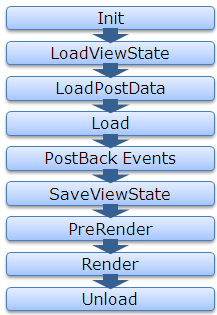
For that, first let’s see the page life cycle on postback.

ASP.NET Page Life Cycle

Now lets first discuss about the View State, How View State works?

If View State is on for any control, during LoadViewstate, the View State data that got saved last time , gets populated in the control. And in last, the SaveViewState method of every controls that are part of the control hiearchy, gets called and combined View State of all the controls gets base64 enocoded and saved.

So as we know the page is recreated every time page makes a trip to the server, the data persistence is done with the help of viewstate.

Now here the point that are we are going to discuss, even if we set off the View State of some controls like textbox, checkbox etc.. the data persists during postback.

Let’s discuss it in bit detail, whenever a page is submitted or posted back to server, the entire form data is posted to the server as a collection with the request. The collection is in the form of NamedValue collection and this collection has the mapping with uniqueid of the control and the value of the control. You can read the data from the form collection by using the following code snippet

	 	 
//Reading textbox value from the form collection	 	 
string textboxvalue = Request.Form[textbox1.UniqueID];	 	 

ASP.NET uses this primitive to update the control’s value. ASP.NET uses IPostBackDataHandler for the controls that load the data from the form collection.

Actually all the controls which implement IPostbackdatahandler, implement the method LoadPostData and RaisePostDataChangedEvent. But here the key method is LoadPostData, which returns true if the posted value is changed from earlier value and updates it with posted value, else it returns false. Lets see the sample code here

	 	 
public virtual bool LoadPostData(string uniqueId,	 	 
NameValueCollection postedCollection) {	 	 
//Getting the current value of control	 	 
String currentValue = this.Text;	 	 
//Getting the posted value from the form collection	 	 
String postedValue = postedCollection[uniqueId];	 	 
//Checks whether the posted value is changed from the current value, if yes updates it with the posted value and return yes	 	 
if (currentValue == null || !currentValue.Equals(postedValue)) {	 	 
this.Text = postedValue;	 	 
return true;	 	 
}	 	 
//else return false	 	 
return false;	 	 
}	 	 

As from the Page Life Cycle, we can see LoadPostData is called after the LoadViewState, whether viewstate is on or not, it gets populated from the posted data. That’s why the data get persisted even if viewstate is set to off for few controls. Following is the complete list of the controls, those implement IPostBackDataHandler.

  • CheckBox
  • CheckBoxList
  • DropDownList
  • HtmlInputCheckBox
  • HtmlInputFile
  • HtmlInputHidden
  • HtmlInputImage
  • HtmlInputRadioButton
  • HtmlInputText
  • HtmlSelect
  • HtmlTextArea
  • ImageButton
  • ListBox
  • RadioButtonList
  • TextBox

I think, this must have helped many of you overcome from this hazzy picture.
Thanks,
Brij

Globalisation with jQuery

Download Sample application

Introduction

Recently, Microsoft announced three jQuery plugins as Official plugin.

  • jQuery Client Templating
  • Data linking
  • Globalization

I found all of them very cool feature for web development.
I have already written articles about the first two. Please find the link below.

I think, you all must have found the above articles very useful and will be using in near future or some of you might have started using this. I would request you all that to share your views about the article, which will be very helpful for me in better writing.

Now, In this article, I am going to discuss the last feature that is Globalization. When we say Globalization, the thing that comes in our mind is resource files. ASP.NET itself provides very good facility to cater the needs of Globalization.But which requires a postback, so it doesn’t look nice and not good in performance as well.

jQuery also provides us a way to implement the globalization, with supported plugin.

Again, I am writing few common points that I wrote in my last two Articles, for the new readers.

What is Globalization

As per MSDN “Globalization is the process of designing and developing
applications that function for multiple cultures
.”

So Globalization allows us to develop an application, which provides the option to localize the application in different cultures/languages. Now as we are working in global environment and serving the entire world, it becomes the necessity, to provide the globalization feature to our application.

So in this article, I am going to discuss, How we can provide the Globalization feature with the help of jQuery.

Prerequisite

  • jQuery library
  • Plugin for Globalization

jQuery already comes with VS2008/2010. But if you are working VS 2005 then you can download from the following link.

Download jQuery

To download plugin for Globalization,
click here

Globalization with jQuery:

So in this article, I am going to discuss, How we can utilise the Globalization feature of jQuery.

jQuery provides us the power to format and parse date, number and currencies in different cultures.  jQuery plugin defines over 350 cultures that currently supported by the plugin.

There are languages those are common in few regions/countries, but the formatting of numbers, currencies and date varies. Like English is spoken in several countries USA, UK and other various European countries. For these we have several cultures defined, that is used to identify the uniqueness amongst these countries.

This plugin comes in two flavors.

One file jQuery.glob.all.js includes around 350 cultures currently. So with this we need to include only this file for all
the cultures supported by the plugin. Another way,Plugin has also culture specific js files, that can included based on cultures that are supported by the application.

Some common APIs of the Plugin:

jQuery.culture:This holds the culture information that is currently set and is used in default case, i e while formatting various values this culture is used if no culture is specified.

jQuery.preferCulture:This method is used set the culture that user prefers and this culture is used for all the formatting, parsing etc done on the page. Actually as the method name suggests, it selects the best match culture that’s JavaScript is included in the page.

jQuery.format:
This method is used to format the date, number and currency in the given format string. This method is widely used.

jQuery.findClosestCulture:
This method works in similar way as preferCulture but it returns the best matching culture and don’t set the jQuery.culture to it.

jQuery.localize:
This method allows us to extend the specific culture and returns or set
the localized value.

There are many more functions like jQuery.parseInt, jQuery.parseFloat, jQuery.parseDate etc provided by the plugin, that can be used for several specific purposes.I have discussed some of them.

Let’s see some Examples:

Here In this section, I’ll be showing you some examples.

First Example:: In this example, I am displaying the stock deatils of Infosys on a specific date. It includes the price and number of unit sold on a specific date in two different cultures. Let’s see the running application.


Now lets move to the code. First let’s see the aspx code

<table style="border:1px solid black; font-family:Verdana; font-size:small">
            <tr>
                <td colspan="2"><h3>English - US</h3></td>
            </tr>
            <tr>
                <td>Stock Name</td>
                <td><span id="Text1" >Infosys</span></td>
            </tr>
            <tr>
                <td>Stock Price </td>
                <td><span id="price"/></td>
            </tr>
            <tr>
                <td>Day</td>
                <td><span id="date"/></td>
            </tr>
            <tr>
                <td>Units Transacted</td>
                <td><span id="unitsTransacted" /></td>
            </tr>
            <tr>
                <td colspan="2"><h3>France - French </h3></td>
            </tr>
            <tr>
                <td>Stock Name</td>
                <td><span id="Span1">Infosys</span></td>
            </tr>
            <tr>
                <td>Stock Price </td>
                <td><span id="price1"/></td>
            </tr>
            <tr>
                <td>Date</td>
                <td><span id="date1"/></td>
            </tr>
            <tr>
                <td>Units Transacted</td>
                <td><span id="unitsTransacted1" /></td>
            </tr>
        </table>

Above as you can see, I am displaying Stock details Infosys in two different cultures English-US and France-French.
Now lets jump to script. Here the script that I have include. These are

 <script src="scripts/jquery-1.4.2.js" type="text/javascript"></script>
    <script src="scripts/jquery.glob.js" type="text/javascript"></script>
    <script src="scripts/globinfo/jQuery.glob.all.js" type="text/javascript"></script>

So I have included three files here. First the jQuery file the common Global file and last one is the file that contains all culture specific details.
Now rest javascript code is

       // Set culture
        jQuery.preferCulture("en-US");

        // Formatting price
        var price = jQuery.format(3899.888, "c");
        //Assigning stock price to the control
        jQuery("#price").html(price);

        // Formatting date
        var date = jQuery.format(new Date(2010, 11, 15), "D");
        //Assigning date to the control
        jQuery("#date").html(date);

        // Formatring units trabsacted
        var units = jQuery.format(45678.576, "n2");
        //Assigning units to the control
        jQuery("#unitsTransacted").html(units);

        // Set culture
        jQuery.preferCulture("fr-FR");

        // Format price
        var price = jQuery.format(3899.888, "c");
        //Assigning stock price to the control
       jQuery("#price1").html(price);

        // Format date available
        var date = jQuery.format(new Date(2010, 11, 15), "D");
        //Assigning date to the control
        jQuery("#date1").html(date);

        // Format units in stock
        var units = jQuery.format(45678.576, "n2");
        //Assigning units to the control
        jQuery("#unitsTransacted1").html(units);

As you can see from the above code, that I have used the preferCulture method to set the culture and format method to format the various data like price, date and units here.

So above one is the simple example which describes that how the plugin works.

Changing culture dynamically:

Now in this example, I am talking about another scenario where user may want to select the culture dynamically, and want to get the page updated accordingly.

In my sample example, I am having one dropdown, user selects the culture and page is getting updated accordingly.
First lets see the application.


Now let’s jump on the code.First let’s view the aspx code

 <table style="border:1px solid black; font-family:Verdana; font-size:small">
            <tr>
                <td style="font-weight:bold">Select Culture</td>
                <td>
                    <select id="ddlCultures">
                        <option value="en-US">English - US</option>
                        <option value="en-IN">EngLish - India</option>
                        <option value="en-AU">EngLish - Australia</option>
                        <option value="fr-FR">French - France</option>
                        <option value="es-MX">Spanish - Mexico</option>
                    </select>
                </td>
            </tr>
            <tr>
                <td style="font-weight:bold">Stock Name</td>
                <td> <span id="Text1">Infosys </span></td>
            </tr>
            <tr>
                <td style="font-weight:bold">Stock Price</td>
                <td><span id="price"/></td>
            </tr>
            <tr>
                <td style="font-weight:bold">Day</td>
                <td><span id="date"/></td>
            </tr>
            <tr>
                <td style="font-weight:bold">Units Transacted</td>
                <td><span id="unitsTransacted"/></td>
            </tr>
        </table>

Now let’s see the scripts included

<script src="scripts/jquery-1.4.2.js" type="text/javascript"></script>
<script src="scripts/jquery.glob.js" type="text/javascript"></script>
<script src="scripts/globinfo/jQuery.glob.en-US.min.js" type="text/javascript"></script>
<script src="scripts/globinfo/jQuery.glob.en-IN.min.js" type="text/javascript"></script>
<script src="scripts/globinfo/jQuery.glob.en-AU.min.js" type="text/javascript"></script>
<script src="scripts/globinfo/jQuery.glob.fr-FR.min.js" type="text/javascript"></script>
<script src="scripts/globinfo/jQuery.glob.es-MX.min.js" type="text/javascript"></script>

As you can see above,I have included culture specific files instead of one common files for all the cultures. Because the size of common files for all 350 cultures could be a performance overhead. As we know, that these are specific
cultures that are going to be used in the application, then we should go for culture specific files.

Now javascript code

     LoadPage("en-US");

     jQuery("#ddlCultures").change(function() {
         var selectedCulture = this.value;
         LoadPage(selectedCulture);
     });

        function LoadPage(selectedCulture) {

            jQuery.preferCulture(selectedCulture);

            var price = $.format(3899.888, "c");
            jQuery("#price").html('12345');

            // Format date available
            var date = $.format(new Date(2011, 12, 25), "D");
            jQuery("#date").html(date);

            // Format units in stock
            var units = $.format(45678, "n0");
            jQuery("#unitsTransacted").html(units);
        }

In this code, I have taken a dropdown with multiple cultures. One can select the desired culture and page will be modified accordingly. I have used the same form but I have called preferculture method based on the selection of dropdown.

Rest code is same as above example.

Picking culture info from Browser:

Sometimes user also set culture preferences in the browser. And lots of applications rely on it. So we can also read the culture information from the browser and can load the page accordingly. To get the culture information we
can use the following.

  var language = "<%= Request.UserLanguages[0] %>";
  jQuery.preferCulture(language);

Conclusion:

This feature is very useful for the applications targeting the entire Globe. As you are moving forward for RIA applications, this plugin of jQuery could be key.

Hope you all must have enjoyed my above article. Please share your valuable feedback, that will help me a lot for better writing.

Feedback and Suggestions:

Hope you all must have enjoyed my above article. Please share your valuable feedback, that will help me a lot for better writing.

Load your Visual Studio IDE faster

This might be a very small trick for all us and some of us may already know this. But who doesn’t know, they can save enough time while working with Visual Studio IDE.

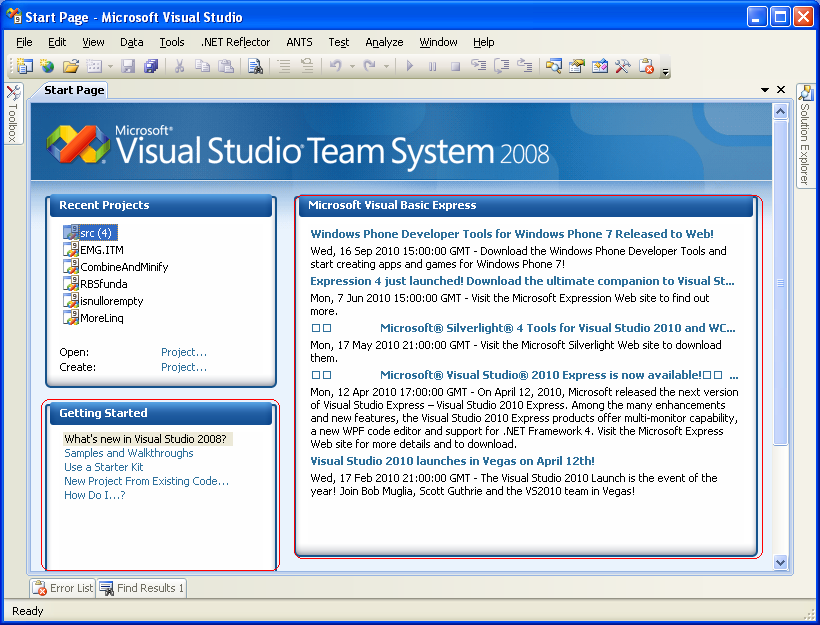
As we used to spend a lot of time in our office/workstation while working with IDE. Normally we are also connected with the Internet. Whenever we install Vistual Studio to our system, then by default, when we open the IDE,  following screen is loaded.

Default As we can see, it includes some news section(marked in Red) that gets download via internet and some other stuff, like Recent Projects. Normally, only stuff that we use Recent Projects. Rest suff are some news that gets loaded online. Which normally makes the loding of IDE very slower, and even sometime after clicking on VS icon we have to wait for a while.

So we can change this behavior as most of the time, we don’t go through these in our daily life. Normally we used to open the IDE several times in a day during our normal cycle Home – Office – Home.

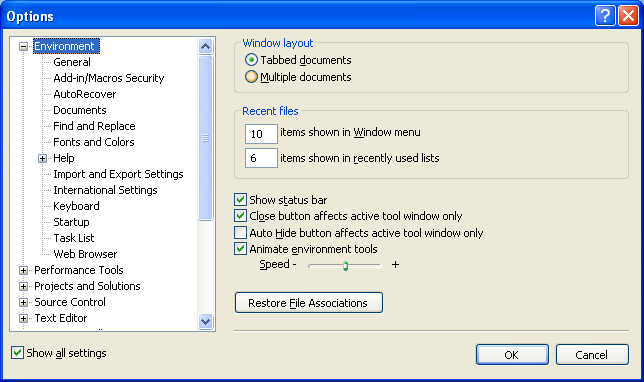
So for changing this behaviour, we have to go Tools->Options, then we’ll see the following screen,

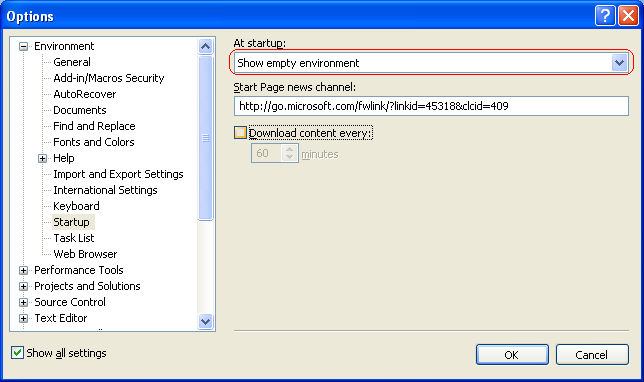
Step 1Now check the checkbox “Show all Settings“, if not checked. Then go to Environment->startup and we’ll see the following screen.


Step 2Now from the first dropdown , we can select the option Show empty enviornment and unselect the Download content every checkbox.

Here we have several other options which we can configure based on our requirement, but above one is faster.

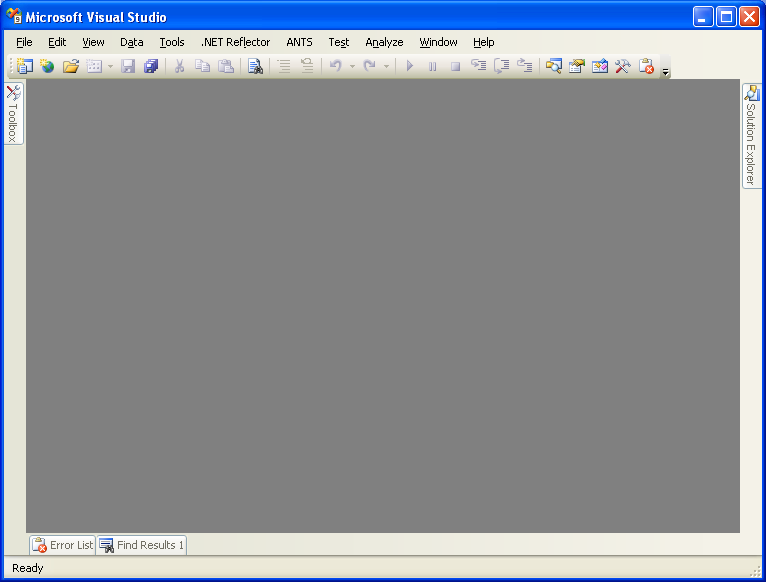
Now our IDE will open as

UpadtedIt may not look very colorful but Now you’ll feel the Visual Studio IDE loading much faster. Which saves your time and make you feel good.


Note: I have Visual Studio 2008 for the blog post purpose, we can do the same with Visual Studio 2005 also.

So enjoy your Visual Studio!!!

Happy Coding,

Brij

Concurrent Collections with .NET4.0

Earlier we used Collections, they were never ThreadSafe. Generics introduced in .NET 2.0 are TypeSafe but not ThreadSafe.

Generics are Typesafe means whenever you are going to declare any generic type, you need to specify the type that is going to be held by the List. And whenever you are going to retrieve any item from list you will get the actual type item, not an Object like we get from Arraylist.

But Generics are not ThredSafe, it’s a programmer’s responsibility. Means let’s say if you have an list collecting some objects. That list is shared amongst several threads, the it may work hazardous if two threads try to access the List at the same point of time, like adding/removing/iterating  items from the same list at the same time.

Thread safety can be implemented with the help of locking the collection and other similar ways. But locking the entire list for the sake of adding/removing an item could be a big performance hit for an application based on the circumstances.

.NET 4.0 provides new classes for the concurrency as Concurrent collections. These are

  • ConcurrentDictionary< Key , Value> Thread safe dictionary in key value pairs.
  • ConcurrentQueue<T> Thread safe FIFO datastructure.
  • ConcurrentStact<T> Thread safe LIFO datastructure.
  • ConcurrentBag<T> Thread safe implementation of an unordered collection.
  • BlockingCollection<T> Provides a Classical Producer Consumer pattern.

Above all classes are available in the namespace System.Collections.Concurrent .

These collections allow us to share the data amongst several thread without any worry.

Concurrent Collections are the key of Parallel programming, that is introduced in .NET 4.0

So let’s discuss the very commonly used list ConcurrentDictionary

  • A thread safe add/remove from dictionary.
  • Very user friendly methods that make it unnecessary for code to check if a key exists before add/remove.
  • AddOrUpdate : Adds a new entry if doesn’t exist else updates existing one
  • GetOrAdd : Retrieves an item if exists, else first adds it then retrieve it
  • TryAdd, TrygetValue,TryUpdate, TryRemove : Allows to do the specified operation like Add/Get/Update/Remove and if it fails the does the alternative action.

Benefits of the above Concurrent collections:

  • Now programmer doesn’t need to take care on threadsafety.
  • Uses light weight synchronization like SpinWait, SpinLock etc that use spinning before putting threads to wait – for short wait periods, spinning is less expensive than wait which involves kernel transition.
  • Means faster add/remove/iterate in multithreading environment without writing the code for it.
  • Some other classes like ConcurrentQueue & ConcurrentStack don’t rely on Interlocked operations instead of locks which make them faster.

There is lot more to discuss on this. But keeping it short and simple, let’s finish it we’ll discuss other things coming subsequent posts.

Thanks to all my readers and supporters

For me, it couldn’t have been a better start for a Year. I felt really blessed, when I received the mail by Chris ( Founder, The Code Project) that I am in the List of CodeProject MVPs 2011.

Again After 2 days, I received the mail, that I received a Mail by Sean(CodeProject), that my article Client Templating with jQuery is selected as Best ASP.NET article of November 2010. What a brilliant start.

And ironically, during these days, I was enjoying the Holidays in Manali with my wife Renu.

What a Year start !! Really felt honored and blessed. I want to heartiest thanks all my readers and supporters. I also want to thanks of some of my friends  Abhijit, Kunal , thatRaja, Abhshek, Srinandan,  Sudeep and lot more.. for their continuous support. Also want thanks some other CPians Pete O Hanlon, Alan Beasley, Petr Pechovic and many others, who provided their candid feedback that helped me in better writing.

Again Thanks to all of you.

One Blog Article selected as “Artcle of the day” at Microsoft Official website (www.asp.net)

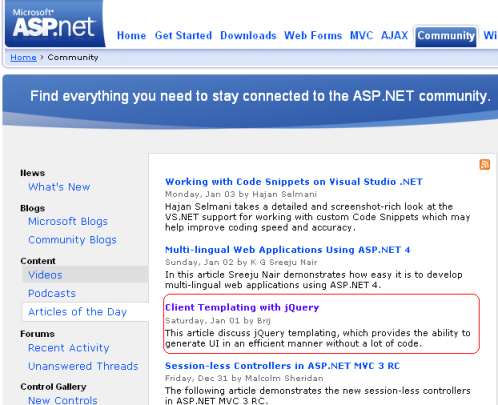
It is really a great pleasure for me that one of my Blog article got a place at Microsoft Official website (www.asp.net).My Article  is selected as “Article of the day” at http://www.asp.net.

In this Article, I have discussed one of the really enticing features of jQuery, that is Client Templating.

You can view complete Blog Post  here.

Thanks to all my Readers.

Just wanted to share, earlier also one of my article got selected at asp.net community. You can view that article here

You can find the complete listing of my article of My articles section in right pane.

Cheers,

Brij

String.IsNullOrEmpty

Might be some of you already using this. But for others it could be a great utility method.

We use a method static method IsNullOrEmpty of string in most of our daily task/Projects a lot. It works fine in most of the cases, but it could work bizarre in some cases if not handled properly.

Say, you get a entry from UI, and having a check whether user has entered something or not. It would work fine as long as user enters the data or not.

But what happen if user enters just spaces. This method would return false, ironically this method is behaving as coded. But do we need this?

Obviously not, spaces could lead wrong entry in our database even can corrupt the data and leads to uncommon results/Y SODS/malfunctioning.

Although being a good developer, one always trim the input before having the check. But it also tends a lots of extra LOCs which we can save and can make our system less error prone.

As most of aware that the beauty of the extension methods that were introduced in c#3.0. So we can have a extension method over a string, which actually does the both first trimming and then checking for IsNullOrEmpty.

So we can have the extension method as

public static bool IsNullorEmpty(this String val)
 {
 if (val != null)
 {
 if (string.IsNullOrEmpty(val.Trim()))
 return true;
 else
 return false;
 }
 return true;
 }

Lets see both existing and our new method running.

My code is

static void Main(string[] args)
 {
 string name = "   ";
 Console.WriteLine(String.IsNullOrEmpty(name));
 Console.WriteLine(name.IsNullorEmpty());
 Console.ReadKey();
 }

The output is

Output

But if you are still using .NET 2.0, you can have a normal static method in your utility call, which does the job for as.

public static bool CheckNullorEmpty(string val)
 {
 if (val != null)
 {
 if (string.IsNullOrEmpty(val.Trim()))
 return true;
 else
 return false;
 }
 return true;
 }

Note: I must say, the limitation of existing IsNullorEmpty has been resolved in .NET 4.0. Means you don’t need to do all this. There is a new method String.IsNullOrWhiteSpace will do the both for you. But unlikely, most of us still working on .NET2.0/3.5

Hope you all must have liked it.

Exploring Client Callback

Download Demo

Client Callback is one of very important features, provided by ASP.NET. Earlier I was not aware on this. In my last application, I implemented this and got a very good result.

This is another way to avoid full post back on the page and can be a great alternative of the Ajax update panel.

Also I was looking for a good article but could not find one, explaining the details. So thought of sharing to you all.

There are various ways, update a part of page without a full page post back, Like update panel, callback etc. But I found callback, is a very useful approach certain times. When we used to display the data.

So here, in this Article I will be discussing the Client Callback, How to implement this, their pros n cons,and how it is handled by the ASP.NET.

What is Client Call back:

We can define the Client Call back like  this “Client Call back provides us a way to call a server side code/method asynchronously and fetch some new data without page refresh.”

So one can initiate Client callback from JavaScript and get the result that can be shown on UI after any required modification. Lets take an pictorial overview.

How to implement Client Callback: To implement call back, one need to follow the below steps.

Things required at Server Side

1 – Implement interface ICallbackEventHandler on any page or control where implemented.

2 – Need to implement two methods RaiseCallbackEvent and GetCallbackResult provided by the interface ICallbackEventHandler.

3 –  RaiseCallbackEvent event is called to perform the Callback on server

4- GetCallbackResult event returns the result of the callback

(Note: There is a property IsCallback of page returns true, if callback is in progress at server.)

Things required at Client Side:

Apart from the above steps, we also require few Client script to complete the Callback functionality. These are

1 – A function that is registered from server and called by any function that want to initiate the callback. It also takes one argument, that can be passed to server.

2- Another function, that is called after finishing the callback, which returns the callback result

3 – On more helper function that performs the actual request to the server. This function is generated automatically by ASP.NET when you generate a reference to this function by using the GetCallbackEventReference method in server code.

Lots more thing written, Not lets jump to code

Here in my example: I have a button and a textbox which is taking Sex type. And on clicking of this button, I am initiating the callback and sending the the type as an argument and accordingly

creating the result and sending it back to the client. And at client side I am displaying in a Client side Div.

So this is a demo, for How to use callback.

Server side code:

I have taken a global variable string, that is used to hold the response, sent to the client as.

string result;

And

public void RaiseCallbackEvent(String eventArgument)
 {
 if (eventArgument == "M")
 {
 result = "You are Male";
 }
 else if (eventArgument == "F")
 {
 result = "You are Female";
 }
 else
 {
 result = "Cannot say";
 }
 }
 

The above method is called at server side, which has one argument, that is passed from the Client. It takes here the textbox value and return the result accordingly.

Another Server side method that is called,

public string GetCallbackResult()
 {
 return result;
 }

It just returned the result that is generated by the method RaiseCallbackEvent.

Also, we need to register some Client side script at Page load.

Here, we need to create a Callback reference, that is the Client side method that is called, after finishing the callback. and assign that reference, in the method that initiate callback from Client.

Lets see the code,

protected void Page_Load(object sender, EventArgs e)
 {
 //Creating a reference of Client side Method, that is called after callback on server
 String cbReference = Page.ClientScript.GetCallbackEventReference(this, "arg",
 "ReceiveServerData", "");

 //Putting the reference in the method that will initiate Callback
 String callbackScript = "function CallServer(arg, context) {" +
 cbReference + "; }";

 //Registering the method
 Page.ClientScript.RegisterClientScriptBlock(this.GetType(),
 "CallServer", callbackScript, true);
 }

We should also write one line at pageload, because no code is required to be executed when call back is in progress

if (Page.IsCallback)
 return;

Client Side ( aspx) code:

There are two javascript function. First is called to initiate the callback.And other one is called after finsihing server side callback events to update the UI.

Let’s see first one

function InitiateCallBack() {
 // gets the input from input box
 var type = document.getElementById('txtType').value;
 //Intiate the callback
 CallServer(type,'');
 }

It is called from when user clicks on button. Now let’s move other function

// Called after the server side processing is done
 function ReceiveServerData(arg, context) {
 //arg: hold the result
 //Updating the UI
 document.getElementById('divCallbacl').innerHTML = arg;
 }

And my aspx code is like this.

<div>
 <span>Enter your Sex(M/F):</span>
 <input id="txtType" type="text" />
 <input id="Button1" type="button" value="button" onclick="InitiateCallBack();"/>
 <div id="divCallbacl">
 </div>

Above are self explanatory.

ClientCallback: Digging deep

As I said, it gives faster response, it actually trim down the page life cycle. Many of events does not execute. We’ll see it. Also to distinguish, at server side, whether it is a normal postback or a Callback. One will find the property isCallback true, which shows that it is a callback request, which I have suggested to use at Pageload earlier. Also the IsPostBack property will also be true.

One more thing, viewstate  information is retireved and available at server but any changes made in it, does not persist. As we’ll see the Callback lifecycle Saveviewstate event doesn’t fire. Which also leads in better performance.

Now lets see the lifecycle comparison between normal postback and a Callback


As above we can see, SaveViewstate and render events does not get fired on server. So it does two things, one we get better performance and on flip side we cannot save viewstate so we should keep in mind while implementing this.

Where to use, where not to:

– Callback is light action and gives us better performance over normal Update Panels.

– One should use Client Callback, for display purpose only. Because we would not get the updated/entered data from the UI on server.

– Also viewstate does not get maintained across during Postback. So one should not rely on it.

Data linking with jQuery

Download Sample

Recently, Microsoft anounced three jQuery plugins as Official plugin.

  • jQuery Client Templating
  • Data linking
  • Globalisation.

In my last article, I discussed about the jQuery Templating. You can view that Article here .

So I think, you all must find Templating article very useful. Because, by the time
web applications development is evolving, we are moving towards Client side
development/scripting, to provide fast and very trendy/flashy look and feel.

So in this article, I am going to discuss another very cool feature, ie
Data linking.This helps us linkling the data and the UI.

What is jQuery:

jQuery is a JavaScript library that works on top of the JavaScript.
jQuery provides a very simple way for HTML document traversing,
DOM manipulation, event handling, animating, and Ajax interactions for
rapid web development. That could have been very complex while working
with normal JavaScript.

jQuery is becoming more and more popular day by day. Even it was integrated
with VS2008 and also available with VS2010.
jQuery is open source. Due to its features,
Microsoft started to support jQuery team and also working with them,
to provide better web based tools to their Clients.

Prerequisite:

  • jQuery library
  • A plugin for datalinking
  • JSON library

jQuery already comes with VS2008/2010. But if you are working VS 2005 then you can
download from the following link.

Download jQuery

To download JSON library,
click here

Data Linking:

Data kinking provides us a way, to link our data/objects to UI controls.
Means, if the controls get updated, the underlying data object would
also be updated. In the same way, if the data objects get updated,
the controls on UI will also get updated (In case of two way linking).

Means once you linked your data with the controls, you don’t need think about
the data object. The syncing between data object and your UI will be taken care
by the jQuery plug in.

So you can imagine, you dont need to get the updated data from the
controls and update the object, which is required at the time
of saving the data at server. Which requires lot more code to be
written and also error prone.

There are several options to link the data.

  • One way Linking
  • Two way Linking

One Way Linking:

One can link the UI controls to some object. Means the object will
always be in sync with UI. Whenever the Data in UI will get changed the underlying
object will also get updated. So one need not worry about the data once it is
done, one can send the object directly to the server for further processing

I have explained it with one sample.

In my example, there is form named as Add Vehicle, where user can enter the
Vehicle name and its price, then click on the Add Vehicle to add the vehicle
at server side.
One can also see the state of the underlying object at any point of time, using
Show Updated Object button.
Now lets go through the code.

Lets see aspx code first

 <table>
            <tr>
                <td colspan="2"><h2>Add Vehicle to Vehicle Store</h2></td>
            </tr>
            <tr>
                <td>Vehicle Name</td>
                <td><input id="txtVName" type="text" /></td>
            </tr>
            <tr>
                <td>Price</td>
                <td><input id="txtVPrice" type="text" /></td>
            </tr>
            <tr>
                <td><input id="btnShow" type="button" value="Show updated object"
                 onclick="ShowUpdatedData();"/> </td>
                <td><input id="btnAdd" type="button" value="Add vehicle to store"
                 onclick="AddVehicle();"/> </td>
            </tr>
        </table>

Here I have two input box to enter the name and price of the vehicle, and two
buttons, one to show the object and other one to add it.

Now lets move to Javascript code,

 var vehicle = {};
 //linking the UI controls with vehicle object
        $(document).ready(function() {
        $(vehicle)
            .linkFrom('Name', '#txtVName', 'val')
            .linkFrom('Price', '#txtVPrice', 'val')
    });

Here I have a global variable vehicle that is linked with the using
linkForm method for the plugin as shown above.

I have also written the code for adding the data at server, using
jQuery Ajax Call as

 function AddVehicle() {
        var inputs = new Object();
        inputs.vehicle = JSON.stringify(vehicle);
        $.ajax({
            type: "POST",
            url: "AddVehcle.aspx/AdVehicle",
            contentType: "application/json; charset=utf-8",
            data: JSON.stringify(inputs),
            dataType: "json",
            success: ShowStatus,
            error: AjaxFailed
        });

    }
    function ShowStatus(result) {
        alert(result.d);
    }
    function AjaxFailed(result) {
        alert('Ajax failed');
    }

    //to show the state of the object
     function ShowUpdatedData() {
        alert([vehicle.Name, vehicle.Price]);
    }
    

Also lets have a look at server side code


public partial class AddVehicle : System.Web.UI.Page
{
public static List lstVehicle = null;
protected void Page_Load(object sender, EventArgs e)
{

}
//This method adds one vehicle
[WebMethod()]
public static string AdVehicle(string vehicle)
{
if (lstVehicle == null)
{
lstVehicle = new List();
}
JavaScriptSerializer ser = new JavaScriptSerializer();
Vehicle objVehicle = ser.Deserialize(vehicle);
lstVehicle.Add(objVehicle);
return "Vehicle added sucessfully";
}
}

public class Vehicle
{
public string Name { get; set; }
public decimal Price { get; set; }
}

The above code is self-explanatory.AdVehicle() is called to add a vehicle using Ajax call.

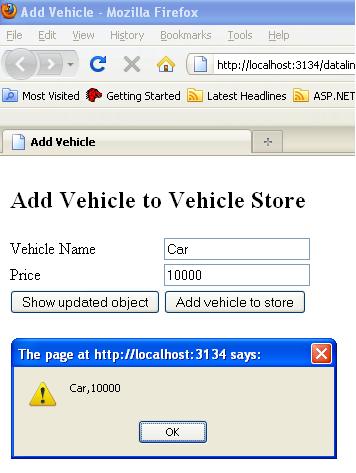
Now lets run the application,
Here I have entered data about one vehicle,

Now when I click to see the updated object, ShowUpdatedData
then get to see the vehicle object as below
Converters:

There is also a good feature provided. We may not
want to save the data as we show at UI. Like if there is some price or quantity,
we may want to format the quantity in some manner before saving. So for that
we can put some converters at the time of linking as

 $(document).ready(function() {
    $(vehicle)
        .linkFrom('Name', '#txtVName', 'val')
        .linkFrom('Price', '#txtVPrice', 'val',
        //Converter that will be called before updating the underlying object
        function(value) { return value.replace(/[^0-9.]/g, "") }
        );
     });

As you can see, I have a converter with Price, that will return only numbers and dot.
Lets see it running
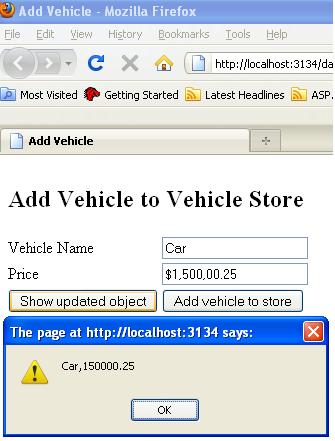
What it is doing, its taking the value from the textbox converting it with the
conerter and the setting to property Price of the vehicle object.

Two way linking:

It also do all the things as above but have one more feature. You can also update the object from code also,  as soon as object will get updated that will also be reflected in the UI.

This feature can be very use full in editing/searching feature.You searched
some data and now want to update it. Now you can update UI as well as underlying
object, both UI and data will always be in sync.

I have discussed it with one sample

In my example, Lets we have a list of person at server. One can fetch the
details of an existing person.One also update the existing person or can add a
new person.

So I have created one class person as

public class Person
{
    public string Name { get; set; }
    public int Age { get; set; }
    public string SSN { get; set; }
    public string Gender { get; set; }
    public string ContactNo { get; set; }

}

My aspx page is as

<table>
            <tr>
                <td> Name </td>
                <td>
                    <input id="txtPersonName" type="text" />
                    <input id="Button1" type="button" value="GetPersonDetails"
                    onclick="PopulatePersonDetails();"/>
                </td>
            </tr>
            <tr>
                <td colspan="3"> <b>Person Details</b></td>
            </tr>
            <tr>
                <td>Name</td>
                <td><input id="txtName" type="text" /></td>
            </tr>
            <tr>
                <td>Age</td>
                <td><input id="txtAge" type="text" /></td>
            </tr>
            <tr>
                <td>SSN</td>
                <td><input id="txtSSN" type="text" /></td>
            </tr>
            <tr>
                <td>Gender</td>
                <td><input id="txtGender" type="text" /></td>
            </tr>
            <tr>
                <td>Contact Number</td>
                <td><input id="txtCNo" type="text" /></td>
            </tr>
            <tr>
                <td colspan="2">
                    <input id="Button3" type="button" value="Show Updated JS Object"
                     onclick="ShowUpdatedData();"/>
                    <input id="Button2" type="button" value="Add/Update Person"
                     onclick="UpdateorAddData();"/>
                </td>
            </tr>
        </table>

As you can see, in my page I have put the input boxes for every property of
person.

At the start of the page I have also, provided a input box to enter the person name and
a button to fetch the requested person from the server.

I have provided two more buttons, One to see the updated objects in javascript alert
and another one to update the data at the server. It actually looks the list for the SSN if it found then update the existing record else add the new
person. We’ll see the code in a moment.

Now lets move the Javascript code that is written.
The code that is used to link the data

First I have declared one global object that object will be linked to the UI controls
as
var person = {};

and the code for linking the data is

//Linking the controls from the object
 $(document).ready(function()
    {
        $(person)
        .linkBoth('Name','#txtName','val')
        .linkBoth('Age','#txtAge','val')
        .linkBoth('SSN','#txtSSN','val')
        .linkBoth('Gender','#txtGender','val')
        .linkBoth('ContactNo','#txtCNo','val');

    });

As from the above you can see, that person object is used and
linked using linkBoth method, which takes three parameters
first the name of the property of the object,
second the id of the control with sign #
third val
Now, after this you don’t need to worry about the data, all things will be taken care the
plugin itself.

Rest javascript method, I have used

// To fetch the detail from the server of the entert person name
 function PopulatePersonDetails() {

        var inputs = new Object();
        inputs.name = document.getElementById('txtPersonName').value;

        $.ajax({
            type: "POST",
            url: "EditPerson.aspx/GetPerson",
            contentType: "application/json; charset=utf-8",
            data: JSON.stringify(inputs),
            dataType: "json",
            success: AjaxSucceeded,
            error: AjaxFailed
        });

        // To be called when ajax call succeeded
        //If no object will be found, it'll show an error message as
        //'Person Not found' else call update the person object
         function AjaxSucceeded(result) {
            if (result.d == 'null')
                alert('Person Not found');
            else
                $(person).attr(JSON.parse(result.d));
        }

        //Will be called, if ajax call gets failed somehow.
        function AjaxFailed(result) {
            alert('Ajax failed');
        }
    }

For the functionality of the updating or adding the person
object at server we have following methods

    //This function get the global variable person object
    //which is always sync with with UI and sends it
    //to server to add/update
    function UpdateorAddData() {

        var inputs = new Object();
        inputs.person = JSON.stringify(person);
        $.ajax({
            type: "POST",
            url: "EditPerson.aspx/AddUpdatePerson",
            contentType: "application/json; charset=utf-8",
            data: JSON.stringify(inputs),
            dataType: "json",
            success: ShowStatus,
            error: AjaxFailed
        });

        }

        //This function is to show the status whether a new person is added or updated
         function ShowStatus(result) {
            alert(result.d);
        }

As I have linked the object to the UI controls, so I am just picking or updating
the person object, that always gives the most updated and synced data.

Also lets have a look to server side code

public partial class EditPerson : System.Web.UI.Page
{
public static List lstPerson = null;
protected void Page_Load(object sender, EventArgs e)
{
}

//This method will return the searched person.
[WebMethod()]
public static string GetPerson(string name)
{
InitializePersons();
JavaScriptSerializer ser = new JavaScriptSerializer();
// ser.Serialize(persons);
return ser.Serialize(lstPerson.Find(p => p.Name == name));
}

//This method will add or update a person based on SSN
[WebMethod()]
public static string AddUpdatePerson(string person)
{
string status;
JavaScriptSerializer ser = new JavaScriptSerializer();
Person obj = ser.Deserialize(person);
InitializePersons();
Person per = lstPerson.Find(p => p.SSN == obj.SSN);
if (per == null)
{
lstPerson.Add(obj);
status = "New person added";
}
else
{
// Updating the person
lstPerson.Remove(per);
lstPerson.Add(obj);
status = "Person updated";
}

// ser.Serialize(persons);
return status;
}

public static void InitializePersons()
{
if (lstPerson == null)
{
lstPerson = new List()
{
new Person { Age = 27, Name= "Brij",
Gender="Male", ContactNo="123456789",
SSN="CC123456"},
new Person { Age = 18, Name = "Ravi",
Gender = "Male", ContactNo = "987654321",
SSN="AB654321"}
};
}
}
}

Lets see the runing application,
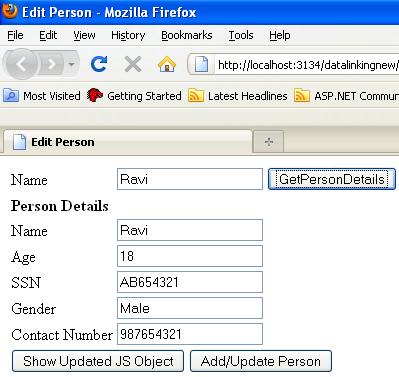
I have few person data at server.When I am entering and clicking
for getting the person details, UI gets updated. While actually I am making
an Ajax call, to get the person data and updating the underlying object
as discussed in above code.

Rest things as per the Vehicle Store example

I have also to added a button, which one can click to see the state of the person
object at any point of time, when one wants.

Please find the full sample in attachment

Conclusion:

I found this feature very useful, while using ajax and jQuery
as I discussed in above example. One should go for the one way or two way linking
based on their requirements.

Hope you all must have enjoyed my above article. Please share your valuable
feedback, that will help me a lot for better writing.

Feedback and Suggestions:

Hope you all must have enjoyed my above article. Please share your valuable
feedback, that will help me a lot for better writing.

Also lets have a look at server side code
Client Templating with jQuery

jQuery templating is becoming a new buzzword for the new Web applications. One cannot avoid jQuery in web applications. Currently most of the applications are using jQuery heavily. It provides very good look & feel and better performance.

There are a lot of plugins are also available for jQuery, they provides really cool feature. We can provide a very new and trendy look and feel with the help of jQuery. Also, as we are making very rich application, performance is also becoming a key point for our applications. jQuery helps a lot in this regard also. We will be discussing mainly jQuery Templating in this article

What is jQuery:

jQuery is a JavaScript library that works on top of the JavaScript. jQuery provides a very simple way for HTML document traversing, DOM manipulation, event handling, animating, and Ajax interactions for rapid web development. That could have been very complex while working with normal JavaScript.

jQuery is becoming more and more popular day by day. Even it was integrated with VS2008 and also available with VS2010. jQuery is open source. Due to its features, Microsoft started to support jQuery team and also working with them, to provide better web based tools to their Clients.

Prerequisite:

  • jQuery library
  • A plugin for templating
  • JSON library

jQuery already comes with VS2008/2010. But if you are working VS 2005 then you can download from the following link.

Download jQuery

To download plugin for templating feature, click here
Relax guys!! you won’t need this plugin after jQuery 1.5. This would integrated with the main library itself Smile

To download JSON library, click here

jQuery Templating:

As we are working on Client server architecture, most of the things are done by the server itself. Server sends the HTML response to the Browser and browser just display it. Earlier, we were not doing lot of things at client side, Normally, some validation and little bit more at client side. With the help of Ajax call from Client side and retrieving data in a very convenient format in JSON, it really becomes easy, to start moving server side code to Client side. Means the data travelling from server to Client, is not the whole HTML response but it is just data that we have to show in different HTML controls.

Lets see an pictorial overview

jQuery and Ajax

Templates :

To use the client templating. You need the following

  • First, data at client side
  • Client side template
  • Now with the help of jQuery, make the HTML elements and adding it to the DOM. Now I am explaining one example. In my example, I am displaying list of Persons. And also adding a person later.Displaying Data:So here, first I am showing the details of Persons. The data is coming in JSON format with the help of Ajax call, in document.ready function.Lets move step by step:I have created a Client template to display the person data.The template is:
<br />
 <script type="text/html" id="personTemplate">
<div>
<div style="float:left;"> ID : </div>
<div>${UId} </div>
<div style="float:left;"> Name : </div>
<div>${Name} </div>
<div style="float:left;"> Address : </div>
<div>${Address} </div>

       </div>

   </script></p>
<p>

But, why have I put it in script tag? Because we don’t want to render it. We will
be using this as a template for displaying the data. Also see, I have made the
type as text/html.

Here, in the template, ${UId}, ${Name} and ${Address}
are replaced by the actual values from the data provided. The name of the properties in provided class is same.

At server side, I made a WebMethod that will be called from the
client to fetch all the person data. As

My Person class is as

<br />
public class Person<br />
{<br />
    public int UId { get; set; }<br />
    public string Name { get; set; }<br />
    public string Address { get; set; }<br />
}<br />

My WebMethod is as

<br />
[WebMethod()]<br />
public static string GetPersons()<br />
{<br />
    List persons = new List()<br />
    {<br />
        new Person { UId = 1, Name = "Brij", Address = "Noida"},<br />
        new Person { UId = 2, Name = "Rahul", Address = "New Delhi" },<br />
        new Person { UId = 3, Name = "John0", Address = "Chris"}<br />
    };</p>
<p>    JavaScriptSerializer ser = new JavaScriptSerializer();<br />
    return ser.Serialize(persons);</p>
<p>}<br />

I created the static data in the code, one can fetch from where s/he wants,
either some database or some file or some other datasource.

Here I have used the namespace System.Web.Script.Serialization
for JavaScript serialization.

I have made a Ajax call at document.ready to get all the persons data.And ,
displayed the data on UI.

//It gets called as soon as Dom gets loaded

<br />
 $(document).ready(function() {<br />
           PopulatePersons();<br />
       });</p>
<p> //Creating the ajax call, and if succeeded then display the result on UI<br />
 function PopulatePersons() {<br />
     $.ajax({<br />
         type: "POST",<br />
         url: "Default.aspx/GetPersons",<br />
         contentType: "application/json; charset=utf-8",<br />
         data: "{}",<br />
         dataType: "json",<br />
         success: AjaxSucceeded,<br />
         error: AjaxFailed<br />
     });</p>
<p>        }<br />
        function AjaxSucceeded(result) {<br />
            Display(result);<br />
        }<br />
        function AjaxFailed(result) {<br />
            alert('no success');<br />
        }</p>
<p>

After fetching the data, from the server, we are rendering the data using jquery
templatng feature

<br />
function Display(result) {</p>
<p>            var persons = eval(result.d);<br />
            personCount = persons.length;<br />
                $("#personTemplate").tmpl(persons).appendTo($("#divPerson"));<br />
        }<br />

Here , what I am doing,I am parsing the data that is returned by webservice.
After that, I am passing it to the tmpl function.
This line of code

$("#personTemplate").tmpl(persons).appendTo($("#divPerson"));

means use the template personTemplate for rendering the
persons data and add it to the container div divPerson

Adding/Updating Data:

For adding more person on UI, I have added a HTML button on my page, to add a person. As

<br />
<input id="Button1" type="button" value="AddMorePerson"        onclick="AddPerson();"/><br />

Onclick of Add button, I am fetching the data from server using Ajax call.

<br />
function AddPerson() {</p>
<p>            var inputs = new Object();<br />
            inputs.count = personCount;</p>
<p>            $.ajax({<br />
                type: "POST",<br />
                url: "Template.aspx/AddPerson",<br />
                contentType: "application/json; charset=utf-8",<br />
                data: JSON.stringify(inputs),<br />
                dataType: "json",<br />
                success: AjaxSucceeded,<br />
                error: AjaxFailed<br />
            });</p>
<p>        }<br />

After fetching the data, display it with the help of client templating., As

<br />
 function DisplayChildren(result) {</p>
<p>            var persons = eval(result.d);<br />
            personCount = persons.length;<br />
                $("#personTemplate").tmpl(persons).appendTo($("#divPerson"));<br />
        }<br />

It just append the a person detail in the existing div as above.

Note: One should keep in sync the name of the properties
of the class and used in template one.

Nested Templates also works same as above but here we’ll be using one template
in the other.This type of requirement is very common, when we need to show
the details of any item one to many or many to many mapping.

So here, I have discussed it with a sample example.

Here i have an employee class which has a list of address, Means an employee can
belong to multiple addresses. My employee and address class are like

<br />
public class Address<br />
{<br />
    public string Street { get; set; }<br />
    public String AddressLine1 { get; set; }<br />
    public String AddressLine2 { get; set; }<br />
    public string City { get; set; }<br />
    public string Zip { get; set; }<br />
}<br />
 

and Employee class

<br />
public class Employee<br />
{</p>
<p>    public int EmployeeId { get; set; }<br />
    public String Name { get; set; }<br />
    public int Age { get; set; }<br />
    public List Addresses { get; set; } }<br />

now the webmethod that is returning the data

[WebMethod()]
    public static string GetEmployees()
    {
        List persons = new List()
        {
            new Employee { EmployeeId = 1000, Age=34, Name ="Rahul",
                Addresses = new List()},
            new Employee { EmployeeId = 1001, Age=29, Name ="Atul",
                Addresses = new List()},
            new Employee { EmployeeId = 1002, Age=32, Name ="Rohan",
                Addresses = new List()}

        };
        persons[0].Addresses.Add(new Address() { Street = "Street 5", AddressLine1 = "New Bay Area", AddressLine2 = "Near Roma Hospital", City = "Kolkata", Zip = "221001" });
        persons[0].Addresses.Add(new Address() { Street = "Bahadur marg", AddressLine1 = "Kailash Colony", AddressLine2 = "Near Public School", City = "Lucknow", Zip = "226001" });
        persons[0].Addresses.Add(new Address() { Street = "Ali Crossing", AddressLine1 = "Republic Colony", AddressLine2 = "Silk Garden", City = "Ahamedabad", Zip = "221021" });

        persons[1].Addresses.Add(new Address() { Street = "Street No 2", AddressLine1 = "Pocket Gama", AddressLine2 = "Near Appollo Hospital", City = "G Noida", Zip = "201301" });
        persons[1].Addresses.Add(new Address() { Street = "1634", AddressLine1 = "Sector 15", AddressLine2 = "Near Nirulas", City = "Noida", Zip = "201301" });

        persons[2].Addresses.Add(new Address() { Street = "Street 10", AddressLine1 = "Sector 18", AddressLine2 = "Near Mosaic", City = "Noida", Zip = "201301" });
        persons[2].Addresses.Add(new Address() { Street = "Gol Marg", AddressLine1 = "New Era Colony", AddressLine2 = "Pitambaram", City = "Alllahabad", Zip = "221001" });

        JavaScriptSerializer ser = new JavaScriptSerializer();
        return ser.Serialize(persons);
    }
}

Now as above at client side, this data is displayed using templating feature.

Now at client side, My client side templates woulld be

Parent Template:

<br />
<script type="text/html" id="empTemplate">
<div>
<div style="float:left;font-weight:bold;"> ID : </div>
<div>${EmployeeId} </div>
<div style="float:left;font-weight:bold;"> Name : </div>
<div>${Name} </div>
<div style="float:left;font-weight:bold;"> Age : </div>
<div>${Age} </div>
<div style="font-weight:bold;">Addresses:</div>
<div style="margin-left:10px;">{{tmpl($data) "#AddressTemplate"}}</div>
</div>

 </script><br />

Child Template:

<br />
<script id="AddressTemplate" type="text/html">
      {{each Addresses}}
<div style="float:left;font-weight:bold;"> Street : </div>
<div>${Street} </div>
<div style="float:left;font-weight:bold;"> AddressLine1 : </div>
<div>${AddressLine1} </div>
<div style="float:left;font-weight:bold;"> AddressLine2 : </div>
<div>${AddressLine2} </div>
<div style="float:left;font-weight:bold;"> City : </div>
<div>${City} </div>
<div style="float:left;font-weight:bold;"> Zip : </div>
<div>${Zip} </div>

      {{/each}}
   </script><br />

As here you can see in child template, I have put the template in the tags
{{each Addresses}}{{/each}}. It just render the inside template for every
address. It works like foreach.

Now inside the parent template, the line code

{{tmpl($data) "#AddressTemplate"}}
indicates
it gets the data ie here list of Addresses and apply the templating on the template
AddressTemplate

Now lets run the application:

Nested Templates

Microsoft Announcements:

Around a month back, Microsoft announced three plugins as new official plugin for jQuery.
– Templating
– Datalinking
– Globalisation
New Official jQuery Plugins Provide Templating, Data Linking and Globalization

In upcoming version of jQuery ( jQuery 1.5) , we would not require to add a plugin for Templating fetaure. This will be part of jQuery 1.5.

In my this article, I discussed Templating and in my upcoming articles I will be talking about Datalinking and Globalization.

Conclusion:

As I already discussed in Introduction section, that jQuery templating provides us a very rich feature to generate the UI without writing much code and in efficient manner. So one should use templateing feature wherever possible. This feature may be very good, where we display the lot of data and also it may get updated. I used it in my application, in almost every page and found it very efficient than server side code.

Feedback and Suggestions:

Hope you all will this Article and will give your valuable feedback which will be very helpful for me to write better content next time.