Learning ASP.NET Signal R – Part 2

This is second post in the series on ASP.NET SignalR. You can access first post from the following link

Learning ASP.NET SignalR – Part 1

In this post, we’ll examine, How SignalR works on various environments. We’ll try dig it out with the help of an example.

First let me know, when you require real time update your UI?
A chat application?

Right. But it’s not the chat application only, you can use it at many other scenarios like any real time data requirement, collaborative applications, Real time loggers, Real Time dashboards, Games, Stock market, Real time news, Live match feeds etc… and many more.

But for this analysis, we’ll use chat application. And will discuss other scenarios in my next post.

Continue reading

Learning ASP.NET SignalR – Part 1

Hello All,

Today I am going to discuss one of the new technologies that changed the way we used to think about How the web works. I’ll be writing a series on this technology and this post is first part of it.

You must have been working on the ASP.NET for long or might be since inception. And till date (or till this technology got introduced) , You got to know from every where that Web is stateless. A webpage is recreated every time from scratch it is posted back to server. In traditional web programming, all the information within the page and control gets wiped off on every postback.

I have taken the above lines from one of my post which I had written long back.

Continue reading

document.ready vs Javascript onload

It is a small post, who are new to jQuery or just started working with jQuery. As we all know that jQuery is Client side library and provides a wrapper over JavaScript . One of the very good things about jQuery that it runs seamlessly in all leading browsers while you must have faced many issues related to the browsers when you work with JavaScript.

So let’s jump to the topic. What is the difference between let’s first go by an example.

I have created a simple default.aspx page in my asp.net empty application and added few images and put the path from web and added few text. Now I put a general alert and called it on load method of window as

<script type="text/javascript" language="javascript">
        window.onload = OnLoad();
        function OnLoad() {
            alert('I am called by window.onload');
        }
    </script>

Now again I tried to change the code to jQuery document.ready function. And used the code as

$(document).ready(function () {
              OnLoad();
         });
        function OnLoad() {
            alert('I am called by document.ready');
        }

and when I ran it. I got the alert very fast. So what I wanted to point out here that jQuery’s document.ready runs much earlier the JavaScript onload. Why?

document.ready get’s fired as soon as DOM is ready and registered with the browser. It does not wait for the all the resources to get loaded. It allows us some very cool showing, hiding and other effects as soon as user sees the first element on the page.

While Javascript’s onload method gets fired only when all content of the webpage and image, iframes etc get loaded in browser then onload get’s fired.

So do we have a method in JavaScript that works in similar way as document.ready?

Partially yes.

We have a method called DOMContentLoaded  that is actually called by jQuery from document.ready. But that’s not it.  DOMContentLoaded is not available to every browser and versions. For IE > 9,  onreadystatechange works in the same way. In case nothing works in browser, jQuery has a fallback and it implemented own logic to traverse the DOM and check the when the DOM got registered and fires document.ready accordingly.

So I hope you all got to know the basic difference between these two.

Cheers,
Brij

HTML5 : Set multiple audio/video files dynamically and run one by one

One of my blog Reader was working on HTML5 audio controls. He asked me a question How can he play multiple audio files one by one. And his requirement was to set the audio files dynamically. So I thought of sharing the solution here. You can customize based on your requirement.

So what I have done. I created an audio control as

 <audio id="ctrlaudio" controls="controls" runat="server">
                Your browser does not support the audio tag.
 </audio>

As you can see an Audio control and made it as runat server, So that I can set some values from code behind. I have also created a hidden variable to set the comma separated name of songs that I want to run one by one. In my code behind I am setting a source for this audio control. My code behind as

string innerHTML =
            "<source src='song1.mp3'></source>";
        ctrlaudio.InnerHtml = innerHTML;
        hdnSongNames.Value = "song1.mp3" + "," + "song2.mp3";

So the whole logic is written in JavaScript and I have used jQuery as well. The logic is something like, First get the list of song names using hidden variable that I require to run one by one . Then I attached an event ended to the audio control. This event is fired when the current playing song is ended. And when one song ended and other next song starts playing. Let’s see the code

 $(function () {
            //Find the audio control on the page
            var audio = document.getElementById('ctrlaudio');
            //songNames holds the comma separated name of songs
            var songNames = document.getElementById('hdnSongNames').value;
            var lstsongNames = songNames.split(',');
            var curPlaying = 0;
            // Attaches an event ended and it gets fired when current playing song get ended
            audio.addEventListener('ended', function() {
                var urls = audio.getElementsByTagName('source');
                // Checks whether last song is already run
                if (urls[0].src.indexOf(lstsongNames[lstsongNames.length - 1]) == -1) {
                    //replaces the src of audio song to the next song from the list
                    urls[0].src = urls[0].src.replace(lstsongNames[curPlaying], lstsongNames[++curPlaying]);
                    //Loads the audio song
                    audio.load();
                    //Plays the audio song
                    audio.play();
                    }
            });
        });

As I have made a comment on most lines of the code, I don’t need to explain it again here. One point, I want to make it here that I have done some coding at Code behind you can totally do at Client side only. If you need any details from server, can initiate a Ajax call get the details (here list of songs) .

Also, the video tag also works similar to audio tag. So you can work similarly with video tag also.

So you can use your business logic.

[Update] Some of my blog reader asked about hdnSongNames. Let me make it bit more clear.

In second paragraph I have written “I have also created a hidden variable to set the comma separated name of songs that I want to run one by one.” So this bold hidden variable is hdnSongNames and I used an asp.net hidden field with Id hdnSongNames (The aspx part is not shown in the post). This field, I have used to access some server side values at client side. If you see in my second code snippet (which is a server side C# code), I have assigned some song names at code behind and used the same field in my third code JS code snippet to read the song names. Hope it clarifies.
Hope you all have enjoyed this.

Cheers,
Brij

Join me and Learn ASP.NET 4.5 with us

Hello Friends,

You’ll be excited to know that on 23rd Feb 2013, I’ll be speaking on ASP.NET 4.5 at Mindcracker Chapter Meet event Pizza, Tea and Code. This will be demo oriented session and will take you through the examples.

To get the details of the Event and register Click Here .

If you are staying in Noida and nearby areas, come and join us and there will three developer session back to back that you will enjoy. We’ve also arranged small refreshments for you as well.

This event will be taking place Sector 63, Noida at Mind Cracker office.

Hope you all enjoy it.

Thanks,
Brij

Lunch Time – An MVP Community Initiative

Hello Friends,

You all have a chance to learn the various Technologies from Exceptional Community leaders absolutely free. This online talk series is organized by Microsoft MVP community and will start from 6th March. It will take place on every alternate Wednesday between 12 PM to 1 PM.

I’ll also be speaking on ASP.NET 4.5 on 20th March. To get the details on the talk series, Please click on the link below.

Lunch Time – An MVP Community Initiative

You’ll also get a chance to ask your questions and provide product feedback.

Hope you all learn a lot by this initiative and enjoy this.

Thanks,
Brij

Accessing other domain web services via jQuery Ajax (CORS)

Now a days, most of the web developers are working on mainly Client side programming to make the web more responsive, intuitive and user friendly. So avoiding the code behind, accessing the server via Ajax, passing and getting the data in JSON format, generating the DOM elements at Client side etc becoming very common these days and these all prepared the ground for many Client side libraries to come up and that’s what we are seeing now a days.

One of the most popular Client side library, jQuery, provides a lot of wrapper methods for writing quick and easy Client side code. You guys must have used jQuery ajax to initiate a ajax call and passing data to and fro in JSON format. As you must be knowing that XMLHTTPRequest  is the base for all Client side ajax call. All the Client side libraries provides a wrapper over it for making any AJAX call. So I’ll start with an example

I have created an empty web application and added a web page . I also added a jQuery script file. I created one small web method GetRatingValues at code behind that returns a list of numbers (Gave a name called rating). So let’s see the code and get it running

So my aspx code is like

<form id="form1">
<div><input onclick="GetRatingData()" type="button" value="GetRatings" />
<div id="ratingDetails" style="display: none;">
<h1>Available Rating Values</h1>
<div id="ratingValues"></div>
</div>
</div>
</form>

And my javascript code is like

<script type="text/javascript" language="javascript">// <![CDATA[
        function GetRatingData() {
            GetRatingValues();
        }
        function AjaxSucceeded(result) {
            $("#ratingDetails").show();
            $("#ratingValues").html(result.d);
        }
        function AjaxFailed(result) {
            alert('Failed to load');
        }

        function GetRatingValues() {
            $.ajax({
                type: "Post",
                url: "First.aspx/GetRatingValues",
                contentType: "application/json; charset=utf-8",
                data: '',
                dataType: "json",
                success: AjaxSucceeded,
                error: AjaxFailed
            });
        }

// ]]></script>

And my web method at code behind is as

 [WebMethod()]
    public static string GetRatingValues()
    {
        JavaScriptSerializer ser = new JavaScriptSerializer();
        IList ratingList = new List() { "5", "4", "3", "2", "1" };
        string str = ser.Serialize(ratingList);
        return str;
    }

Now if you run the code and Click on the button. It’ll run perfectly fine and page will be displayed as
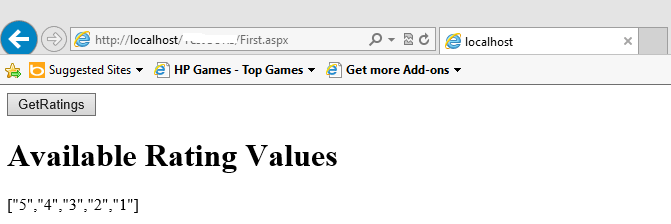
SamedomainAjaxCall

Now let’s have another scenario. I have added a simple HTML page (Test.html) in my solution and I have added the following script on my aspx page

 function GetHTML() {
            $.ajax({
                type: "GET",
                url: "Test.html",
                success: ShowHTML,
                error: AjaxFailed
            });
        }
        function ShowHTML(data) { alert(data); }
        function AjaxFailed(result) {
            alert('Failed to load');
        }

Now if you run this code. It’ll display the html content of the page. I ran it and it displayed as expected

GetAjaxHTML

Let’s also see the HTTP Headers that I have taken via firebug

HTTP Headers
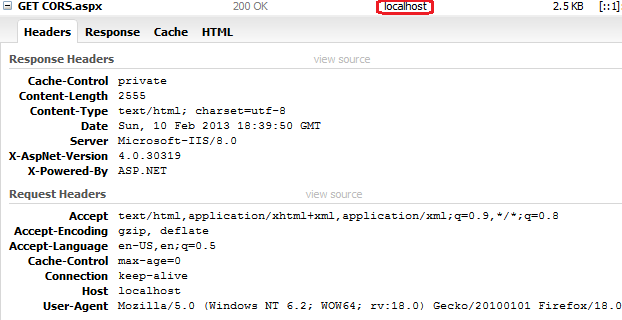
GetRequest1

Also let’s see the response of the URL

Response

If you see the encircled area in both the above picture they are pointing to localhost.

If you see the URL in both AJAX call they are pointing to same domain. But have you ever tried to initiate an jQuery AJAX call to some other domain .

What I have done here, I am running my application from IIS and I added a domain for Testing (localtest.me) in IIS. So I changed the URL in my AJAX call as

OtherDomainNewBut now if you try to run this code, it would not run. Because now the URL targeting to other domain. Let’s see again the HTTP Headers and response.
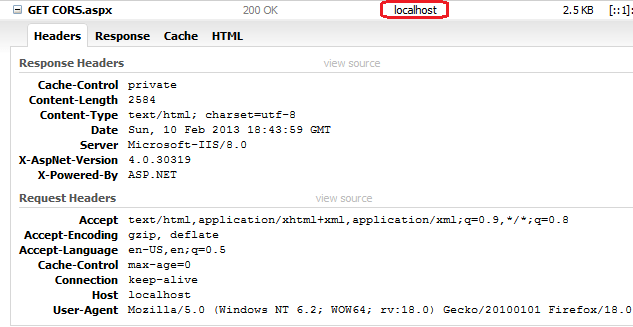
GetRequestOther

Let’s see the Response

GetResponseOtherDomainNow if you see here in the above picture the encircled area, both are different and pointing to different domain and didn’t get any result.

But why?

As I already described that every AJAX request is built on XMLHTTPRequest object and XMLHTTPRequest has some security limitation. It follows same-origin policy, it means that any HTTP request using XMLHTTPRequest initiated by a web application, can be processed only if it loaded from same domain/origin. If it requests to any other domain it will not be successful.

But as now we make lots AJAX call and some times to third party web services, it becomes hurdle to our development. To overcome this issue W3C has come up with feature called Cross-Origin Resource Sharing (CORS) which enables cross site data transfer without compromising security. To use this , we require to add few new HTTP headers that allows to add set of other origins/domains and the content type that is required to transfer.

Also let’s understand what is meant by other domain/origin?

If I have a domains like mydomain.com and mydoman1.com so as it is clear from seeing that these are different domain. Similarly subdomains like abc.mydomain.com and xyz.mydomain.com are also considered as from different origin/domain. Also at certain times the url also contains port number so if the port number is different, it also be treated as from different origin.

So as a thumb rule, you can say if the portion of URL before first single slash is different, it would be considered as from different origin and same origin policy would not be applied.

So now, let’s again back to our example. To run our example, we need to add these custom headers.  ASP.NET provides a way to add these new headers by adding some config entry. so I added the following in my web.config
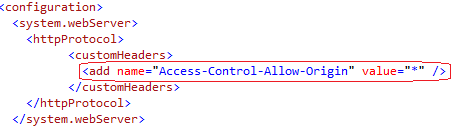
GetConfig

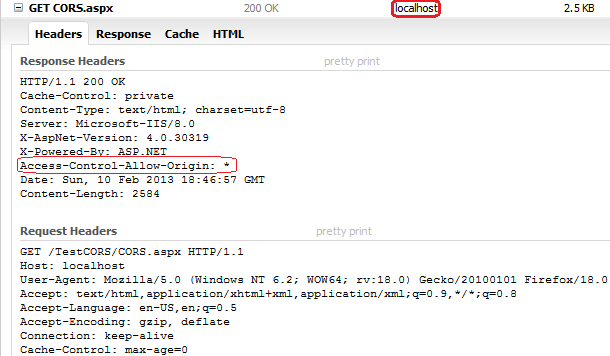
Now if we run the code it runs successfully. Let’s analyse again the HTTP Headers and Response.
GetrequestOtherSuccess

And the Response

GetresponseOtherSuccess

Now if you see the dark encircled area, they are pointing to different domain and yet got the response. But the successful result caused by the thin encircled area in header pic, which is a new header got added. And we made this entry in web.config

But what would happen if I change the URL that I used in my first sample as

 function GetRatingValues() {
            $.ajax({
                type: "Post",
                url: "http://localtest.me/TestCORS/First.aspx/GetRatingValues",
                contentType: "application/json; charset=utf-8",
                data: '',
                dataType: "json",
                success: AjaxSucceeded,
                error: AjaxFailed
            });
        }

And if you run it again, It would not run. because in my last example, I was using Get Request. For Post (type: “Post”)request I can  transfer some data back and forth to server. So here I need to define one more entry in web.config that will add another header in the request as
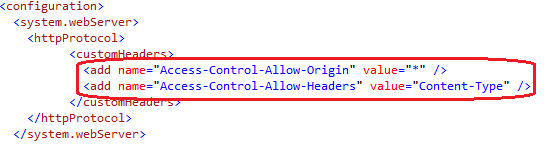
Postheader ConfigNow after adding it, if you run the code then it’ll run like a charm.

One more point, I’ll make a here that providing * for Access-Control-Allow-Origin is not a good Idea, because it allows to access any other domain URL so it’s if you specify the particular domains here.

Hope you all have enjoyed this post. Do share your feedback.

Thanks,
Brij

The requested content appears to be script and will not be served by the static file handler. : A Solution

Today, I faced one issue while working on one sample . And could not find solution in one go and error shown was not intuitive enough.

First let me share my environment. Windows 8 (64 bit), Visual Studio 2012, IIS8

I created an ASP.NET 2.0 web service using Visual Studio 2012 directly at IIS8. But as soon as, I tried to access my web service via browser I found the following error

ErrorAs you can see from the error, it does not point to any cause.

For this error there could be one issue that IIS is not registered with ASP.NET. So to register it, I opened the command prompt with run as administrator and navigated to the folder C:\Windows\Microsoft.NET\Framework\v2.0.50727. I navigated to framework version 2.0 because I was accessing the ASP.NET 2.0 webservice. Now I required to run the following command

aspnet_regiis -i

But as soon as I run the above command, I faced another error

errorcmd

Later, I found that my Operating System (Windows 8) that I am running is of 64 bit version. So again navigated 64bit version executable and it ran successfully

successfullyRanSo you can see above the message “Finished installing ASP.NET <2.0.50727>”.  Here in the above pic, if you see the red encircled area, I have ran here 64 bit version executable.

Also note, this issue arises only if you installed the IIS after installing Visual Studio.

Hope this would save lot of time of yours.

Thanks,
Brij

Authentication and Session timeout – Session expired message on clicking the login button

In my starting phase of Career, My client reported me a peculiar issue. They said that they get redirected to session expired page even before they actually Login.

In that application, We developed a generic methodology, then whenever a user clicks on any action that requires a post back, it first checks whether session is expired or not and if expired then redirects to a custom session expired page. Later, user can click on login link and redirected to Login page.

[As asked by one of my blog readers, There could be many ways for the generic methodology. I have seen people place common code at several place like Master Page,  some put in base class that further worked as base class for all the web pages. I used it in a base class. In my view there are other places like Global.asax and methods could be Application_PreRequestHandlerExecute, Application_AcquireRequestState .]

I analyzed that Issue and found that users used to open the website first page which is obviously the Login page and some of them left the page for a while around 15 or more minutes and after that they when they again back to system, used to enter the credentials and click on login button, it redirects them to session expired page.

It left them annoying and even me too. I have myself seen to many application where I open the Login page and after sometime when I enter my Login details but it redirects me to session expired page.

Some of my colleagues was saying, how a session can expire even before successfully login. I have also found many other developers have same question. So I thought of writing a blog post on it.

So first let me explain, how session works

Session_Life_Cycle

So as you can see above, as soon as user accesses the site and the first page gets opened, the countdown of the session timeout starts. So it does not matter whether you Login or not, session will be expired after the specified amount of time. So if your website does not have a check on session expiration before Login then it wont be visible to your user and even if user Logins after the specified amount of time, A new session will be created.

But so many people get confused about authentication and session. Session start and expire does not have any connection with authentication start and authentication timeout. Authentication works separately.

As you know, A user request any Page, It goes through many HTTPModules and lastly served by a HTTPHandler. We can show it pictorially as

ASP.NET Request Proessing

As you can see, An asp.net request goes through many HTTPModules and finally served by a HTTPHandler. Many features of ASP.NET are developed as HTTP Module. Session and Authentication are also developed as HTTPModules . For session handling we have SessionStateModule which is available under the namespace System.Web.SessionState and various Authentication mechanism in ASP.NET like Form Authentication is also available via a HTTPModule FormsAuthenticationModule which is under the namespace System.Web.Security.  So these two are separate modules and works independently.

Normally in our application, as soon as user clicks on sign out, we used to kill session. Normally, we set authentication time out and session timeout same but what may happen if we have

<forms timeout="15" loginUrl="Login.aspx" name=".ASPXFORMSAUTH">

and

<sessionState timeout="10">

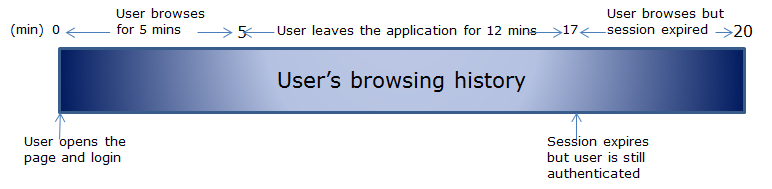
What could happen

user's browsing history

As you can see in the above scenario, I have set session time out is less than authentication timeout. After browsing for 5 mins, I left it for around 12 mins and my session got timeout.  As my session time out is 10 mins while my authentication time out is 15 mins. But I’ll be still authenticated and able to browse application even my session expired and got recreated and my existing session data will be lost.

So normally we put the authentication time out and same time out as same. This is just first step to avoid the discrepancy between the timeout of Authentication and Session.

But at certain browsers, it behaves differently. Like Session gets time out if the last request made was 10 (in my example session timeout is 10 minutes) or more minutes and on every request the counter get resets for 10 minutes but Authentication timeout does not work in same ways in different browsers. Like if have authentication timeout for 10 minutes, the authentication timeout counter does not get reset on every request to 10 minutes. Sometimes there are some performance improvement has been done which resets on the counter only at certain points say if after 5 or 7 minutes as to reset the authentication timeout on very request is costly. And this may lead to discrepancy.

Other scenario, If some how IIS gets reset the sessions of the users connected to that web server will become invalid while the user authentication will still be valid.

To avoid any unprecedented event like above, I put a check for an authentication and session on every page, So that user cannot continue further if session or authentication is not valid. Also if we found user is not authenticated any more then used to clear and abandon the session and redirects the user to login page. Similarly, if session is not available then the remove the user the authentication as well.

Also, at the time of user clicking on Logoff, one should clear and abandon the session. So that same session is not available after Logoff.

So as you can see, that session and authentication works separately and they work parallely and independently.

So for the problem stated earlier in this post, I suggested a solution to avoid the issue but you can yourself can put your own logic to prevent the issue.

Hope you all have enjoyed this post. Please share your valuable feedback.

Cheers,
Brij

ASP.NET 4.5 : Login using other Authentication Providers Simplified

In this Post, I am going to discuss one of the other new features of ASP.NET 4.5. That you’ll like. I’ll also try to make it simple and include step by step tutorial so that you can implement at your environment.

Now a days, you guys must have seen that almost all leading websites allow you to login with your other accounts/credentials. It may be Facebook, Gmail, Twitter, Microsoft and many other.

I like this feature very much because a user don’t need to register on every website where s/he wants to login and reduce the login credentials count drastically and make life simpler.

So Facebook, Gmail, Twitter… works as Identity provider that provides there APIs that one can integrate with there application and allow user to login with their Facebook, Twitter, Gmail… accounts. There are various ways to implement it and they work on some standard protocols so that everybody can understand their API.

Currently, most leading identity provider follow OAuth standards and OAuth provides a process for end-users to authorize third-party access.

So now let’s come to ASP.NET. ASP.NET 4.5 new template has the required code already in place that you require to write to uses the third party Identity provider. You just need to enter some required Ids and secret keys and once you provide it. It’ll start working.

So let’s first create a ASP.NET application as FILE|NEW|Web Site|ASP.NET Web Forms Site. Now if you open the solution explorer, It has created lots of files and that provides many feature already implemented, you must have seen in earlier version as well. I assume you have basic Idea about all that.

Now let’s open a file under App_Code/AuthConfig.cs. Now if you check this file has several lines of commented code. If you see that closely, then actually it adding authentication clients like Twitter, Facebook, Microsoft, Google . Now here, you need Id and secret keys for the authentication clients that you need to provide.

So I have uncommented the code for two authenticated clients Twitter and Google. And I have put my Twitter  key and secret key while Google doesn’t require any. Now as soon as,  you run the application and click on login link at right top, you ‘ll see below

Login

You can see two buttons Twitter and Google. A user can use these accounts to login. Let’s click on twitter.

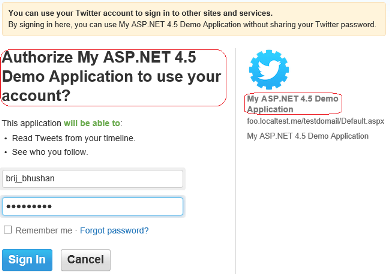
Twitter Login

It took me on the above page and I entered here my Twitter account and clicked on sign in and it took me at the following page

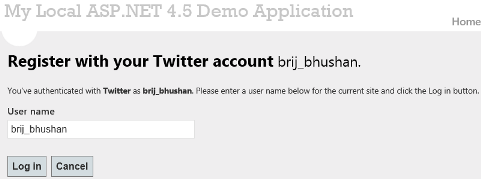
AfterLogin

here I can change my my user name and I changed it as Brij. As soon as I click on login, I am authenticated and you can see that I am now loggedin.

LoggedinWithTwitter

Now if you click on the user name (Brij) shown in above pic right corner, It shows the following page.

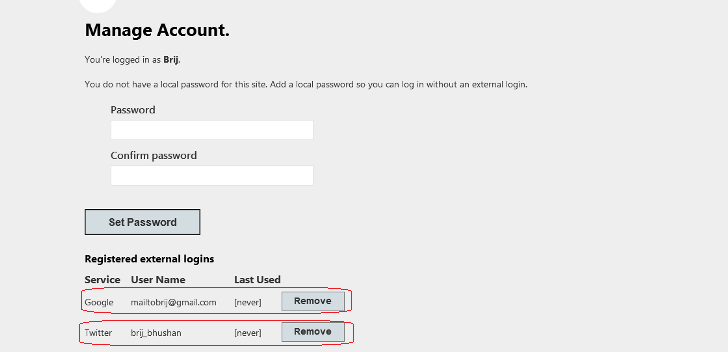
twitter-ResetPwd

It allows you to set a local password. After setting your local password you won’t need to your login via Twitter  to authenticate the current website. Now if you see the last section, it shows twitter account which is used for login.

You can login with other account as well at same point of time. As, I have enabled the two authentication providers Twitter and Google, you are seeing both of these two at last section . And when I click on Google it takes me at Google login page. As soon as I put my credential and click on Sign in button. It shows me that I am logged in as using two accounts. Twitter and Google as

Loggedinwithtwoaccount
Also, you can see after login with two accounts, it shows a remove button to remove any authentication. And as soon as you’ll click on any remove button that authentication will get removed and other remove button will also be removed. Because for login, at least one authentication is required.

Now I’ll tell you, How I created Ids and secret for my local App. To create appId and secret from Twitter go to link TwitterApp .

Once you click on the following the below steps:

  1. Click on Create a New Application
  2. Put the name and description of your application.
  3. Now, put the URL of the your local application. A caveat,  you cannot put the URL generated by Visual Studio integrated server. So host your application at local IIS but twitter wont accept localhost URL as well. You need to have some URL that be hosted on some domain. So how can you mimic that scenario on your local server. I have found a interesting testing domain localtest.me . This is not localhost.me but localtest.me.
    So to set the domain, Go to IIS->Default Web Site. Right Click Default Web Site and Click on Edit Bindings. Here I added a Site Binding (localtest.me)  by Clicking on Add button. I just entered the Host Name localtest.me as

AddBinding

So my application URL for twitter was http://localtest.me/testdomain/Default.aspx.

So once you’ll put all these and save. You’ll get Key and Secret that you can use for your ASP.NET 4.5 local application.

So you have seen, How ASP.NET 4.5 simplified our life by providing inbuild mechanism for using other leading authentication providers. We as developer don’t need to worry about underlying complex logic. Just need to provide some AppIds and Secrets and Google does not require any Id and secret as well.

Hope you all have enjoyed.

Happy Learning,
Brij