OutputCache doesn’t work with Web API – Why? A solution

Output Cache is one of the most useful features of ASP.NET and plays a key role for making high performance web applications. It’s very easy to use this feature. Just put OutputCache attribute on any controller/action or you can set outputCacheSettings attribute in web.config. ASP.NET MVC and ASP.NET Web API are two technologies that looks very similar when we work with them. They have similar concepts like Controller, Action, routing etc and work almost in similar way except one returns View and returns data in JSON/XML format.

Recently in an application, I was required to cache some web api calls so I put the OutputCache attribute over the Web API action but when I ran it was not working. The data was not getting cached and on every request, it was going to server and further fetching data from database and returning the same. Then to verify the attribute, I put the same attribute over a MVC action and it was working like a charm. So I felt that it looks like that this attribute is not working. Continue reading

Few ways to pass values to a Function in Isolate scope : {{AngularJS}} – Part 12

Custom Directives in AngularJS is pretty vast topic. I thought of covering it in a single post but as I started writing, count is just increasing as I don’t want to leave any important and relevant aspect. This is third post on custom directive and twelfth post in the series of AngularJS (Click here to see all the post). Till Now, we have discussed that how to create a basic custom directive in first post then in second , we discussed about creating custom directive with isolate scope. The link of those two posts are below –

  1.  Creating custom directive in AngularJS – Part 9
  2.  Create Custom Directive using Isolate scope in AngularJS – Part 10

Continue reading

Your Dependency Injection ready ASP.NET : ASP.NET 5


Dependency Injection has become one the key design patterns of the current projects. It helps in writing loosely coupled code which makes the code easily testable and maintainable. As per wiki

Dependency injection is a software design pattern that implements inversion of control for software libraries. Caller delegates to an external framework the control flow of discovering and importing a service or software module specified or “injected” by the caller.

In this post, we will see that how easily we can implement this pattern with ASP.NET 5 projects and leverage various available options .

ASP.NET 5 got completely redesigned and made DI friendly. It provides a by default container which can be used while writing the application. It also enables us to use third party containers with it and you may need a adapter to use with ASP.NET. Continue reading

Recap – Presented on ASP.NET 5 at #GIDS Banglore – Download Slides and demo

IMG_9518 - Copy

Great Indian Developer Summit (GIDS) is Asia’s largest technology event where thousand of developers joins each year. The event took place at IISc Bangalore during 21-24 April 2014 where many veteran speakers presented on various topics.

This year, I gave an one hour Talk on one of my favorite topics – ASP.NET 5. ASP.NET is always very near and dear to me and it got more awesome because of the kind of changes is taking place in coming version. People were very enthusiastic about the talk and the Hall got full ten minutes before the schedule and some of them were event standing at the back. Although it was a completely demo oriented session where I wrote the code live on Visual Studio 2015 but I presented few slides to give the audience bigger picture.

I talked on the core changes of ASP.NET 5 and discussed Middle-ware, Dependency Injection, Configuration management etc. Please find my slides below. Continue reading

Presenting on ASP.NET 5 in #GIDS2015

GIDS_Website_LogoThe Great Indian Developer Summit (GIDS) is the largest and most popular annual conferences of India. This year it is taking place during April 21-24, 2015. I am very excited to share that I will be presenting there on ASPNET5 which was always very near to me . This version is bit different from earlier releases due to the massive changes that are taking place with it in this version. All the slides and the demos will be shared at the end of session. The details of of Talk are as below

BrijB1

Building Modern Web Applications with ASP.NET 5

ASP.NET 5 is now redesigned to cater to the needs of modern web applications. With the redesign, you can now  use the latest best practices such as dependency injection, TDD etc. ASP.NET 5 curtails many modules and components that we normally don’t use in our projects and hence boosts application speed. In this session we will examine the design shift that took place within ASP.NET 5 and how it resolves several of the problems that we encounter in our coding lives. At the end of session, you will have a good idea on the changes that ASP.NET5 brings to you as a developer.

If you are visiting this time, I will highly recommend to join this session for an hour and explore the awesomeness of ASP.NET 5. This session will be driven by demos with lots of Interactions

I am very excited to see you all there.

Cheers,
Brij

What is View component: ASP.NET 5

This is the second post on ASP.NET 5. In this post, we are going to explore one another very useful feature of ASP.NET 5. The link of my earlier post on ASP.NET 5 is

 Getting started with Tag Helpers – ASP.NET 5

ASP.NET 5 comes with another version of ASP.NET MVC that is ASP.NET MVC6.View Component is another very powerful got added with MVC 6. If you have not already gone through with this feature, you might just keep guessing about it and may correlate with multiple things. But this feature when you go through, you will enjoy it.

Before discussing this, How many of used Child Actions or know about that?

If you have used that you must have find it bit nasty. Child Actions are like a normal action but it can not be called by directly from url instead it is called from a view. The key usage of Child Action, when we want to reuse some part of UI at multiple places then we create a child action and use it at multiple places. One of the key issues was that with this, it makes another request to the server to call the action method, by going through the whole life cycle which makes the application slow. Also It can not be invoked asynchronously. Continue reading

Getting started with Tag Helpers – ASP.NET 5

ASP.NET has been always near and dear to me and it got more exciting for me as ASP.NET5 got revolutionary changes comparing to previous versions. All the changes has been done considering key points that are driving the software evolution like Agility, embracing latest design standards and technologies. It provides more capabilities, more power to developer, follows latest standards and helps in writing Cloud and mobile ready applications. As we know ASP.NET is like a umbrella of technologies and consists of ASP.NET MVC, ASP.NET WebForms, ASP.NET web api etc. All these technologies got lots of change and design to serves the modern web apps. ASP.NET5 comes with another new version of ASP.NET MVC6. I will be writing couple of posts on cool features of ASP.NET 5 that actually makes our life easy as a developer. Continue reading

ASP.NET MVC and Angular Routing together – Part 11

[To view earlier posts of the series – Click Here]
This will be short but very helpful post. I have seen lots of questions and confusion over Angular Routing and ASP.NET MVC Routing. In this post, I will try to unravel. We all already know the following two points

1- ASP.NET MVC is a server side technology so it means ASP.NET MVC routing takes place at Server.

2- AngularJS is a client side technology so Angular routing itself cannot conflict with ASP.NET MVC in any way. But it works on the top of the ASP.NET MVC. Let’s discuss it with a example.

I will be taking the sample from one of my earlier posts (Learning {{AngularJS}} with ASP.NET MVC – Part 5) on AngularJS and modify a bit for this post. Let me brief about the\example

1- It has one MVC controller – named EventsController that has three methods. One returns the index view and in rest of the two, one returns a list of talks and other, list of speakers in JSON format.

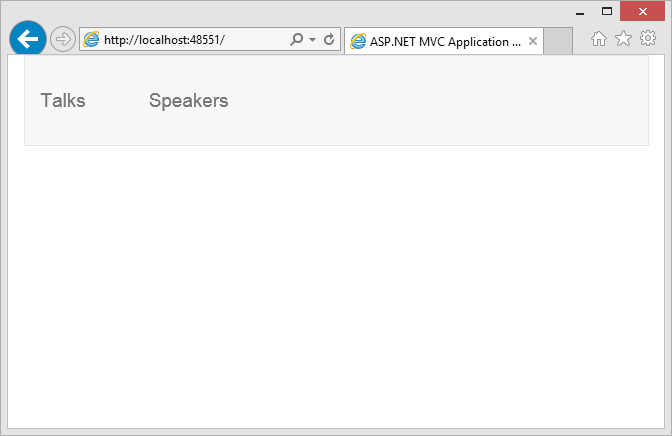
2- It has two angular routes, one for listing speakers (/Events/Speakers) and another from listing talks (/Events/Talks). These urls are used in top menu. So when we run the application and the url (http://localhost:/ or http://localhost:/events or http://localhost:/events/index) the page loads as homeAfter clicking the the two tabs talks or speakers are loaded accordingly. Angular Routes in the sample are defined as

var eventModule = angular.module("eventModule", []).config(function ($routeProvider, $locationProvider) {
 //Path - it should be same as href link
 $routeProvider.when('/Events/Talks', { templateUrl: '/Templates/Talk.html', controller: 'eventController' });
 $routeProvider.when('/Events/Speakers', { templateUrl: '/Templates/Speaker.html', controller: 'speakerController' });
 $locationProvider.html5Mode(true);
 });

Now if we access the direct angular defined routes (like ) it does not work. Let’s understand why?

When we access the url http://localhost:48551/events/index then it actually calls the MVC EventsController and Index action as expected and loads the page. Now when we click on one of the tabs (say speaker) then Angular chips in and it loads the angular view. The call does not go to MVC controller and action at server rather it gets handled at client side by Angular. It loads the data via angular service that initiates the ajax call to server to get the data. Here the url changes but handled at client side only and server (or say ASP.NET MVC) does not even get to know about it.

Now the next question, in second case, why the call does not go at server? In first case, there is nothing available at client side and request goes to the server and gets the page. When page loads it loads everything including angular library. Now when second time, the url gets changed Angular checks whether it can handle the url if yes then it just process it at client side and if not then try to load otherwise url if defined else loads nothing and leave it empty. The whole process can be defined it pictorially

ngrouteupdatedNow we can imagine a scenario while accessing a Angular defined url (http://localhost:48551/Events/Talks) as initial request, it finds nothing at client side which can handle it as it is a fresh request. And it goes to server and tries to find the EventsController and Talks action but it is not defined by ASP.NET MVC so it does not work. We just have Index action at MVC controller. Now how to resolve this issue?

As Initially in this post, I pointed out that Angular defined urls are handled at Client side only, so AngularJS must be loaded and initialized before it can handle the request. There would be two steps involved

1- All angular defined urls should be mapped to a MVC route that returns the response to client with all the client side libraries including Angular.

2- Then as angular is initialized, it handles the url as discussed earlier When we try to access an angular defined urls as first request, it goes to server then we need to initialize the page first with AngularJS then rest angular takes care.It means that in the example, we need to call the index action when somebody try to access the AngularJS urls (Talks and Speakers) directly which will load the page and it will initialize the Angular as well then the Angular urls will be handled by angular itself. So how to do that, we just need to add some routes in Global.asax of so that even if Angular defined urls are called it returns fires of the index action only. So we can add it like

 public static void RegisterRoutes(RouteCollection routes)
 {
 routes.IgnoreRoute("{resource}.axd/{*pathInfo}");

 routes.MapRoute(
 name: "EventsCourses",
 url: "Events/Talks",
 defaults: new { controller = "Events", action = "Index", id = UrlParameter.Optional }
 );
 routes.MapRoute(
 name: "EventsSpeakers",
 url: "Events/Speakers",
 defaults: new { controller = "Events", action = "Index", id = UrlParameter.Optional }
 );

 routes.MapRoute(
 name: "Default",
 url: "{controller}/{action}/{id}",
 defaults: new { controller = "Events", action = "Index", id = UrlParameter.Optional }
 );
 }

So here I added two routes EventsCourses and EventsSpeakers for Angular Urls and for both, index action of events controller gets called.

Here we should not have a URL which can be processed by Angular and MVC both in that case you will get different behavior in both the case so we should keep in mind while defining the URLs. So I hope it must have been clear to you. Also you do not need to add each AngularURL as new route in Global.asax, you can have unique pattern in Angular URLs and for that pattern, you can have just one route which return the same action for that pattern. Sample is attached with the post.

[Update : Updated the flow diagram of this post and content to add some clarification in a scenario when requested url is not defined in URL – 04th May 15]
To navigate to previous and next post of the series, use the links at the bottom of the post.

Happy Learning
Brij

Create Custom Directive using Isolate scope in AngularJS – Part 10

This is the tenth post in the series of AngularJS (Get the list of all previous posts, click here) and this post in the continuation of last post where we have discussed the basics of custom directive (I will recommend to read last post before continuing, Click here to see previous post) but the real value of a custom directive, if it is reusable and can be independently used at many places. If you are using the parent scope directly in your scope then it wont be reusable. One more side effect, if the parent scope gets updated then your custom directive will also be affected even if you don’t want. Not clear? Let’s see an example

var myangularapp = angular.module("myangularapp", []);
myangularapp.directive('customdirective', function () {
    var directive = {
    restrict : 'E', // restrict this directive to elements
    template: "<input type='text' placeholder='Enter message...' ng-model='message' />" +
        " Your Message : {{message}}"
    };
    return directive;
});

I have created a directive where user is allowed to enter some message as it and created multiple instances of same directive as

<customdirective> </customdirective> 
<customdirective> </customdirective>
 

Now let’s see it running
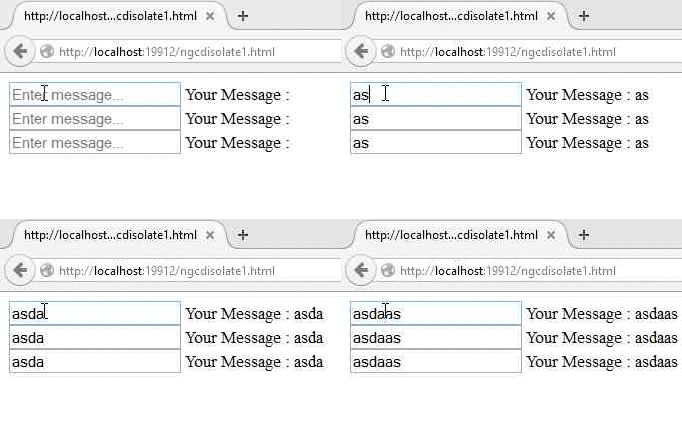
normalHere we can see that even we are changing the values in one directive but its getting reflected in all the directives. It is because all are accessing the same scope. Certainly we don’t want this. This problem can be resolved using isolate scope.

What is isolate scope ?

The problems that we discussed above, can be resolved by isolate scope. We can isolate the scope easily that is used in the custom directive. To add isolate scope, we need to add the scope property while defining the directive. It also makes sure that parent scope is not available to the custom directive.

But now the question arises how will the directive interact with the outside world? Because the directive cannot be useful if it works in complete isolation. To handle it, Isolate scope provides us three options to communicate to isolate directive that is also known as Local Scope properties. These are
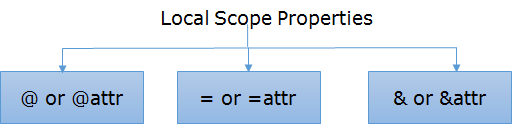
localscopedirectivesLet’s discuss each in details

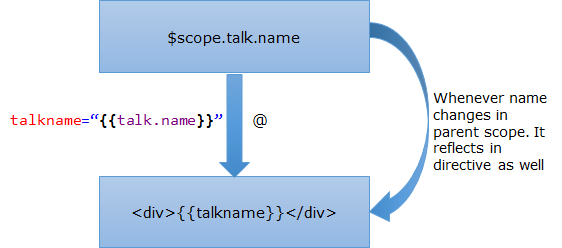
@ or @attr : @ provides us capability to pass a value to custom directive in string format. I have made the string format as bold because I wanted to highlight it, here we cannot pass an object. If you pass an object it will be treated as string format only and accordingly displayed. Also, it works like one way binding it means if the data changes in parent scope, then it reflects in the directive as well as

onewaySo here we find that a change takes place in parent scope, it reflects in directive itself but vice versa is not true. If it gets changed inside directive, parent scope does not get affected. Now, How to create the directive?
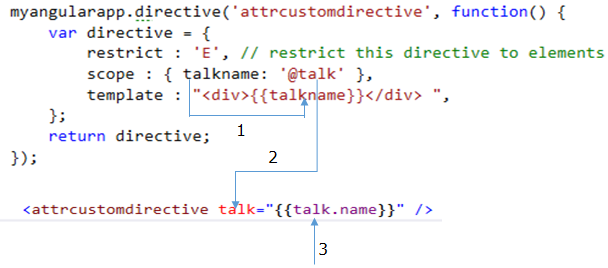
onewaycodeSo here we have created a directive and used it. The details of three points (in pic) are

1- talkname is a property in the isolate scope and it is only accessible in directive itself

2- @talk means that this would be the attribute name in the custom directive that will be used to communicate. We can also write scope : { talkname: ‘@’ }, in this case, talk and talkname both would be same. In this example, I have used different name for better understanding.

3- This is passed from parent scope. As I mentioned in earlier section, that if parent changes then it would reflect in directive as well.

The complete code is as

<script language="javascript" type="text/javascript">
    var myangularapp = angular.module("myangularapp", []);
    myangularapp.controller("mycontroller", function ($scope) {
        $scope.talk = { name : 'Building modern web apps with ASP.NET 5', duration : '60m'}
    });
    myangularapp.directive('attrcustomdirective', function() {
        var directive = {
            restrict : 'E', // restrict this directive to elements
            scope : { talkname: '@talk' },
            template : "<div>{{talkname}}</div> ", 
        };
        return directive;
    });
</script>
</head>
<body ng-app="myangularapp" ng-controller="mycontroller">
    <attrcustomdirective talk="{{talk.name}}" /> 
</body>

Now let’s move to another type.

= or =attr :

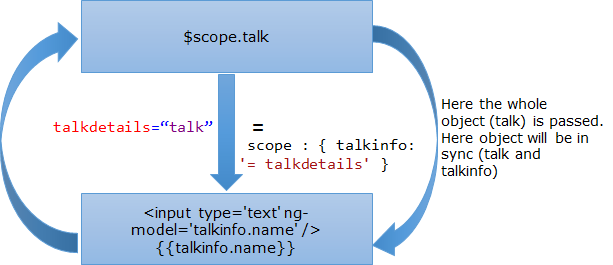
Unlike the @ property which allows us to pass only string value, it allows us to pass the object itself to directive. And the data also gets synced in parent and child scope like two data binding. If the data changes from inside the directive it reflects in parent scope.

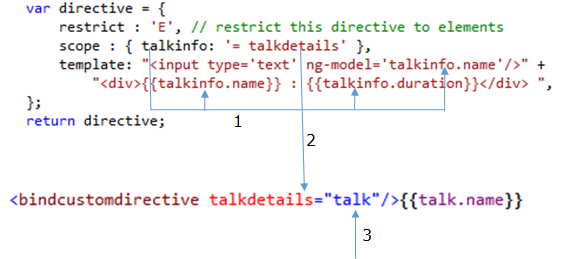
bindHere talk (whole object) is passed in directive and assigned to talkinfo. Now whether the talk or talkinfo gets updated both remains always in sync. bindcodeWe can see from above that how the directive got created with = and its uses. The details of three points (in pic) are

1- talkinfo here is the object that that got received via talkdetails. You can see, I have accessed the value of talkinfo three times via its properties.

2- talkdetails is attribute name that is used to pass the object via directive. Similar as earlier if we don’t provide the attr as scope : { talkinfo: ‘=’ } then the attribute name will be talkinfo only.

3- talk is the scope object that is assigned to talkdetails.

The complete example will be as

<script language="javascript" type="text/javascript">
    var myangularapp = angular.module("myangularapp", []);
    myangularapp.controller("mycontroller", function ($scope) {
        $scope.talk = { name : 'Building modern web apps with ASP.NET5', duration : '60m'}
    });
    myangularapp.directive('bindcustomdirective', function() {
        var directive = {
            restrict : 'E', // restrict this directive to elements
            scope : { talkinfo: '=' },
            template: "<input type='text' ng-model='talkinfo.name'/>" +
                "<div>{{talkinfo.name}} : {{talkinfo.duration}}</div> ",
        };
        return directive;
    });
</script>
</head>
<body ng-app="myangularapp" ng-controller="mycontroller">  
    <bindcustomdirective talkdetails="talk"/>{{talk.name}}
</body>

Let’s move to last Local scope property.

& or &attr

This is the third and last isolate local scope property. It allows us to wire up external expression to the isolate directive. It could be very useful at certain scenario, where we don’t have details about the expression while defining the directive like we want to call some external function when some event occurs inside the directive based on requirement.
expressionIn the above pic, we see that we have function with name method that is passed to directive as via the attribute named expr. Let’s see how do we create the directive and how different property and attributes are co-related.

exprcodeIn the example above, I have used two directives & and @. @ is just used to support this example. Although you must have understand the three points that I have used in the above pic as it is similar to earlier but let me explain it once more in this context. In this example, we are updating an object that gets updated and reflected in the directive as well because of one way binding behavior of @ local scope property

1- method is the property of inner scope here so it is used to access the passed method

2- expr is the attribute name that is used in the directive to pass the expression or defined method. Behavior would be same as earlier local scope property if we just write scope : { method: ‘&’}

3- UpdateData() is the method name that we want to pass in the directive and it is defined as part of parent scope.

4- This value gets updated when we click on Update Data button that calls UpdateData() method which updated the object Talk.

Let’s see the complete example.

<script language="javascript" type="text/javascript">
    var myangularapp = angular.module("myangularapp", []);
    myangularapp.controller("mycontroller", function ($scope) {
        $scope.talk = { name: 'Building modern web apps with ASP.NET5', duration: '60m' }

        $scope.UpdateData = function () {
            $scope.talk = {
                name: 'Working with AngularJS',
                duration: '45m'
            };
        };
    });
    myangularapp.directive('expcustomdirective', function() {
        var directive = {
            restrict : 'E', // restrict this directive to elements
            scope : { method: '&expr', talkname : '@'},
            template: "<div>{{talkname}}</div> <input type='button' " +
                "ng-click='method()' value='Update Data'/> ",
        };
        return directive;
    });
        
</script>
</head>
<body ng-app="myangularapp" ng-controller="mycontroller">
    <expcustomdirective expr="UpdateData()" talkname="{{talk.name}}" />
</body>

Hope you must have got good idea about local scope properties in isolate scope and will be able to decide easily that what to use. Do share your feedback and questions.

To navigate to previous and next post of the series, use the links at the bottom of the post.

Happy learning
Brij

Reboot NCR (31st Jan) – A very successful event

Hello All,

In this post, I am going to write the summary of Reboot event that we conducted with the support of Microsoft Gurgaon. It was a full day event and 5 speakers kept the 100+ audience engaged in their sessions throughout the day. I took the second session of the day and talked about the features offered by ASP.NET 5.  Everybody enjoyed the session and amazed with the features that Microsoft bringing with ASP.NET5.

Slides of my session are attached with this post. Just to note that I have used Visual Studio 2015 Beta1 release for the session and as it is not a final release there could be some difference in final release but the concept would be same.

Some of the pics of my session..

IMG_30891975098_10155119890895463_5459032723523304022_n


10957327_10155119889000463_2552868464931909734_n1924536_10155119905620463_5541168978162528134_n


For more snaps, please click here

Slides of my session are

Hope you all enjoyed the day with fun way of learning. Do let me know if you have any specific feedback.

Cheers,
Brij