How to access the input control’s data at Server side during Client Callback : A useful trick

Client callback is one way to update the webpage without performing the full page postback. It maintains the Client state while updating the Webpage. During Client callback the webpage runs through modifies version of Page Life Cycle.

The LifeCycle of a page in Client Call Back is  as

Page Lifecycle iin Callback

If you want to learn  more about Client Callback, click here.

But the main drawback of  Client Callback, The input data is not posted from Client to Server. Also,  It does not maintain the view state during partial postback as you can see the Page life cycle of Client callbak it is not saved or SaveViewState event is not fired.

Lets see it with an example.

I have created a simple form to collect some information of an person data. And it has a submit button, which initiates a Callback. As

 <table>
 <tr><td><asp:Label id="lblFName" runat="server" Text="First Name" /> </td>
 <td><asp:TextBox ID="tbFName" runat="server"></asp:TextBox></td></tr><tr>
 <td><asp:Label id="lblMName" runat="server" Text="Middile Name" /> </td>
 <td><asp:TextBox ID="tbMName" runat="server"></asp:TextBox></td></tr><tr>
 <td><asp:Label id="lblLName" runat="server" Text="Last Name" /></td><td><asp:TextBox ID="tbLName" runat="server"></asp:TextBox></td></tr><tr>
 <td><asp:Label id="lblAge" runat="server" Text="Age" /></td><td><asp:TextBox ID="tbAge" runat="server"></asp:TextBox></td></tr><tr>
 <td><asp:Label id="lblMailId" runat="server" Text="Email" /></td><td><asp:TextBox ID="tbEMail" runat="server"></asp:TextBox></td></tr><tr>
 <td><asp:Label id="lblSex" runat="server" Text="Sex" /></td><td><asp:TextBox ID="tbSex" runat="server"></asp:TextBox></td></tr><tr>
 <td colspan="2"><input id="btnCallBack" type="button" value="Submit" onclick="InitiateCallBack();"/></td></tr>
</table>

Server side code is as

public partial class Callback : System.Web.UI.Page,ICallbackEventHandler
{
    string result;
    protected void Page_Load(object sender, EventArgs e)
    {
        if (Page.IsCallback)
            return;
        //Creating a reference of Client side Method, that is called after callback on server
        String cbReference = Page.ClientScript.GetCallbackEventReference(this, "arg",
            "ReceiveServerData", "");

        //Putting the reference in the method that will initiate Callback
        String callbackScript = "function CallServer(arg, context) {" +
            cbReference + "; }";

        //Registering the method
        Page.ClientScript.RegisterClientScriptBlock(this.GetType(),
            "CallServer", callbackScript, true);
    }
    public void RaiseCallbackEvent(String eventArgument)
    {
        string firstName = tbFName.Text;
        //Read other data as well

    }
    public string GetCallbackResult()
    {
        return result;
    }
}

And the client side method is

function InitiateCallBack() {
     //Intiate the callback
     CallServer("",'');
}

// Called after the server side processing is done
function ReceiveServerData(arg, context) {
    //arg: hold the result
    //Updating the UI
    document.getElementById('divCallbacl').innerHTML = arg;
}

After filling this form, I submitted it. Now if you try to access the entered using control’s property, you would not get it.

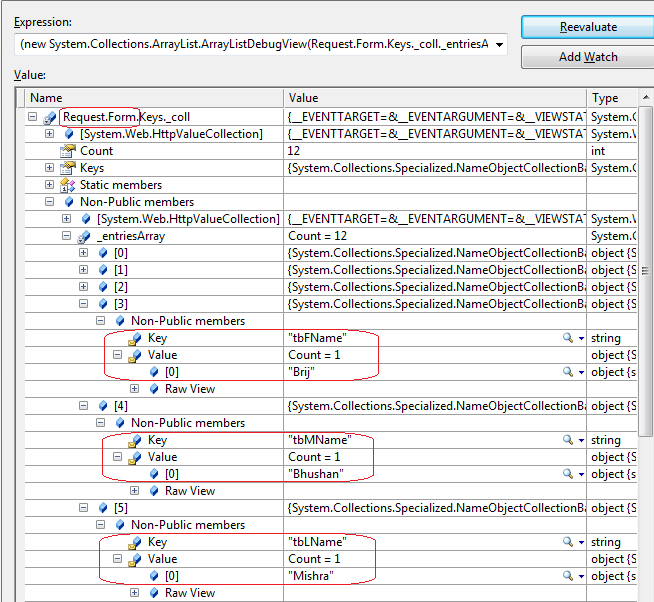
Let’s dig it more and check the form collection, whether the data is passed from Client to server or not

So as you can see that the data is not passed in form collection

But let’s put the following lines of code in java-script, just before initiating the call for Callback as

 function InitiateCallBack() {
	__theFormPostCollection.length = 0;
        __theFormPostData = "";
        WebForm_InitCallback();

        //Intiate the callback
        CallServer("",'');
}

Now let’s run the code and submit the form as earlier.

Now let’s check the form collection.

What a surprise, we got all the input data in form collection. That’s nice.

Now access the data using control’s property.

and you got it.

Now let’s try to see, what does the extra lines of code does

//This Clear the earlier the old data in form collection.
__theFormPostCollection.length = 0;
//It sets the forms data to empty
__theFormPostData = "";
//This method builds the body of the POST request when the page loads. The body of the page is a string 
//(that is __theFormPostData) filled with the contents 
of the view state and all of the input fields in the form.
WebForm_InitCallback();

But I would suggest to use these line at caution. Use only when you need to collect the update from Page during Callback. If you don’t need to get some data or it is in readonly page, don’t use it it introduce extra overhead to your page and costs at performance point of view.

Hope you  all have enjoyed the post.

Writing asynchronous HTTP Module in ASP.NET 4.5

Today again, I am going to discuss , one of the new features that got enhanced in ASP.NET 4.5. And It is Asynchronous HTTP Module . And it’s going to be very useful if used meticulously.

First Just to give a brief Idea, why Asynchronous HTTPModules are important ?

As we all know, web is stateless. A Web page is created from scratch every time whenever it is posted back to the server. In traditional web programming, all the information within the page and control gets wiped off on every postback. Every request in ASP.NET goes through a series of events.

Every request is served by am HTTP handler and it goes a series of HTTPModules (HTTPPipeline) which can be read, update the request. A lot of features of ASP.NET like Authentication, Authorization, Session etc are implemented as HTTP Module in ASP.NET. Let’s have a view on the Request Processing

ASP.NET Request Processing : HTTPPipeline and HTTPHandler


Now as you can see the request is assigned to a thread T1 from the available threads is thread pool. And the request is passed through several HTTPModules and finally served my HTTPHandler and response is send back with the same thread (T1).

During the entire processing, same thread is engaged in serving  the same request and cannot be used by any another request till request processing completes.  During the request processing if any HTTPModules depends on some entities like I/O based operations, web services, Databases queries etc then it takes long to complete which makes the thread busy for long which makes asp.net thread will not do anything during that duration and will be useless.  In this kind of scenarios the throughput goes down rapidly.

In the above scenario, synchronous HTTPModule can degrade the site performance a lot. So if we can make  HTTPModules as asynchronous  that can increase the through put a lot.  In asynchronous mode, ASP.NET thread get released as soon as the control get passed to another component/module, it does not wait. And the thread becomes available in thread pool and can be used to serve another request. When the component completes its assigned task then it got assigned to new ASP.NET thread which completes the request. The flow can be graphically presented as

Working of an asynchronous HTTPModule

In the above picture, An asp.net thread T1 is assigned from threadpool to server the request. When the control got passed to File System to log message, asp.net thread got  released and when essage logging got completed, control passed to asp.net and it is assigned to another thread say T2 from thread pool.
In .NET Framework 4.o, there was some major enhancement made for asynchronous programming model. Any asynchronous operation is represents a Task and it comes under the namespace System.Threading.Tasks.Task.

In .NET 4.5, there are some new operator and keyword introduced that makes the life easy for implement Asynchronous feature. One is async keyword and await operator.

These two enables us to write the asynchronous code is similar fashion as we write for synchronous mode.

And these features can be easily used while writing HTTPModules and HTTPHandlers. We’ll be using these enhancements in writing our custom asynchronous HTTPModule.

In my sample as depicted in image, I am creating a module that writes some log messages in a text file for every request made.

So to create a Custom HTTPModule, Create a class library project. And create a class  say named LogModule which implements IHttpModule. For this you need to add a reference of Assembly System.Web.

LogModule would contains the methods discussed below.

We need to implement two methods Init and Dispose that are part of IHTTPModule interface.

Here first , I have written an asynchronous method that actually reads the information from the request and writes in the log file asynchronously . For this I have used WriteAsync of FileStream

private async Task WriteLogmessages(object sender, EventArgs e)
{
	HttpApplication app = (HttpApplication)sender;
        DateTime time = DateTime.Now;

        string line = String.Format(
        "{0,10:d}    {1,11:T}    {2, 32}   {3}\r\n",
        time, time,
        app.Request.UserHostAddress,
        app.Request.Url);
        using (_file = new FileStream(
            HttpContext.Current.Server.MapPath(
              "~/App_Data/RequestLog.txt"),
            FileMode.OpenOrCreate, FileAccess.Write,
            FileShare.Write, 1024, true))
        {
            line = line + "  ," + threaddetails;
            byte[] output = Encoding.ASCII.GetBytes(line);

            _file.Seek(_position, SeekOrigin.Begin);
            _position += output.Length;
            await _file.WriteAsync(output, 0, output.Length);
        }

}

Here you can see the await key word, what it means..

As per msdn “An await expression does not block the thread on which it is executing. Instead, it causes the compiler to sign up the rest of the async method as a continuation on the awaited task. Control then returns to the caller of the async method. When the task completes, it invokes its continuation, and execution of the async method resumes where it left off.

await is used with some asynchronous method that returns task and is used suspend the execution of the method until the task completes and control is returned back to the caller to execute further. await should be used with the last expression of any code block.

And Init method would be like

public void Init(HttpApplication context)
{
        // It wraps the Task-based method
        EventHandlerTaskAsyncHelper asyncHelper =
           new EventHandlerTaskAsyncHelper(WriteLogmessages);

        //asyncHelper's BeginEventHandler and EndEventHandler eventhandler that is used
        //as Begin and End methods for Asynchronous HTTP modules
        context.AddOnPostAuthorizeRequestAsync(
        asyncHelper.BeginEventHandler, asyncHelper.EndEventHandler);

}

So apart from above these methods, we need to implement the dispose method.

Now compile your class library and use the reference in your ASP.NET website . Now as you must be knowing that we need to need to add the entry in the config file. So it’ll be as

<system.webServer>
<modules>
<add name="MyCustomHTTPModule" type="MyCustomHTTPModule.LogModule, MyCustomHTTPModule"/>
</modules>
</system.webServer>

Now when you run your application, you will see the logs are created in a text file in App_Data folder as mentioned path in the code.

Hope you all have liked this new feature.

Page.ClientScript.RegisterStartupScript is not working : A Solution

This is going to be a very short post but will be useful many developers.

You have registered some JavaScript block from server side. But it’s not working. Actually it’s not getting rendered on Client side when you see the PageSource. But the same code works in different projects/applications/pages. Say you have code like this

           Page.ClientScript.RegisterStartupScript(this.GetType(), "ShowStatus", "javascript:alert('Record is not updated');", true);
 

It is registering one one startup script that will be fired when the page will be loaded.
Say you have used at several time and it was working but now it is failing.  Similarly Page.ClientScript provide many other methods that will also not work.

One of the main reasons is, We start using Ajax on our pages. Ajax requires a ScriptManager to handle all the ajax related (Partial postback) tasks. Ajax requires lots of JavaScript code that is managed by the ScriptManager. And it must be noted on a single page only one instance of ScriptManager is allowed.

So whenever we have an instance of  ScriptManager on our page, we need to register the Script using ScriptManager. So you need to change the code like this

            ScriptManager.RegisterStartupScript(this, this.GetType(), "ShowStatus", "javascript:alert('Record is not updated');", true);


Now this code make the script start working. Similarly , we also need to change other Page.ClientScript methods to appropriate ScriptManager method.

Cheers,

Brij

Claim based Authentication and WIF : Part 2

This post is second part of my post on Claim based Authentication. This part mainly discusses WIF and demonstrates a sample step by step. You all can access my first post from here.

Claim based Authentication and WIF

In my last post I discussed the problems of current day’s authentication implementation, details about Claim based authentication and basic components of Claim based authentication. Now in this post, I’ll discuss about Windows Identity Foundation and the main concepts one by one with a sample.

What is Windows Identity Foundation(WIF):

First of all. I’ll say Windows Identity Foundation is a   Microsoft way to leverage the Claim based Authentication. Lets see the definition from msdn,

Windows Identity Foundation enables .NET developers to externalize identity logic from their application, improving developer productivity, enhancing application security, and enabling interoperability. Enjoy greater productivity, applying the same tools and programming model to build on-premises software as well as cloud services. Create more secure applications by reducing custom implementations and using a single simplified identity model based on claims. Enjoy greater flexibility in application deployment through interoperability based on industry standard protocols, allowing applications and identity infrastructure services to communicate via claims.

So we can say, Windows Identity foundation provides a set of classes which facilitates in implementing Claim based authentication.

Prerquisite:

To use WIF you need Windows 2003 server+ or Windows 7/8/Vista.

  • WIF for Win server 2003 download it from
    here
  • WIF for Win 7+ download it from
    here
  • WIF SDK download it from
    here

WIF SDK provides some visual studio template that helps in developing Claim
aware applications. These templates are

  • ASP.NET Security Token Service Web Site
  • Claims-aware ASP.NET Web Site
  • Claims-aware WCF Service
  • WCF Security Token Service

Above templates are available in New Website under File Menu.

Let’s discuss an Example

So today we will create an asp.net application(Relying Party Application-RP). And also
we’ll create a custom
Identity provider and we’ll use this identity provider for authentication of the user.

These are following main steps need to perform.

  • Create a Custom Identity Provider
  • Create an ASP.NET application
  • Create a trust between Identity provider and ASP.NET application

So lets first create an Identity Provider

Creating a Custom Identity Provider

So here I will create a step by step process to create a Custom Identity Provider.

– Open Visual studio-> Create new website ->select ASP.NET Security Token Service Web Site (I have selected the location HTTP
to host it at IIS directly)
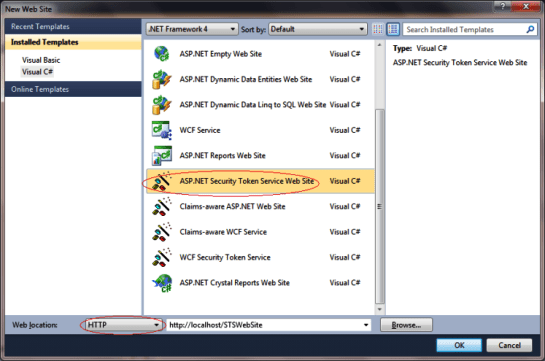
Now your sample Identity provider is created. It provides the basic infrastructure for you. It includes one login page that actually authenticates the user and here forms authentication is used.

Create an ASP.NET application( Relying Party – RP):

I have created an ASP.NET application as below.
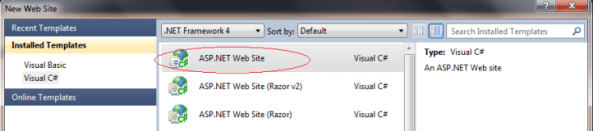
Now as this already create a inbuilt authentication module. You can remove it at all because we’ll not be using this. Or you can create an empty asp.net solution and some page as per needed. I have removed the account folder for the demo.

Create a trust between Identity provider and ASP.NET application(RP): This can be done using FedUtil provided by WIF SDK. Also from UI, we can add an STS reference in the ASP.NET website and make a trust relationship between Identity Provider and Relying Party. Look the following steps to add the reference

  • Add a STS Reference to ASP.NET website

  • This is First screen of FedUtil which displays the URI and location of ASP.NET website(RP)

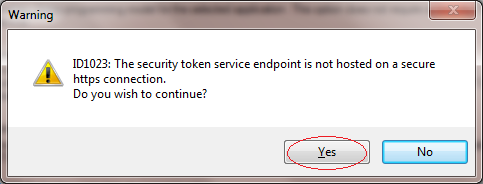
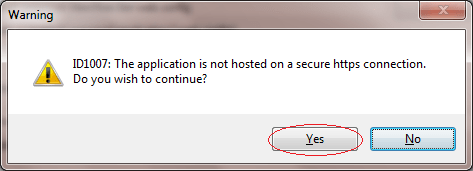
  • If you have not hosted your ASP.NET website(RP) on SSL it will the following Warning. At Production all the communication between Identity Provider and ASP.NET website(RP) should happen over SSL only. Here for demo purpose, I didn’t use SSL. I clicked on Yes.
  • In this screen, It asks to select the STS ( Security Token Service). And has three option. As we have created the STS, we need to select the option “Use an existing STS”

To build the trust relationship, we need to provide the federation metadata provided Identity Provider.

  • Now we need to browse the FederationMetada xml file of the STS that we created.


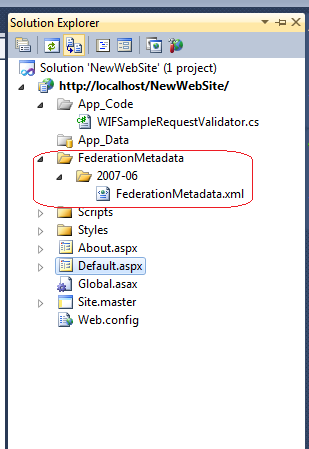
FederationMetadata file resides in a special folder hierarchy “FederationMetadata/2007-06” under the STSWebsite physical folder.

  • And Select the FederationMetdata. And Click next

  • Again as my Security Token Service(STS) is not hosted at SSL. So it is showing the below warning
    message. I just clicked Yes

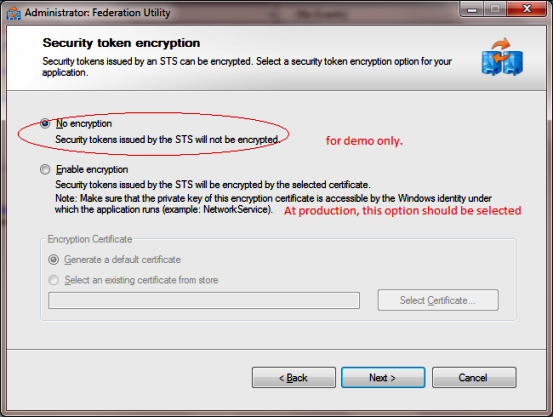
  • Here it asks if one wants to encrypt the token. It should be encrypted on production.You require to provide a certificate for the encryption. Here I have selected the option “No Encryption” for the demo.

  • Now it shows all the claims passed by STS to RP. We can pass more claims from STS to RP as per our requirement. All the Claims is shown here while adding the STS reference at end. By default there are only two roles provided by STS (Name & Role)

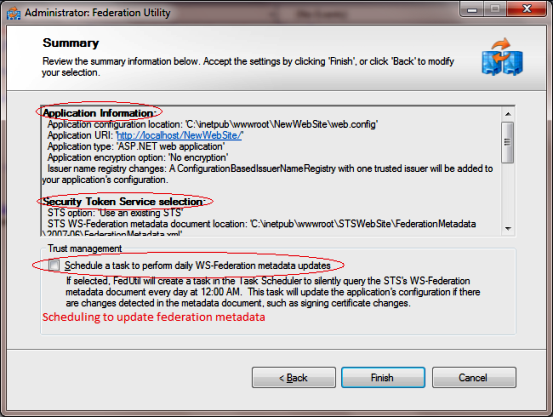
  • This is the Summary screen, shows the details about STS and RP. One need to review and click finish.

Note: Here There is an option for to update the federation metadata on a routine basis. One need to know, if the STS is getting changes say Token or Claims etc. RP would only come to know about when federationmetadata will be updated, else say if someone removed a Claim and metadata is not updated it will allow to get the that Claim but actually at runtime you would nto get that claim which will not be a good condition.One should always have the metadata in updated form.

After clicking Finish. A folder FederationMetadata is added to ASP.NET website (Relying Party -RP) as below


Lets run the application:
Now if you run the application. It will throw an exception as

“Unable to evaluate expression because the code is optimized or a native frame is on top of the call stack.”

This is an issue with it and I have made a small post on it. You can get it resolved easily. Please check this

Now after changes it will run smoothly and It will take you at login page that is provided by STS. This is default login page provided STS, here you dont need to write password just put some name and click on login as below.
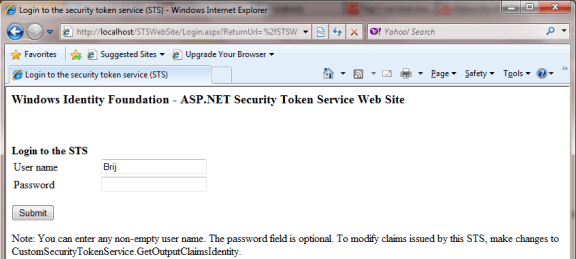
It will redirect to another page to STS which will actually initiate the process to create the token and claims. Then after creating it will be transferred to your website as authenticated user.

Now our application is running. As here in STS we have a sample login page the uses Forms authentication and by default authenticate every user. Here we can put our code, whether if we want to authenticate the user using windows authentication/Form authentication and use database this all we can and also we can get some data of the user from any store say DB here and that we can send using in Claims as per our requirement.

So Now here I’ll show, how to pass some more information to the user in Claims. So one can additional claims here. When you create a STS, there are four files get added in App_Code folder. One file named CustomSecurityTokenService.cs. In this file there is a method GetOutputClaimsIdentity actually creates the claims. We need to add the claims here ( I have added few)

             ///
<summary> /// This method returns the claims to be issued in the token.
 /// </summary>
    ///The caller's principal.
    ///The incoming RST, can be used to obtain addtional information.
    ///The scope information corresponding to this request.
    /// If 'principal' parameter is null.
    /// The outgoing claimsIdentity to be included in the issued token.
    protected override IClaimsIdentity GetOutputClaimsIdentity( IClaimsPrincipal principal, RequestSecurityToken request, Scope scope )
    {
        if ( null == principal )
        {
            throw new ArgumentNullException( "principal" );
        }
        IClaimsIdentity claimsIdentity = (IClaimsIdentity)principal.Identities[0];

        ClaimsIdentity outputIdentity = new ClaimsIdentity();

        // Issue custom claims.
        // Update the application's configuration file too to reflect new claims requirement.

        outputIdentity.Claims.Add( new Claim( System.IdentityModel.Claims.ClaimTypes.Name, principal.Identity.Name ) );

        outputIdentity.Claims.Add(new Claim(ClaimTypes.Role, "Manager"));
        //I added these custom claims
        outputIdentity.Claims.Add(new Claim(ClaimTypes.Email, "brij@gmail.com"));
        outputIdentity.Claims.Add(new Claim(ClaimTypes.Gender, "Male"));

        return outputIdentity;
    }
       

I have added two claims (Email, Gender )as above. These Claims will be available at ASP.NET website( Relying Party).
The same Identity provider can be used in multiple application.

Reading Claims at Relying Party(RP):

It’s easy to read the claims at Relying Party. To read the claims you need ClaimsIdentity of the logged in user and it is available in User Property. I have read the Claims at my page. I have created a dynamic table and shown the claim in that.

          IClaimsPrincipal claimsPrincipal = Page.User as IClaimsPrincipal;
        IClaimsIdentity claimsIdentity = (IClaimsIdentity)claimsPrincipal.Identity;

        // The code below shows claims found in the IClaimsIdentity.

        Table claimsTable = new Table();
        TableRow headerRow = new TableRow();

        TableCell claimTypeCell = new TableCell();
        claimTypeCell.Text = "Claim Type";
        claimTypeCell.BorderStyle = BorderStyle.Solid;

        TableCell claimValueCell = new TableCell();
        claimValueCell.Text = "Claim Value";
        claimValueCell.BorderStyle = BorderStyle.Solid;

        headerRow.Cells.Add(claimTypeCell);
        headerRow.Cells.Add(claimValueCell);
        claimsTable.Rows.Add(headerRow);

        TableRow newRow;
        TableCell newClaimTypeCell, newClaimValueCell;
        foreach (Claim claim in claimsIdentity.Claims)
        {
            newRow = new TableRow();
            newClaimTypeCell = new TableCell();
            newClaimTypeCell.Text = claim.ClaimType;

            newClaimValueCell = new TableCell();
            newClaimValueCell.Text = claim.Value;

            newRow.Cells.Add(newClaimTypeCell);
            newRow.Cells.Add(newClaimValueCell);

            claimsTable.Rows.Add(newRow);
        }

        divClaims.Controls.Add(claimsTable);
       

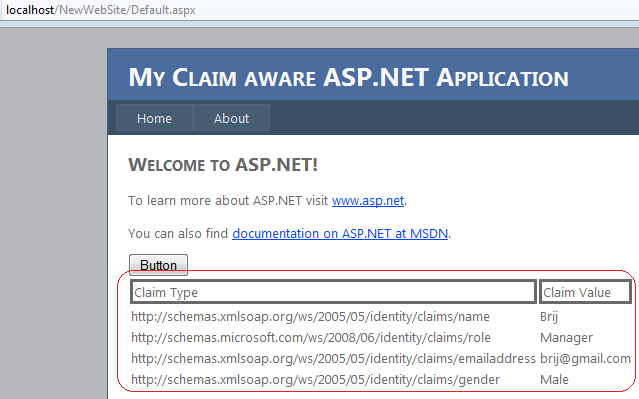
and now when you run the page it will be shown like

Now you can see that it is very easy to read the claims and this can be used in further processing.

I hope the above sample will help a lot. In my new post of this series. I will discuss another technique to implement use Claim based Authentication which is widely Used Called Identity Federation.

Thanks a lot

Exception while using Custom STS in ProcessSignInResponse – Windows Identity Foundation : A solution

This is just a small post. Last few days I was working on Custom Identity provider. I created a STS site using the Visual studio template “ASP.NET Security Token Service Website” .
I also created the my new website that was actually going to use the above STS as Identity Provider. I added the STS reference to my new website using VS IDE.
Now When I ran my application I was redirected first to Login page of STS that was as expected. I got happy but as soon as I clicked on login, there was an exception. And the exception message was

Unable to evaluate expression because the code is optimized or a native frame is on top of the call stack.”

Continue reading

Claim based Authentication and WIF : Part 1

Introduction

There is a lot of buzz about Claim based Authentication. In this article, we’ll understand what is Claim based Authentication? What are the benefits and lot more.This is first Postin this Series. In subsequent posts, We will the implementation and more scenarios.

Let’s first understand, what is the need of Claim based authentication?

Problems with Current Authentication Mechanism

As we used to make several user accounts at several portals/websites. So every time we need to access the corresponding website, we need to remember usrename and password and if somehow we forget the password then we need to remember some specific details like security question etc to get the access of the account again. And every time we might not remember all these details. Also It is never advisable to write your user credentials physically.

One more problem, Most of the applications are using some authentication mechanism mainly Classic UserName and Password. As most of developers are not really security experts they use to leave loopholes during development which are easy to break. So it is a major security risk.

Most of developers have some or other day have worked SingleSignOn feature. It’s not always been a simple task. It leads a lot of challenges and many issues after the application is deployed on UAT/Production.

As a user, we create a new user credentials (username and password) to lot of many application on internet like facebook, yahoo, gmail etc and some in-house site like some college portal etc or some enterprise application. So create every time a new credentials and to remember all these credentials and all are secured enough is very tedious. If there is any error you might loose some credentials and could end up in a big loss.

Solution

Imagine the situation where you just need to have one user credential ie username and password and that is enough to access all your portals/websites. This will be Ideal situation. Might be it could not take place completely, but we are somehow moving in this direction.

But how can this take place?

Actually Now a days when we create a Application which has authentication page, we need to understand, how it works. Actually when user logs in an Identity is assigned to that session and that Identity is maintained throughout the session until user logs out or it expires. So let’s view the current scenario.

Means every application which has some authentication mechanism first authenticates the user and gives an Identity and then user gets the rights to access the application. So somehow if we can externalize the authentication part from the application then this will be very helpful and the same authentication application used by several application. I explain it pictorially


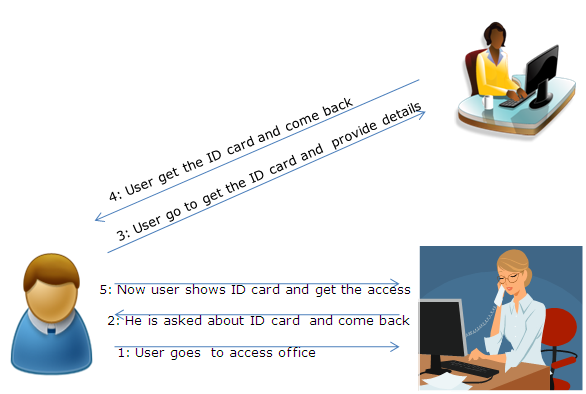
So the basic Idea is, If there are some applications that do the authentication and provides the Identity (Called Identity Provider), and applications rely on this Identity. Like in our daily life


Above picture explains everything about itself.

Claim Based Authentication

The same mechanism is also followed in Claim based Authentication. There are some authentication provider/Identity provider which are used by various applications so whenever a user tries to access some application, Application checks whether user is authenticated or not, if not, it forwards the user to Identity provider which actually authenticates the user, gives a token to user and forward the user to application. Application verifies the token and user is allowed to access the application.

But this is not so easy in web scenario. There are few challenges – Who are the Identity Providers? – What all the data is needed to the relying party ie what data can be transferred from Identity provider and in which form – If there are multiple Identity providers. How application trust on them.

Actually there are couple of Identity providers nowadays like Google, facebook, WindowsLive Id and many more.. And even we can develop our own Identity provider for on premise applications. This also can be used on Cloud as well.

Now if I am making an application and my application uses some Identity provider to authenticate a user. Then application must understand the token of that Identity provider and also there must be trust relation between application and Identity providers, so that application can rely on the token sent by that Identity provider.

Basics of Claim based Authentication

Now let us discuss what are the basic things involved in it. These are mainly Identity, Tokens, Claims, Identity Provider or Security Token Service, RP (Relying Party) etc. To move ahead we need to understand all these. Lets discuss one be One.

What is an Identity

You can say Identity is a group of information that can uniquely identify anything. Most of the other things also have identity like your own PC, Vehicle etc. But here as we are talking about person. So in this digital era, we can say a digital identity is a group of information to identify a person.

Token and Claims

When this digital identify is passed over wire. It is passed as stream of bytes and that is known as token. Token contains some set of Information about the user in the Claim format. A token can contain multiple claims and every claim contains some specific information. The token is digitally signed so that it can be verified at receiver end. So we can show the pictorially as


Sometimes token be XML based Security Assertion Markup Language (SAML) format. But now application use rather simpler token call as Simple web Token( SWT). So the benefit is here we just not pass user credential but also we can pass some other information of the user to the application.

Identity Provider and STS

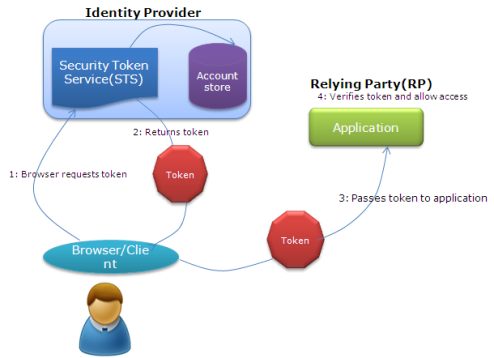
Identity provider is the key in this technology, this is actually authenticate the user and create the token with claims, as per the requirement and digitally sign it before sending. Identity provider is also known as Security token service. So how STS work lets have a view.

RP (Relying Party)

Relying party are the applications those uses these Identity Provider for authentication. They just need to understand and verify the token and get all the data from the token itself which is required. But before all this, RP needs to build a trust relationship and tell the Identity provider what all data needs for a user. So that next time a token it receives, it can verify the issuer and get the required data.

Complete Scenario

Now you guys got all the basic information about Claim based Authentication. Now let us have a look, how these Identity provider is used

So this is the basics of the Claim based Authentication and in my Next Post we’ll focus on Implementation part with the help Windows Identity Foundation WIF.

Do share your views about this post and let me if I have missed anything.

Cheers,
Brij

Playing with List Controls using jQuery

You all must be knowing, I am fan of jQuery. The kind of neat and clean code and the power provided by jQuery at Client side scripting is unmatchable.

List Controls are one of the most used form controls. And we all know that manipulating these controls from JavaScript always have been a tough task.

In this post I’ll be discussing about accessing List controls and manipulating it with the help of jQuery. Hope you all like it and also will able to apply with other controls as well.

Continue reading

Single Sign On between sub domains : Forms Authentication

Today, I am going to discuss one of the feature, that I was working last few days and spent sleepless nights at office and Home as well. Here I am going to discuss Single Sign On (SSO) feature and every other developer implements SSO on some or other day.

So Actually I was having two applications. The requirement was like, user logins from one application and on clicking a link it is navigated to another application. So when user clicks on the link it redirected to application2, it checks, whether the user is authenticated or not. If authenticated it can access the application2 else get redirected to first application for Authentication, And once authenticated again directly reaches the second application.

Continue reading

IsCrossPagePostBack : Cross page PostBack

Download sample from here

Last few days, I was working on one of my module in my web application. During writing code, I came accorss one property IsCrassPagePostBack of Page Class. I have seen this earlier but never tried to dig. So I thought of exploring it and here I am sharing my findings with you all.

First, Let’s start from beginning. We know when we submit a page, entire form data with hidden fields, including view state is posted to the server. One must be using IsPostBack property a lot. It is false when page loaded first time but returns true if any postback takes place. Whenever we click any server side control like button, linkbuttons etc or any other control with autopostback true. All the data including hidden field, View State etc.. is posted to the server and available for processing at codebehind. Continue reading…

Could not load file or assembly ‘PresentationCore’ or one of its dependencies. An attempt was made to load a program with an incorrect format. : A solution

Few days back, I was migrating my application for VS2008 to VS2010 and it was done successfully except  some people started running the application. They faced the error as below

Could not load file or assembly ‘PresentationCore’ or one of its dependencies. An attempt was made to load a program with an incorrect format.

I tried to diagnose the problem and tried to find a solution.<!–more Continue reading… –>

So whenever you  upgrade to VS 2008 to VS 2010 and also upgrade ASP.NET version to 4.0. And if your website hosted on IIS, when you open your VS 2010 IDE it prompt a message asking to upgrade to asp.net version to 4.0. When you say yes it upgrades the version at IIS.

So let’s come back to our original problem. When I diagnosed I found the machine was having 64bit OS.

And at IIS, there is setting “Enable 32-bit Applications” at application pool level that is by default set false . So if you are having 64 bit OS and your application target 32-bit applications then this property must be true.

So how to set it. I have included the images for IIS7.  So first you need to know, which application pool your virtual directory points. So to check this

Goto -> cmd prompt -> type inetmgr -> click on your virtual directory and click on basic settings

Basic settingsNow you can see the Red oval that that is the name of Application pool set for this directory.

Now click on Application pool-> Click on DefaultAppPool -> and click on Advance settings.

App pool advance settings

Here you can see Red oval, I have set Enable 32-bit Applications to true.  Now restart the IIS.

Now run your application and it must be working.

Cheers,

Brij