Wish you All a very Happy New year

Hello All,

I want to wish all my blog readers a Very Happy New Year. Wish that New Year brings joy, happiness, good health and you achieve all the things that you planned in the New Year.

This year again, I received Microsoft MVP award third time in a row. It would not have been possible without all of your support and feedback. Keep flowing in your precious comments and feedback, it energizes to work more towards community. I also received MVP award from C# Corner for the contribution to their Delhi Chapter and on C# Corner website. It was great learning experience with them.

In the New year, I will devote more time to the community online/offline and try to be more fruitful to you. I am sure that you all like my posts in new year too. You all can connect me through my blog, email, twitter, facebook, Linkedin, mail. I’ll try to respond as early as possible.

Again, A very happy new year to all you and your loved ones. See you all in Next year 🙂

Cheers,
Brij

Sass : A simplified way to write CSS – Part 3

This is the third post in series on SASS. In my first post, I briefly discussed about SASS and Variables. In my second post I discussed about operators and some important inbuilt functions. Links of earlier posts are

Sass : A simplified way to write CSS – Part 1

Sass : A simplified way to write CSS – Part 2

In my today’s post, We’ll discuss nesting, mixins and inheritance with SASS.

Nesting is very common practice in programming languages and supported in all the major languages in one or other way. Even if we see the normal HTML page then we find that the whole page is structured in a nested manner. Similarly we find it in XAML or even normal aspx page as well. But it is not supported in CSS.

Sass supports nesting. Let’s see via an example

NestedIf we see above code then we see the whole section is defined for navigation bar in a nested manner. Now let’s see the above CSS when it renders on client and looks like

nestedrenderedThe rendered version is above. Here the Sass pre-processor processes the file and converts it that can be understood by the browser. Here all the classes are rendered in separate blocks as required.

Now let’s move to other topic that is Mix-ins. In our CSS files, many times we write the same css style at several places. If we require to change the same then we need to update the same at several places. Let’s see it via an example

mixin-codeIn above code, we have defined a mix-in variable named custom-style and the same variable, we have used in another classes (class1, class2, class3). To use mix-in variable at another places,  use @include keyword as above in the code. Mix-ins can be used in another scenarios as well.

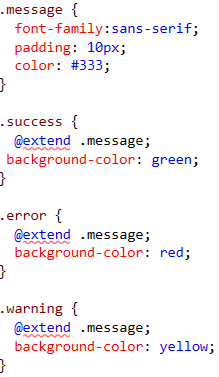
SASS also supports Inheritance. @extend keyword allows us to use the properties of another class. Let’s see it via an example

In this example, say we want to show messages based on response and change the background color based on response type like on error, warning, success etc. This could be written as

ineritanceHere if we see the above code then we find that we have created a class .message and later we used this class in other classes success, error and warning with extend keyword. Just let’s see how it gets rendered.

renderedinheritanceAs it clearly shows that the classes success, error and warning has power of .message class as well. So we can easily use the inheritance feature as well.

So we have seen in last three articles that Sass provides us the capability to use our normal programming techniques that we are using since long, can be used with CSS. This helps us in writing better and organized manner and also helps not to devote much time on normal CSS.

Hope you all have enjoyed this post.

Cheers,
Brij

Video Post – String Manipulation in C#: String, StringBuilder, String.Join

Hello All,

This is a short video post that I recorded few days back. In this video and I have discussed about available options to use for string manipulation in C#. I have seen many junior to senior developers making the mistakes, knowingly or unknowingly which causes performance issues. I have tried to explain it pictorially.

Hope you’ll enjoy it and do share your feedback.

Cheers,
Brij

Join me and Learn jQuery, Node.Js and Knockout.js

Hi All,

C# Corner Delhi chapter is hosting next event  on 23rd November at Noida and Become Better JS developer in a day. This time we are discussing various hot Client side libraries jQuery, Node.js and Knockout.js. After all the session, there will be Test which results will be online. This will be a full day event with full hands on exercises etc.

Date and Timing – 23rd November 2013, 10:30 PM to 6:00 PM

Is there any fee – No. It is Absolutely free

Venue –

MCN Solutions Pvt. Ltd.
H-217, Second Floor,
Sector-63, Noida
Landmark: Behind Indian-Oil Petrol Pump
Contact No: +91-9810371053

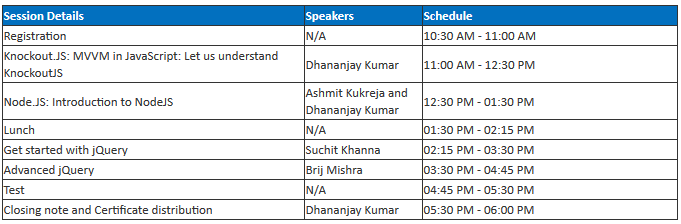
The agenda of the day will be :

agenda

For more details and registration Click Here

Join and Learn with us.

Thanks,
Brij

Sass : A simplified way to write CSS – Part 2

In my last post, I have discussed briefly about Sass (Syntactically awesome style sheets) and Sass variables with examples. You can find the last post link below.

Sass : A simplified way to write CSS

Now in today post, we’ll discuss about operators and inbuilt functions provided by Sass.

Sass supports math operators like +, -, *, /, and %. There could be various scenarios using operators like say we have created some basic variables say a variable with font size as 9px. Now in our application we may require various font size based on locations like top, middle, different headers and other sizes for different sections which can be derived from the base font size. Similarly that can be done while using colors and other various case.

Let’s see it via an example. So my scss file is as

operator-1

If we see above, I have created a variable $base-font-size as 9px then used the same variable to derive font size for multiple classes h1, h2, h3. In h1, * (multiplication) operator is used, in h+ (addition) operator is used and in h3 % opertaor is used. Here if we see the variable in not a pure numeric variable, it contains px as well. But it is taken care while processing the scss file so we dont need to care about it and we can use any other —- as well. So let’s run the code and see the generated css file

operator-2

Lets see another example

$basepadding : 1%;
.thinpadding
{
    padding : $basepadding;
}
.thickpadding
{
    padding : $basepadding*5;
}
.superthickpadding
{
    padding : $basepadding*10;
}
.normalpadding
{
    padding : $basepadding*2;
}

Here I have defined a base padding and then use the same variable to define the different padding  classes that can be used to define padding at various places.

We can use these operators at various places based on the requirement.

SASS also provide a list of inbuilt functions that can be used for writing the scss which include color functions like darken, lighten, hue. Let’s see an example

We can have a base color and just we can use the same color or lighter color or darker color or any other color in our application. So it can be used as

$basebackgroundcolor : #EDF0F5;

.darkbackground
{
    background : darken($basebackgroundcolor, 50%)
}
.lightbackground
{
    background : lighten($basebackgroundcolor, 25%)
}

Here in first class we have used the darken color which produces the dark color by 50% while the second one produces the light color by 25%.
There are many other color functions and host other Number functions, List functions, String functions etc are available. For complete list, please refer the documentation here http://sass-lang.com/documentation/Sass/Script/Functions.html

In next post, I’ll discuss about Nesting and Mixins with examples.

Cheers,
Brij

Sass : A simplified way to write CSS

This is the age of revolutions. For me at least as a web developer, I am seeing it last few years. Once AJAX came into the market and become popular, it changed the whole web development and web experience as a user. Microsoft came up with the whole new AJAX control toolkit to make the UI very UI intuitive. The Client side technologies like JavaScript, CSS etc are always pain for a web developer like me. But jQuery gave a new flavor to Client side scripting and now get used in almost all web projects. There are many new plugins of jQuery came into existence and few of them got widely used.

And now it’s turn to CSS, I faced tough time working with CSS but new things are coming up. Microsoft always embraces these technologies so that the developer gets the benefit of these technologies and get the first class experience in their Visual studio itself. Today we’ll talk about SASS ( Syntactically awesome stylesheets).

So What is Sass?

As the full form of Sass it self says (Syntactically awesome style sheets). As per the sass website it is “Sass is the most mature, stable, and powerful professional grade CSS extension language in the world“. One does not need to learn any new technology instead uses the existing technology/learning and use that to write wonderful CSS in a very simple way.

So how does it actually works?

A Sass file is compiled into an normal CSS file while execution. When we run the application, the sass file get converted to css file and returned to the browser.

Next how to use Sass?

As now Microsoft introduces a new and very powerful tool Nuget to install packages/plugins for the project. It’s very simple and easy to install. In this example, I’ll be using ASP.NET, So I have installed the package SassAndCoffee.AspNet via nuget as

Go to -> Package Manager Console and type

Install-Package SassAndCoffee.AspNet

else you can also install via Manage Nuget Package.

It adds few dlls and some config entries in web.config. After installing it, It adds in HTTPModule which looks for any incoming request for all css request and tries to find the css file and if css file does not available then it looks for scss file and if it is available the process the scss file and convert it into css file and return it. So your page does not need to know about all the behind the seen processes, you just need to include the normal css file in your project.

.Sass provides us the capability to use programming language feature for writing StyleSheet. SASS provides us two syntaxes. The new syntax is known as SCSS (Sassy CSS) that is easy to write and also a superset of CSS3. I’ll be using it our posts. The file extension for it is scss. While the other older one is normal sass  and known as indented css and now is obselete.

Let’s see the basic feature of Sass. Sass provides us the capability

  • Declaring Variables
  • Allows Operations
  • Allows Nesting
  • Mixins
  • Extend/Inheritance

Doesn’t it look interesting? You get the basic features of any programming language for your css and you dont need to learn anything for this to use except some basics about how to use it.

So in this post, we’ll see the Variable and operations.

Variables – It means we can created the variables and use it in our file wherever require similar like in C# or other language. So variables can be created as

$common-font: verdana;
$common-font-size : 9px;
$basecolor : #000;
$custom-border : solid 5px, #000;

Variable could contain single value or contain list of items as $custom-border contains multiple values. So in my application, I have created a file with extension as scss ( Custom.scss) and that contains
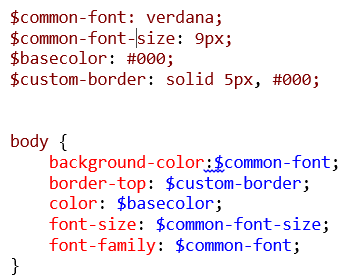
first

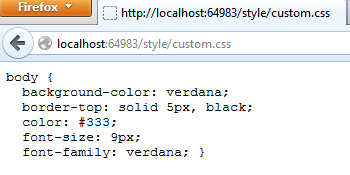
Now if we run the application and access the file with URL

http://localhost:64983/style/custom.css

then it returns the processed css file as

secondAll the processing like here replacing with actual values, is done at server side. So it does not affect any client side catching.

If we have here option to create variable, then it should also provide the capability to do some operation over it. Yes, we can do it. We’ll discuss this in next part.

Also if we try to access the URL

http://localhost:64983/style/custom.scss

then it returns the error

HTTP Error 404.3 – Not Found

Hope you have enjoyed this post. In next post, I’ll discuss about various operations and few other examples.

Cheers,
Brij

WebGrease : A fantastic tool for Web Optimization

In this post, We are going to talk a library that you guys must have seen in latest version of ASP.NET (4.5) and ASP.NET MVC (4.0). So first let’s first understand,

What is WebGrease?

WebGrease is a suit of tools that helps is optimizing the static files (like JavaScript, CSS) in a web application. This tool is developed by a performance team in MSN division of Microsoft . Actually It is evolution of the AJAX min library that we are already using.  This team continuously works on the optimization of their web sites. So the current capabilities of WebGrease are

Continue reading

What is SecureString ?

In this post, we are going to discuss a class SecureString. Although this class is available since .NET 2.0, but I am sure, many of us would not be knowing or using it. Even I was not aware of this fantastic class few weeks ago. This class can be very useful for you if you are more concerned about your application security.

This class belongs to the namespace System.Security . This class should be used to store the data which is confidential. The text assigned to this string is by default encrypted. This data is also removed as soon as it is not required which in-turn reduces the chances of misuse.

Continue reading

Reading Event logs efficiently using C#

This post is extension is my last post on Event Viewer. Please the find the link below.

Working with EventViewer using C#

We’ll be talking about the reading event logs. In my last post I discussed about reading the event logs. But that is very slow because that loads all the event entries in memory and then iterate one by one. Say if we have around one five thousand entries in the log then it will load all the entries in memory and then allows to iterate one by one. It makes the reading of logs very slow. Also at certain point of point we might require to read the event logs on some specific criteria or want to read some specific logs then also we need to load all the events and iterate and find the required entry.

Continue reading

Looking into Windows authentication at Web.config and at IIS

Hello All,

I have seen many confusion around setting authentication mode as windows in web.config and enabling  Windows authentication at IIS.

First thing that there is no relation between setting authentication mode as windows at web.config and enabling/disabling (Integrated)Windows Authentication at IIS.

Continue reading