ASP.NET: Asynchronous Programming

Click here to download the sample code

Introduction:

Have you ever tried using Async pages in asp.net? Did you ever explore it in
respect of ASP.NET?

If No. This is the article for you. In this, I will be discussing, what is Async
programming? what are the benefits? Async in respect of ASP.NET and its uses
and lots more.

Async programming:

In a literal meaning, Asynchronous operation means that a process operates independently of other processes. If there are multiple operations, All that can be handled different processes/thread without waiting to complete the other ones. So here in coming sections, we will be discussing, how Asynchronous programming comes into the picture in ASP.NET.

Async Programming in ASP.NET:

Normally the kind of websites that we make are not scalable enough that could have been. These websites are very limited and confined. ASP.NET provides us a way to develop our websites more scalable. Continue reading…

Error While Serailize/De-Serailize DateTime in JSON format : A Solution

Sometimes back, I was working on one my modules in my application. Here I had an of a Class which has some properties of DateTime type. Actually I was serializing the object using JavaScriptSerializer to serialize it in JSON format but later could not be able to deserialize it again.

So I thought of digging deep to this problem. So  I will be discussing it with an example. Let’s have a class Continue reading…

Call HTTPhandler from jQuery, Pass data and retrieve in JSON format

Download sample for here

Last few days ago, I was woking with HTTP handler. Here I was required to call handler from Client script. Later I found, that I need to pass some data to handler and also recieve some from it.

So I was looking for if there is some way we can pass some data to handler in some format and can recieve.

So Here I am going to share, How we can call a HTTPHandler from jQuery and can pass some data to handler and receive as well.

So Let’s go step by step Continue reading…

Invalid View State error While expanding your Web Farm

Last few days back, I faced one peculiar issue, while adding a new system in my Web Farm. My users started facing an issue “InValid View State” intermittently.

First, I could not guess what is the issue and thought of some programming issue. But later after analysis I found the issue is caused by the changes in the Web Farm.

Just before discuss the solution, Let’s analyse this.

First,  What is Web Farm?

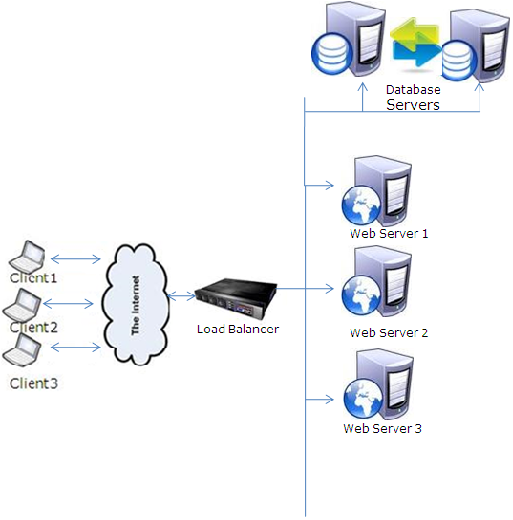
A Web Farm is used in highly available applications and which have a lot of users that cannot be served by a single server. They provides better performance and are easily scalable. It means we’ll have multiple web servers behind a Network Load Balancer (NLB). Whenever a request comes, it first goes to the load balancer, which checks all the available web servers and finds the web server which has comparatively less requests to serve, and passes the request to that web server. Continue reading…

A way to improve performance of your Web Application significantly

Last few days,  I was working on performance improvement of one of my Web Applications. I analysed my application in various ways. Also used different profiler and did profiling for my application using several profilers like Ants, .NET profiler etc. During analysis, I found few problems, that we rectified but got no visible improvement.

Later I thought, my server side code is good enough, but still its taking time to download the page.  Although we are already using IIS compression to reduce the page size, but still Page was taking good amount of time to download.

I posted a blog to enable IIS compression, Click the following link to have a look

How to enable HTTPCompression at IIS6

Actually,  My application is RIA application and we are using myriad  ajaxtoolkit controls in our application. I analysed my application using firebug and there are a lot of scriptresource.axd and webresource.axd files are gettng downloaded.

So I thought if we can combine these files into single that will a great performance application boost for our application.

First, I tried doing it from myself, Later I found ASP.NET itself provides a way to combine these axd files. Just you need to have .NET 3.5 SP1.

So if you are using framework version 3.5 upgrade it to SP1 and enjoy this feature.

I have created a small sample and will show you with the help of it.

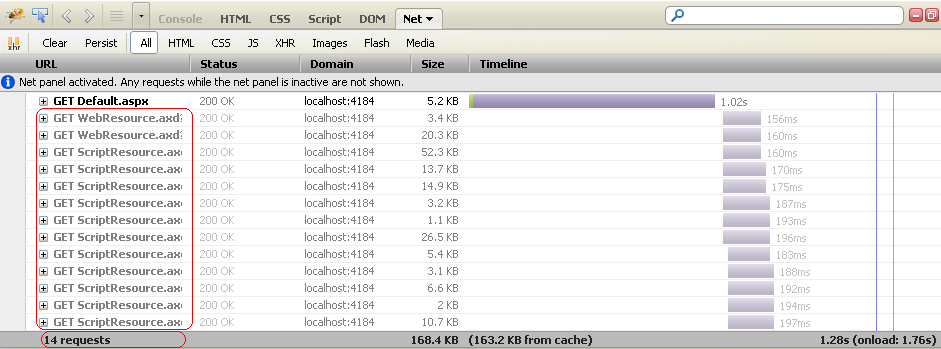
So In my sample application, I have a Calender extender.  Lets see how many requests are there using firebug.

Requests of a Web Page

We can see currently there are 14 requests on every PageLoad. We can reduce the number of request.

So to  use this, first you need to download a ScriptReferenceProfiler. You can download it from here.

Now add the reference in your project and add the profile in the your page.

First register it as


<%@ Register Assembly="ScriptReferenceProfiler" Namespace="ScriptReferenceProfiler"
    TagPrefix="cc2" %>

and add it as a control like


<cc2:ScriptReferenceProfiler ID="ScriptReferenceProfiler1" runat="server" >
</cc2:ScriptReferenceProfiler>

Now when you run you application you will see the page as

Now copy all the link and put it in the CompositSctript tag as


<asp:ScriptManager ID="ScriptManager1" runat="server">
            <CompositeScript>
                <Scripts>
                    <asp:ScriptReference name="MicrosoftAjax.js"/>
	                <asp:ScriptReference name="MicrosoftAjaxWebForms.js"/>
	                <asp:ScriptReference name="AjaxControlToolkit.Common.Common.js" assembly="AjaxControlToolkit, Version=3.0.30930.28736, Culture=neutral, PublicKeyToken=28f01b0e84b6d53e"/>
	                <asp:ScriptReference name="AjaxControlToolkit.Common.DateTime.js" assembly="AjaxControlToolkit, Version=3.0.30930.28736, Culture=neutral, PublicKeyToken=28f01b0e84b6d53e"/>
	                <asp:ScriptReference name="AjaxControlToolkit.Compat.Timer.Timer.js" assembly="AjaxControlToolkit, Version=3.0.30930.28736, Culture=neutral, PublicKeyToken=28f01b0e84b6d53e"/>
	                <asp:ScriptReference name="AjaxControlToolkit.Animation.Animations.js" assembly="AjaxControlToolkit, Version=3.0.30930.28736, Culture=neutral, PublicKeyToken=28f01b0e84b6d53e"/>
	                <asp:ScriptReference name="AjaxControlToolkit.ExtenderBase.BaseScripts.js" assembly="AjaxControlToolkit, Version=3.0.30930.28736, Culture=neutral, PublicKeyToken=28f01b0e84b6d53e"/>
	                <asp:ScriptReference name="AjaxControlToolkit.Animation.AnimationBehavior.js" assembly="AjaxControlToolkit, Version=3.0.30930.28736, Culture=neutral, PublicKeyToken=28f01b0e84b6d53e"/>
	                <asp:ScriptReference name="AjaxControlToolkit.PopupExtender.PopupBehavior.js" assembly="AjaxControlToolkit, Version=3.0.30930.28736, Culture=neutral, PublicKeyToken=28f01b0e84b6d53e"/>
	                <asp:ScriptReference name="AjaxControlToolkit.Common.Threading.js" assembly="AjaxControlToolkit, Version=3.0.30930.28736, Culture=neutral, PublicKeyToken=28f01b0e84b6d53e"/>
	                <asp:ScriptReference name="AjaxControlToolkit.Calendar.CalendarBehavior.js" assembly="AjaxControlToolkit, Version=3.0.30930.28736, Culture=neutral, PublicKeyToken=28f01b0e84b6d53e"/>
                </Scripts>
            </CompositeScript>
        </asp:ScriptManager>

Now lets run the Application. Lets check the firebug.

Combined requests

Here we can see the number of significantly reduced It’s just 4.

But this is sample and its working fine. But when you try to your actual application you might face several issues.
One issue that I faced while using with my Live application and That is

Issue: The resource URL cannot be longer than 1024 characters. If using a CompositeScriptReference, reduce the number of ScriptReferences it contains, or combine them into a single static file and set the Path property to the location of it.

So first I could not understand it and try to find to something on google. But somewhere found it’s a issue and it will be taken care or handle by own for the time being. But during analysis I found one solution.
The problem is the URL length is getting higher than 1024. So for this one has to reduce the number of files getting combined. So you can have more than one group of file and put it in different composit scripts tag.

I have added one script manager proxy and added a compositscript tag it in it and pasted almost half of the scripts in it. And it resoved the issue. As


 <asp:ScriptManager ID="ScriptManager1" runat="server">
            <CompositeScript>
                <Scripts>
                    <asp:ScriptReference name="MicrosoftAjax.js"/>
	                <asp:ScriptReference name="MicrosoftAjaxWebForms.js"/>
	                <asp:ScriptReference name="AjaxControlToolkit.Common.Common.js" assembly="AjaxControlToolkit, Version=3.0.30930.28736, Culture=neutral, PublicKeyToken=28f01b0e84b6d53e"/>
	                <asp:ScriptReference name="AjaxControlToolkit.Common.DateTime.js" assembly="AjaxControlToolkit, Version=3.0.30930.28736, Culture=neutral, PublicKeyToken=28f01b0e84b6d53e"/>
	                <asp:ScriptReference name="AjaxControlToolkit.Compat.Timer.Timer.js" assembly="AjaxControlToolkit, Version=3.0.30930.28736, Culture=neutral, PublicKeyToken=28f01b0e84b6d53e"/>
                </Scripts>
            </CompositeScript>
        </asp:ScriptManager>
        <asp:ScriptManagerProxy ID="ScriptManagerProxy1" runat="server">
            <CompositeScript>
                <Scripts>
                <asp:ScriptReference name="AjaxControlToolkit.Animation.Animations.js" assembly="AjaxControlToolkit, Version=3.0.30930.28736, Culture=neutral, PublicKeyToken=28f01b0e84b6d53e"/>
	                <asp:ScriptReference name="AjaxControlToolkit.ExtenderBase.BaseScripts.js" assembly="AjaxControlToolkit, Version=3.0.30930.28736, Culture=neutral, PublicKeyToken=28f01b0e84b6d53e"/>
	                <asp:ScriptReference name="AjaxControlToolkit.Animation.AnimationBehavior.js" assembly="AjaxControlToolkit, Version=3.0.30930.28736, Culture=neutral, PublicKeyToken=28f01b0e84b6d53e"/>
	                <asp:ScriptReference name="AjaxControlToolkit.PopupExtender.PopupBehavior.js" assembly="AjaxControlToolkit, Version=3.0.30930.28736, Culture=neutral, PublicKeyToken=28f01b0e84b6d53e"/>
	                <asp:ScriptReference name="AjaxControlToolkit.Common.Threading.js" assembly="AjaxControlToolkit, Version=3.0.30930.28736, Culture=neutral, PublicKeyToken=28f01b0e84b6d53e"/>
	                <asp:ScriptReference name="AjaxControlToolkit.Calendar.CalendarBehavior.js" assembly="AjaxControlToolkit, Version=3.0.30930.28736, Culture=neutral, PublicKeyToken=28f01b0e84b6d53e"/>
                </Scripts>
            </CompositeScript>
        </asp:ScriptManagerProxy>

Now it will combine the resource files in two files. You can add more CompositScript tags if required.

Hope all you have enjoyed this and get benefited from it.

Cheers,

Brij

How to store custom objects in web.config

In this Post, I am going to discuss about web.config. Normally in our daily life, we used to have some data in appSettings section of web.config and read it when required. That is in string form. But there are lot more than this. We can update the data in web.config  programmatically as well .

Now another main point is, we can store some object of custom type in web.config as well, which we normally don’t do it. But this can be very useful in several scenarios.

Have anyone tried to update some value or add some value in web.config?  W’ll have brief discussion on this.

First, This is very common to have some constant data at appSettings section of web.config and read it whenever required. So how to read this ( for beginners).

//The data is stored in web.config as
<appSettings>
		<add key="WelcomeMessage" value="Hello All, Welcome to my Website." />
</appSettings>

// To read it
string message = ConfigurationManager.AppSettings["WelcomeMessage"];

Now if we want to update some data of appSettings programatically. One can do like this.

//Update header at config
        Configuration config = WebConfigurationManager.OpenWebConfiguration(Request.ApplicationPath);
        config.AppSettings.Settings["WelcomeMessage"].Value = "Hello All, Welcome to my updated site.";
        config.Save();

Now what do you do,  if you want to add some data in appSettings . You can add some app.config data as below.

//Update header at config
        Configuration config = WebConfigurationManager.OpenWebConfiguration(Request.ApplicationPath);
        config.AppSettings.Settings.Add("ErrorMessage", "An error has been occured during processing this request.");
        config.Save();

The above code is adding one new key value pair in web.config file.  Now this can be read anywhere in the application.

Now, the question is, Can we store some custom data at config?

Yes…

We can store some object. Let’s see how

I have created a sample example. In this example, I have saved an  object of my custom class NewError in web.config file. And also updating it whenever required.

To do this, Follow the below steps.

a) Create a Class that inherit From ConfigurationSection (It is available under namespace System.Configuration ).  Every property must have an attribute ConfigurationProperty, having attribute name and some more parameters. This name is directly mapped to web.config. Let’s see the NewError class

public class NewError:ConfigurationSection
{
    [ConfigurationProperty ("Id",IsRequired = true)]
    public string ErrorId {
        get { return (string)this["Id"]; }
        set { this["Id"] = value; }
    }
    [ConfigurationProperty("Message", IsRequired = false)]
    public string Message {
        get { return (string)this["Message"]; }
        set { this["Message"] = value; }
    }
    [ConfigurationProperty("RedirectURL", IsRequired = false)]
    public string RedirectionPage
    {
        get { return (string)this["RedirectURL"]; }
        set { this["RedirectURL"] = value; }
    }
    [ConfigurationProperty("MailId", IsRequired = false)]
    public string EmailId
    {
        get { return (string)this["MailId"]; }
        set { this["MailId"] = value; }
    }
    [ConfigurationProperty("DateAdded", IsRequired = false)]
    public DateTime DateAdded
    {
        get { return (DateTime)this["DateAdded"]; }
        set { this["DateAdded"] = value; }
    }
}

as you can see every property has attribute ConfigurationProperty with some value. As you can see the property ErrorId has attribute

 [ConfigurationProperty ("Id",IsRequired = true)]

it means ErrorId will be saved as Id in web.config file and it is required value. There are more elements in this attribute that you can set based on your requirement.
Now if you’ll see the property closely, it is bit different.

public string ErrorId {
get { return (string)this["Id"]; }
set { this["Id"] = value; }
}

Here the value is saved as the key “id”, that is mapped with web.config file.

b) Now you are required to add/register a section in the section group to tell the web.config that you are going  to have this kind of data. This must be in <configSections/>  and will be as

<section name="errorList"  type="NewError" allowLocation="true"
     allowDefinition="Everywhere"/>

c) Now one can add that object in your config file directly as

<errorList Id="1" Message="ErrorMessage" RedirectURL="www.google.com" MailId="xyz@hotmail.com" ></errorList>

d) And to read it at your page. Read it as follows.

NewError objNewError = (NewError)ConfigurationManager.GetSection("errorList");

And also a new object can be saved programmatically as

 NewError objNewError = new NewError()
        {
          RedirectionPage="www.rediff.com",
          Message = "New Message",
          ErrorId="0",
          DateAdded= DateTime.Now.Date
        };
        Configuration config =
            WebConfigurationManager.OpenWebConfiguration(Request.ApplicationPath);

        config.Sections.Add("errorList", objNewError);
        config.Save();

Even one can add a custom group and have some custom elements in in this section.

ASP.NET provides very powerfull APIs to read/edit the web.config file easily.

Hope you all must have enjoyed this, and I will appreciate your feedback.

Thanks

State Management and ways to handle Cache in Web Farm/Web Garden scenario

In this Article, I am again going to talk about state management but focus on mainly Web Farm and Web Garden scenarios . For the new readers, I am adding first few sections from my earlier articles to give brief idea about State Management. In this Article, I’ll be discussing about Web Farm/Web Garden and later will discuss various approaches to handle Cache in Web Farm/Web Garden scenario.

Basics about State management:
As we all know,web is stateless .A Web page is recreated every time it is posted back to the server.In traditional web programming, that all the information within the page and control gets wiped off on every post back. To overcome this problem,ASP.NET framework provides various ways to preserve the states at various stages like controlstate,viewstate, cookies, session etc.These can be defined in at client side and server side state management. Please see the image below.

State Management in ASP.NET

In this Article, I will be talking about the server side state management Techniques.

First lets talk about on very basic key Thing AppDomain which is introduced in .NET 2.0.

What is AppDomain
An AppDomain can be defined as light weight process and is used for security isolation and availability. AppDomain is hosted on some process and a Process can host multiple AppDomains. So one AppDomain can go down/restarts without affecting other AppDomains in the same process.

Role of AppDomain in ASP.NET:
AppDomain plays a key role in asp.net. When ASP.NET receives first request, the Application manager creates an application domain for it, Application domain are very important because they provide the isolation amongst various applications on the web server and every application domain is loaded and unloaded separately and in application domain an instance of class HostingEnvironment is created which provides access to information about all application resources. Have a pictorial view

ASP.NET Handling first request

So Now AppDomain is responsible all the server side side management, means all the data session(InProc mode) Application Objects/Variable Cache all resides in AppDomain itself. If AppDomain goes down, all the data at web server will be wiped off. Let’s have a View

All server side state management data resides in AppDomain

First Let’s talk about Web Farm as Web Garden:

Web Farm is used in Highly available application and which have a lot of users that cannot be served by single server. Then we use Web Farm. They provides better performance and also easily scalable. It means we’ll be having multiple web servers behind a Network Load Balancer (NLB). So now whenever a request comes, it first goes to the load balancer, it checks all the available web servers and which has comparatively less requests to serve, passes the requests to that web server. Lets have a pictorial overview.

Web Farm

Most of the large applications are deployed in Web Farm scenario. A Single server might not able to handle millions of requests in a day and we provide a virtual IP to the Load Balancer and the URL is mapped to Load Balancer, and load balancer takes a decision to pass the request to a specific web server.

So in this scenario, the Session mode InProc does not work. We require to use OutProc mode, because might be, at first request is served by some server1 and store some session data, but later it another request Load balancer finds that server1 is busy handling another requests and it can pass this to another server, which obviously does not have session data and it can result in a bizarre.

In OutProc mode Session data is not stored in the AppDomain of web server. In this we store the data some another server. We’ll discuss it in brief later.

Affinity

There is a setting known as affinity parameter setting, can be set so that Load balancer directs all the requests from one Client IP address to the same machine. This allows us to use Session (InProc mode), Application data and Cache in Web Farm scenario seamlessly. Means the application would work like it is deployed on single server only. But it has few limitation like below.

  • If the server serving request, goes down in between, all the server data would be lost.
  • This limits the use of Web Farm as Load balancer would be confined to redirect to the requests for the same Client machines to a single Web server only.

Have detailed look on the link Click Here

What is Web Garden:
When we deploy our application on IIS(6 and above). We assign an application pool to out application. Application pool is used for isolation purpose from another application deployed on the same web server. So an application pool is having on worker process(w3wp.exe) normally. An AppDomain is created over this Worker process, that handles/serves the requests send by the client machines. All the server data(Session, Cache , Static Variables, Application variables) is stored in AppDomain boundary. But we can have multiple worker process on the same application pool for performance benefits. It allows better handling the web request sent by the Client machines. But these worker process does not share the memory And a new AppDomain is created for the same Application and each AppDomain has its own copy of data. Means if some session is stored in one AppDoain’s memory and the next request is handled by another web server it won’t be having the session data.

Let’s have a pictorial overview.

First two Application pools show Web Garden Scenario

Affinity:

Now the question: Do we have some affinity settings in WebGarden scenario? yes

There is a hardcoded client connection affinity to a worker process instance. So for a given client TCP connection all the HTTP requests will be handled by the same instance of the worker process.

So as we all have seen that in case of setting Affinity parameter, we can host our Application in WebFarm/WebGarden scenario without worrying about, How web server data is going to be stored and managed.It will be working seamlessly as your application is hosted on single server only.

But as we discussed the limitation the affinity parameter, It is not advisable to set the affinity parameter.
Something more about Session Management:

Let’s discuss Session a bit

As we know, these are stored on Web server. First let’s have a quick Idea about How Session is stored .

There are two modes for storing session.

  • InProc
  • OutProc

InProc:In this mode, Session values are stored AppDomain on webserver where application is running itself. As this is stored in server memory its highly efficient in performance point of view. But this is not very scalable and robust, because as the users at the application increasing, you application may face some tough  time while processing multiple requests and it can go down. But obviously, you would not want that your website goes down. And also for highly available websites, this does not work.

OutProc:Here the data in session is not stored in the AppDomain on the webserver memory. And whenever your data goes out from webserver memory, you need to serialize and need deserialize again before using this. Here this is one performance overhead. Here the session stored on mainly in three ways:

StateServer: In this, Session information in state server that is a process, known as ASP.NET state service, that is separate from the ASP.NET worker process. But this is a single point of failure. But if this service/box goes down, your application will stop working abruptly.

Sql Server: Here, we store the session in Sql Server..NET provides some default scripts that can be used to install at SQL and it gets ready to use to store session data  Also there we can have cluster, by maintaining the Session on several machines. So if one goes down, The user requests can be served from other box.

Custom Aproach: ASP.NET provides us the flexibility to write our own custom provider for maintaining and storing Session data. This provides us to store the session data where and how as we want.

Now we are going to discuss Cache management.

Should we not use the Application state in case of WebFarm/WebGarden scenarios?

We have lot discussed about the Session in these scenarios. But I found people having less Idea other states like Application and others like Cache.

Lets discuss Cache
How to handle Cache in Web Farm/Web Garden scenario:

To start with,  you must have some basic Idea about Cache management in ASP.NET.

How we can handle Cache which resides in AppDomain in web farm or web garden scenario

The best way to don’t use Cache in Web Farm and web Garden Scenario.

Frankly speaking. It depends on the requirements, the kind of data you are going to have in your Cache.

If you have really static data, like country names, so these is static data and is not going to be changed every now and again. So in this case it does not matter, whether is in web farm/web garden scenario, if the data would not be available in the AppDomain, it will get loaded from the database. And obviously its not going to changed once loaded so no worries in case of Web Farm/Web Garden.

So here I will be discussing case by case with the specific scenario

Scenario 1:
You have some data in file system. Say you have lots of data in our config file, which is frequently used. So here reading again and again from the config file would not be good approach. Better have it in Cache and retrieve it from there whenever required.

Approach: This is very basic scenario: you can load the data initially, when there is no data in Cache and set the dependency on the file. Means whenever there is any change in file, the cache will be invalidated and will get updated and this will be valid for all the AppDomain across web farm/web garden.

Dependent on File System

Scenario 2:
One might have the scenario, that there is some master data, that is used by entire application frequently. So in this scenario, it might not be a good approach to get the data the from database every time you need it. So better to have it in Cache. One more thing, This master can be updated by Admin with a new Interface.
Aprroach:
I think this is very basic requirement and best candidate for using Cache. As the data is almost static and will be updated very infrequently. So now, There is some master data. That we can load first time when it is not in cache and pick from it whenever required. As I discussed in the scenario, Their might be some admin interface which is only able to enter the master and update it in database. At this point, one need to update the Cache for all the AppDomain on all the web servers. So here in webfarm scenario, you data is coming from database, so you can set the dependency on database so that as soon as the data gets updated in your database the cache will be invalidated on all the web servers and get reloaded with updated data from database. So this is a common scenario and one does not need to worry about Data syncing let’s have a pictorial view.

Cache dependent on database

Scenario 3:

This is common scenario. Where we store some data in Cache at the server. And it can get updated at any time. So How to handle it in WebFarm and Web Garden scenario.
Note: Here I am discussing only few approaches to handle Cache in web farm/web garden scenario. There can be many more ways to handle this.
Approach 1:

Here the basic approach is , as soon as , the data in any of the cache gets updated,  it will invoke a web service call to all the web servers which will update the cache in all the associated web servers behind the Load Balancer.  So here we can have a table in database, which will have the IP of the webserver connected in web farm (These IP will the direct IP of the web servers not the load balancer virtual IP). Let’s see it in steps.

  • There will a table in database having the entry of the IPs of all the webservers under the load balancer.
  • There will be the webservice, that will get the ips of all the webservers and update the cache one by one.
  • The webservice will be invoked by any of the webserver behind the load balancer on which cache will get updated.
  • Here it is also to to add a new webserver under load balancer to cater the new needs. Just add that the table which have all the IPs of webserver.
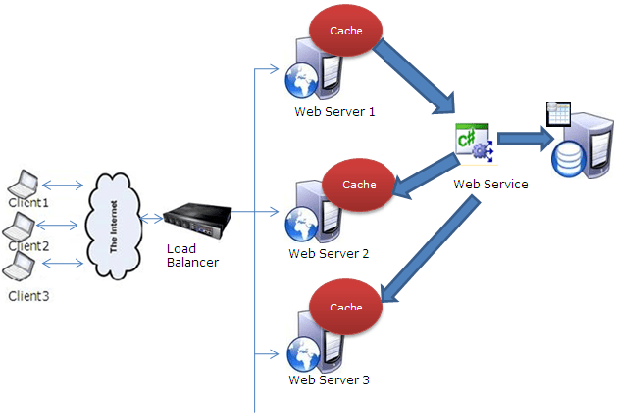
Cache handling with web service approach in Web Farm scenario

Approach 2:

In this, your cache not on the web server but you can store it on some another server. So every web server is going to connect this machine to get the cached data. Now you will be asking if the cache is stored on some another box, what will the performance benefit we’ll get. So I would suggest you to have a remoting (TCP) connection to that caching server and it is so fast to get the data from there, that there would not be any much difference in having the data at web servers memory or at another cache server.

Cache handling with remoting approach in Web Farm scenario

Approach 3:
This is very easy one and will cost you.There are myriad third party tools are available. Which can be used to handle the Cache issue on web farm or web garden scenario. You can get with the help of Google.

That’s all. I would request to you all to share your feedback and give me some suggestions, which which would encourage and help in more writing.
Validating partial page with ASP.NET Validators using JavaScript

Validation plays a key role whenever we take a inputs from the user. For this, ASP.NET provides us few validator controls that are used a lot in web applications.
Now a days, in our application, we used to have several section in our web pages.
And also, we populate some data based on the user’s input.
So several times, it requires  to validate the page partially not the entire page,
while earlier we used to have single submit button and their we need to validate the page.

AJAX also played a key role, for partial post back, initiate a call to server etc, which requires to validate a part of the page.

So in these scenarios our earlier approach of validation would not work.
In this kind of scenario, I will discuss few things that will be very helpful.

First, I would suggest, to divide your page in some logical section, those you might need to validate at certain points. And assign a different group name to the validators on those section.

1) If you are initiating an ajax call or initiating a callback from java-script, and you want to validate certain section/part of the page.

So before initiating the ajax call, you need to validate the user inputs. This can be easily with the following method.

You need to call Page_ClientValidate() method, this method has two flavors,
– Page_ClientValidate() it fires all the validators on the page and returns false, if it fails
– Page_ClientValidate(‘groupname’), this method fires all the validators having the passed groupname and returns false if any validator fails.
This is quite useful, while validating partial section/part of the page. So your java script code may look like this

function SaveAddress()
{
	if(Page_ClientValidate('groupname') == false)
		return false;
	else
	{
		//Save Address
	}
}

2) Several time, it happens, that based on some requirement, we used to hide some section of input form or hide some input control, but whenever page/section is going to be submitted, the hidden validators also gets fired. So to overcome this problem, you may need to disable the validators. So to disable any validator from javascript as

document.getElementById('ValidatorClientId').enabled=false;

So these validator wont be fired till you gain enable it. You can enable it as

document.getElementById('ValidatorClientId').enabled=true;

Hope you all will like this post and will found it to be useful.

Why MaxLength property of a textbox with multiline mode doesn’t work? A Solution

Many developers set the MaxLength property of a Textbox and it works fine until the Textbox is not in multiline mode, which is by default behavior of a Textbox.

So what is the basic diffference between a textbox in single line and multiline mode!!!

Let’s see, how it gets rendered as html. Lets have a look

Textbox with SingleLine mode

Textbox with SingleLine mode

Now Textbox with MultiLine mode

Textbox with MultiLine mode

Textbox with MultiLine mode

As you can see, When a Textbox is in SingleLine mode, it gets rendered as a input type text  and when it is in MultiLine mode, it gets rendered as a textarea. As we know MaxLength property works only for input type.

So what is the solution. We need to have a custom solution for this.

Let’s try some solution,

One thing we can do, we can attach a function on onkeypress event to the textbox, which first check the length of input string and if exceed with limit it just returns else allow to enter any input. In the below example I have used the maximum length as 10.

<asp:TextBox ID="tb" runat="server" TextMode="MultiLine" onkeypress="return CheckLength();"></asp:TextBox>

//And the javascript code is
function CheckLength() {
            var textbox = document.getElementById("<%=tb.ClientID%>").value;
            if (textbox.trim().length >= 10) {
                return false;
            }
            else {
                return true;
            }
        }

This works fine until, a user doesn’t paste a text  which is greater than the max length that is given( here 10).  So there is no simple way to stop this. To overcome this problem, one should use one of the asp.net validators.

One can go for the custom validator, and provide a javascript function, which checks the length of the text and if exceeds the maxlength then show an error. Let’s see the code below

<asp:TextBox ID="tb" runat="server" TextMode="MultiLine" ></asp:TextBox>
//Validator
        <asp:CustomValidator ID="CustomValidator1" runat="server" ErrorMessage="Please enter maximum 10 charachters." ControlToValidate="tb"
         SetFocusOnError="true" ClientValidationFunction="CheckMaxLength" ></asp:CustomValidator>

//Client Validator function
function CheckMaxLength(sender, args) {
            if (args.Value.trim().length >= 10) {
                args.IsValid = false;
            }
        }

But there is another smart way is there, to acheive this. We can also use Regular expression validator for this, which will check the count of the entered character and will throw an error if it exceeds. Here we would not require to write a javascript function. We need to have a regular expression that will work. Let’s see the code

<asp:TextBox ID="tb" runat="server" TextMode="MultiLine" ></asp:TextBox>

//Regular Expression validator
<asp:RegularExpressionValidator ID="RegularExpressionValidator1" runat="server" ControlToValidate="tb" ErrorMessage="Please enter maximum 10 charachters."
 SetFocusOnError="true" ValidationExpression="^[a-zA-Z.]{0,10}$"></asp:RegularExpressionValidator>

Here we don’t require to write a javascript function. I have used a regular expression ^[a-zA-Z.]{0,10}$, which allows all the characters with length 0 to 10.

Hope you all must have enjoyed.

Thanks,

Brij


Why textbox persists data during postback even if View State set to off

I have seen lots of confusion in various threads, that How and Why a textbox persists data even when View State is set to off. Even I was confused earlier but I tried to discover it and I found the root cause, so sharing it to you all.
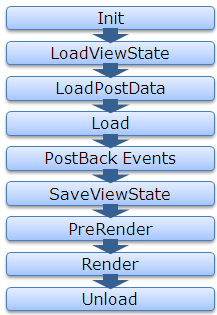
For that, first let’s see the page life cycle on postback.

ASP.NET Page Life Cycle

Now lets first discuss about the View State, How View State works?

If View State is on for any control, during LoadViewstate, the View State data that got saved last time , gets populated in the control. And in last, the SaveViewState method of every controls that are part of the control hiearchy, gets called and combined View State of all the controls gets base64 enocoded and saved.

So as we know the page is recreated every time page makes a trip to the server, the data persistence is done with the help of viewstate.

Now here the point that are we are going to discuss, even if we set off the View State of some controls like textbox, checkbox etc.. the data persists during postback.

Let’s discuss it in bit detail, whenever a page is submitted or posted back to server, the entire form data is posted to the server as a collection with the request. The collection is in the form of NamedValue collection and this collection has the mapping with uniqueid of the control and the value of the control. You can read the data from the form collection by using the following code snippet

	 	 
//Reading textbox value from the form collection	 	 
string textboxvalue = Request.Form[textbox1.UniqueID];	 	 

ASP.NET uses this primitive to update the control’s value. ASP.NET uses IPostBackDataHandler for the controls that load the data from the form collection.

Actually all the controls which implement IPostbackdatahandler, implement the method LoadPostData and RaisePostDataChangedEvent. But here the key method is LoadPostData, which returns true if the posted value is changed from earlier value and updates it with posted value, else it returns false. Lets see the sample code here

	 	 
public virtual bool LoadPostData(string uniqueId,	 	 
NameValueCollection postedCollection) {	 	 
//Getting the current value of control	 	 
String currentValue = this.Text;	 	 
//Getting the posted value from the form collection	 	 
String postedValue = postedCollection[uniqueId];	 	 
//Checks whether the posted value is changed from the current value, if yes updates it with the posted value and return yes	 	 
if (currentValue == null || !currentValue.Equals(postedValue)) {	 	 
this.Text = postedValue;	 	 
return true;	 	 
}	 	 
//else return false	 	 
return false;	 	 
}	 	 

As from the Page Life Cycle, we can see LoadPostData is called after the LoadViewState, whether viewstate is on or not, it gets populated from the posted data. That’s why the data get persisted even if viewstate is set to off for few controls. Following is the complete list of the controls, those implement IPostBackDataHandler.

  • CheckBox
  • CheckBoxList
  • DropDownList
  • HtmlInputCheckBox
  • HtmlInputFile
  • HtmlInputHidden
  • HtmlInputImage
  • HtmlInputRadioButton
  • HtmlInputText
  • HtmlSelect
  • HtmlTextArea
  • ImageButton
  • ListBox
  • RadioButtonList
  • TextBox

I think, this must have helped many of you overcome from this hazzy picture.
Thanks,
Brij