Why textbox persists data during postback even if View State set to off

I have seen lots of confusion in various threads, that How and Why a textbox persists data even when View State is set to off. Even I was confused earlier but I tried to discover it and I found the root cause, so sharing it to you all.
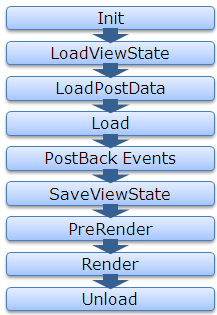
For that, first let’s see the page life cycle on postback.

ASP.NET Page Life Cycle

Now lets first discuss about the View State, How View State works?

If View State is on for any control, during LoadViewstate, the View State data that got saved last time , gets populated in the control. And in last, the SaveViewState method of every controls that are part of the control hiearchy, gets called and combined View State of all the controls gets base64 enocoded and saved.

So as we know the page is recreated every time page makes a trip to the server, the data persistence is done with the help of viewstate.

Now here the point that are we are going to discuss, even if we set off the View State of some controls like textbox, checkbox etc.. the data persists during postback.

Let’s discuss it in bit detail, whenever a page is submitted or posted back to server, the entire form data is posted to the server as a collection with the request. The collection is in the form of NamedValue collection and this collection has the mapping with uniqueid of the control and the value of the control. You can read the data from the form collection by using the following code snippet

	 	 
//Reading textbox value from the form collection	 	 
string textboxvalue = Request.Form[textbox1.UniqueID];	 	 

ASP.NET uses this primitive to update the control’s value. ASP.NET uses IPostBackDataHandler for the controls that load the data from the form collection.

Actually all the controls which implement IPostbackdatahandler, implement the method LoadPostData and RaisePostDataChangedEvent. But here the key method is LoadPostData, which returns true if the posted value is changed from earlier value and updates it with posted value, else it returns false. Lets see the sample code here

	 	 
public virtual bool LoadPostData(string uniqueId,	 	 
NameValueCollection postedCollection) {	 	 
//Getting the current value of control	 	 
String currentValue = this.Text;	 	 
//Getting the posted value from the form collection	 	 
String postedValue = postedCollection[uniqueId];	 	 
//Checks whether the posted value is changed from the current value, if yes updates it with the posted value and return yes	 	 
if (currentValue == null || !currentValue.Equals(postedValue)) {	 	 
this.Text = postedValue;	 	 
return true;	 	 
}	 	 
//else return false	 	 
return false;	 	 
}	 	 

As from the Page Life Cycle, we can see LoadPostData is called after the LoadViewState, whether viewstate is on or not, it gets populated from the posted data. That’s why the data get persisted even if viewstate is set to off for few controls. Following is the complete list of the controls, those implement IPostBackDataHandler.

  • CheckBox
  • CheckBoxList
  • DropDownList
  • HtmlInputCheckBox
  • HtmlInputFile
  • HtmlInputHidden
  • HtmlInputImage
  • HtmlInputRadioButton
  • HtmlInputText
  • HtmlSelect
  • HtmlTextArea
  • ImageButton
  • ListBox
  • RadioButtonList
  • TextBox

I think, this must have helped many of you overcome from this hazzy picture.
Thanks,
Brij

Concurrent Collections with .NET4.0

Earlier we used Collections, they were never ThreadSafe. Generics introduced in .NET 2.0 are TypeSafe but not ThreadSafe.

Generics are Typesafe means whenever you are going to declare any generic type, you need to specify the type that is going to be held by the List. And whenever you are going to retrieve any item from list you will get the actual type item, not an Object like we get from Arraylist.

But Generics are not ThredSafe, it’s a programmer’s responsibility. Means let’s say if you have an list collecting some objects. That list is shared amongst several threads, the it may work hazardous if two threads try to access the List at the same point of time, like adding/removing/iterating  items from the same list at the same time.

Thread safety can be implemented with the help of locking the collection and other similar ways. But locking the entire list for the sake of adding/removing an item could be a big performance hit for an application based on the circumstances.

.NET 4.0 provides new classes for the concurrency as Concurrent collections. These are

  • ConcurrentDictionary< Key , Value> Thread safe dictionary in key value pairs.
  • ConcurrentQueue<T> Thread safe FIFO datastructure.
  • ConcurrentStact<T> Thread safe LIFO datastructure.
  • ConcurrentBag<T> Thread safe implementation of an unordered collection.
  • BlockingCollection<T> Provides a Classical Producer Consumer pattern.

Above all classes are available in the namespace System.Collections.Concurrent .

These collections allow us to share the data amongst several thread without any worry.

Concurrent Collections are the key of Parallel programming, that is introduced in .NET 4.0

So let’s discuss the very commonly used list ConcurrentDictionary

  • A thread safe add/remove from dictionary.
  • Very user friendly methods that make it unnecessary for code to check if a key exists before add/remove.
  • AddOrUpdate : Adds a new entry if doesn’t exist else updates existing one
  • GetOrAdd : Retrieves an item if exists, else first adds it then retrieve it
  • TryAdd, TrygetValue,TryUpdate, TryRemove : Allows to do the specified operation like Add/Get/Update/Remove and if it fails the does the alternative action.

Benefits of the above Concurrent collections:

  • Now programmer doesn’t need to take care on threadsafety.
  • Uses light weight synchronization like SpinWait, SpinLock etc that use spinning before putting threads to wait – for short wait periods, spinning is less expensive than wait which involves kernel transition.
  • Means faster add/remove/iterate in multithreading environment without writing the code for it.
  • Some other classes like ConcurrentQueue & ConcurrentStack don’t rely on Interlocked operations instead of locks which make them faster.

There is lot more to discuss on this. But keeping it short and simple, let’s finish it we’ll discuss other things coming subsequent posts.

String.IsNullOrEmpty

Might be some of you already using this. But for others it could be a great utility method.

We use a method static method IsNullOrEmpty of string in most of our daily task/Projects a lot. It works fine in most of the cases, but it could work bizarre in some cases if not handled properly.

Say, you get a entry from UI, and having a check whether user has entered something or not. It would work fine as long as user enters the data or not.

But what happen if user enters just spaces. This method would return false, ironically this method is behaving as coded. But do we need this?

Obviously not, spaces could lead wrong entry in our database even can corrupt the data and leads to uncommon results/Y SODS/malfunctioning.

Although being a good developer, one always trim the input before having the check. But it also tends a lots of extra LOCs which we can save and can make our system less error prone.

As most of aware that the beauty of the extension methods that were introduced in c#3.0. So we can have a extension method over a string, which actually does the both first trimming and then checking for IsNullOrEmpty.

So we can have the extension method as

public static bool IsNullorEmpty(this String val)
 {
 if (val != null)
 {
 if (string.IsNullOrEmpty(val.Trim()))
 return true;
 else
 return false;
 }
 return true;
 }

Lets see both existing and our new method running.

My code is

static void Main(string[] args)
 {
 string name = "   ";
 Console.WriteLine(String.IsNullOrEmpty(name));
 Console.WriteLine(name.IsNullorEmpty());
 Console.ReadKey();
 }

The output is

Output

But if you are still using .NET 2.0, you can have a normal static method in your utility call, which does the job for as.

public static bool CheckNullorEmpty(string val)
 {
 if (val != null)
 {
 if (string.IsNullOrEmpty(val.Trim()))
 return true;
 else
 return false;
 }
 return true;
 }

Note: I must say, the limitation of existing IsNullorEmpty has been resolved in .NET 4.0. Means you don’t need to do all this. There is a new method String.IsNullOrWhiteSpace will do the both for you. But unlikely, most of us still working on .NET2.0/3.5

Hope you all must have liked it.

Exploring Client Callback

Download Demo

Client Callback is one of very important features, provided by ASP.NET. Earlier I was not aware on this. In my last application, I implemented this and got a very good result.

This is another way to avoid full post back on the page and can be a great alternative of the Ajax update panel.

Also I was looking for a good article but could not find one, explaining the details. So thought of sharing to you all.

There are various ways, update a part of page without a full page post back, Like update panel, callback etc. But I found callback, is a very useful approach certain times. When we used to display the data.

So here, in this Article I will be discussing the Client Callback, How to implement this, their pros n cons,and how it is handled by the ASP.NET.

What is Client Call back:

We can define the Client Call back like  this “Client Call back provides us a way to call a server side code/method asynchronously and fetch some new data without page refresh.”

So one can initiate Client callback from JavaScript and get the result that can be shown on UI after any required modification. Lets take an pictorial overview.
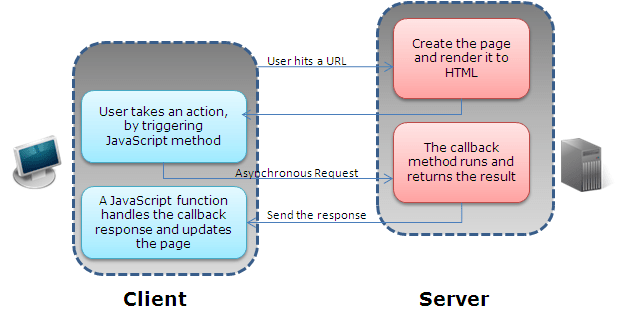
How to implement Client Callback: To implement call back, one need to follow the below steps.

Things required at Server Side

1 – Implement interface ICallbackEventHandler on any page or control where implemented.

2 – Need to implement two methods RaiseCallbackEvent and GetCallbackResult provided by the interface ICallbackEventHandler.

3 –  RaiseCallbackEvent event is called to perform the Callback on server

4- GetCallbackResult event returns the result of the callback

(Note: There is a property IsCallback of page returns true, if callback is in progress at server.)

Things required at Client Side:

Apart from the above steps, we also require few Client script to complete the Callback functionality. These are

1 – A function that is registered from server and called by any function that want to initiate the callback. It also takes one argument, that can be passed to server.

2- Another function, that is called after finishing the callback, which returns the callback result

3 – On more helper function that performs the actual request to the server. This function is generated automatically by ASP.NET when you generate a reference to this function by using the GetCallbackEventReference method in server code.

Lots more thing written, Not lets jump to code

Here in my example: I have a button and a textbox which is taking Sex type. And on clicking of this button, I am initiating the callback and sending the the type as an argument and accordingly

creating the result and sending it back to the client. And at client side I am displaying in a Client side Div.

So this is a demo, for How to use callback.

Server side code:

I have taken a global variable string, that is used to hold the response, sent to the client as.

string result;

And

public void RaiseCallbackEvent(String eventArgument)
 {
 if (eventArgument == "M")
 {
 result = "You are Male";
 }
 else if (eventArgument == "F")
 {
 result = "You are Female";
 }
 else
 {
 result = "Cannot say";
 }
 }
 

The above method is called at server side, which has one argument, that is passed from the Client. It takes here the textbox value and return the result accordingly.

Another Server side method that is called,

public string GetCallbackResult()
 {
 return result;
 }

It just returned the result that is generated by the method RaiseCallbackEvent.

Also, we need to register some Client side script at Page load.

Here, we need to create a Callback reference, that is the Client side method that is called, after finishing the callback. and assign that reference, in the method that initiate callback from Client.

Lets see the code,

protected void Page_Load(object sender, EventArgs e)
 {
 //Creating a reference of Client side Method, that is called after callback on server
 String cbReference = Page.ClientScript.GetCallbackEventReference(this, "arg",
 "ReceiveServerData", "");

 //Putting the reference in the method that will initiate Callback
 String callbackScript = "function CallServer(arg, context) {" +
 cbReference + "; }";

 //Registering the method
 Page.ClientScript.RegisterClientScriptBlock(this.GetType(),
 "CallServer", callbackScript, true);
 }

We should also write one line at pageload, because no code is required to be executed when call back is in progress

if (Page.IsCallback)
 return;

Client Side ( aspx) code:

There are two javascript function. First is called to initiate the callback.And other one is called after finsihing server side callback events to update the UI.

Let’s see first one

function InitiateCallBack() {
 // gets the input from input box
 var type = document.getElementById('txtType').value;
 //Intiate the callback
 CallServer(type,'');
 }

It is called from when user clicks on button. Now let’s move other function

// Called after the server side processing is done
 function ReceiveServerData(arg, context) {
 //arg: hold the result
 //Updating the UI
 document.getElementById('divCallbacl').innerHTML = arg;
 }

And my aspx code is like this.

<div>
 <span>Enter your Sex(M/F):</span>
 <input id="txtType" type="text" />
 <input id="Button1" type="button" value="button" onclick="InitiateCallBack();"/>
 <div id="divCallbacl">
 </div>

Above are self explanatory.

ClientCallback: Digging deep

As I said, it gives faster response, it actually trim down the page life cycle. Many of events does not execute. We’ll see it. Also to distinguish, at server side, whether it is a normal postback or a Callback. One will find the property isCallback true, which shows that it is a callback request, which I have suggested to use at Pageload earlier. Also the IsPostBack property will also be true.

One more thing, viewstate  information is retireved and available at server but any changes made in it, does not persist. As we’ll see the Callback lifecycle Saveviewstate event doesn’t fire. Which also leads in better performance.

Now lets see the lifecycle comparison between normal postback and a Callback
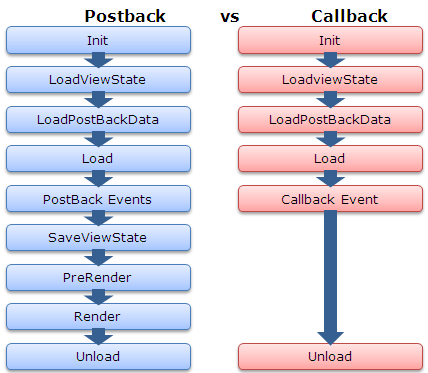


As above we can see, SaveViewstate and render events does not get fired on server. So it does two things, one we get better performance and on flip side we cannot save viewstate so we should keep in mind while implementing this.

Where to use, where not to:

– Callback is light action and gives us better performance over normal Update Panels.

– One should use Client Callback, for display purpose only. Because we would not get the updated/entered data from the UI on server.

– Also viewstate does not get maintained across during Postback. So one should not rely on it.
How to enable HTTPCompression at IIS6

Last week, I was working on performance improvement of one of my projects. So I read several Articles on Internet and found that we can configure HTTPCompression on IIS. It compress the response sent to the browser and the size of the response get reduced dramatically i e major improvement in performance. So I wanted to share you all.

I’ll discuss it point wise.

1: Why do we need HTTP compression?

Nowadays, we are building Rich Internet Applications, which is increasing the size of  Pages heavily. Means the more page size, more time it’ll take to load. But, IIS provides a feature to compress the responses and most common browsers support the HTTP Compression.

Means you can configure, HTTP compression at your web server, and browsers will understand it.

2: How much page size will be reduced.

Normally there are two algorithm supported. One is gzip and other one is deflate. I used Gzip in my website and found that the Page size was reduced by 60 to 70%.

3: When we don’t need compression.

If your page size are very less by default less than 60 to 70k. Then I think you don’t need this. Also if your users are having very high speed Internet then also you can ignore it. Because obviously the compression/decompression is a overhead if you are not gaining much.

4: How HTTPCompression works:

When a browser send a request to IIS, it also the send the information that what all kind of encoding supports. You can see the request header by many tools (One is Firebug that is available as a plugin for Firefox). You will be able to see following line in the request header.

Accept-Encoding: gzip,deflate

It says that this browser accepts gzip and deflate encoding

Now when IIS receives the request and find that that the requester can understand the given encoding. Based on the configuration, it encodes the response.

Now you can see the Response header. There it is mentioned, in what encoding is done on response as you can see it in header as

Content-Encoding: gzip

It means the response was encoded with gzip.

Here I am showing you all an example of Gmail.

Here I am showing the request header sent by the Firefox 3.5

It says it can accept encoding : gzip,deflate

Now let’s see the  response header

As you can see, the response is sent is gzipped format

5: What will happen if Browser does not understand any encoding?

Actually when browser sends a request to the server it tells the server what all encoding it supports and that is available in Request Header. If it does not support,  it may not send the Accept-Encoding tag.

Now when IIS receives the request and if it does not find any encoding mechanism supported by Requester, It does not apply any compression/encoding mechanism and the response is not encoded and sent it in normal format.

So you don’t need to worry about, it any browser does not understand gzip or deflate, then what will happen. IIS takes care, IT only encodes when it is supported by the requester.

6: How to configure HTTPCompression at IIS,

There are two types of Compression that can be configured.

First one: Static ( for static files like some css, javascript file etc.)

Other one: Dynamic (means for for dynamic generated page/response) .

There is no console available to configure to Configure HTTPCompression.

So there are two ways to configure HTTP compression at IIS.

First: Update the IIS metabase files directly.

Second: Use some commands to update it.

Here I’ll discuss the second one and will discuss the commands that can be used to configure it.

Here you need to do two things.

First: Configure the IIS for HTTPCompression

Second: Configure what all types/extension will be encoded

So for that you need to run the following commands at your web server:

Configure the IIS6 for HTTP Compression-

First Open command prompt and go to your IIS root folder, normally it would be “c:\inetpub\adminscripts\” then follow the below steps.

Static Compression:

To see whether Compression is enabled or not:

cscript adsutil.vbs get w3svc/filters/compression/parameters/HcDoStaticCompression

Enable/Disable Static Compression

adsutil.vbs set w3svc/filters/compression/parameters/HcDoStaticCompression true/false

To view what all files will be encoded:

cscript adsutil.vbs get W3SVC/Filters/Compression/gzip/HcFileExtensions (for gzip)

cscript adsutil.vbs get W3SVC/Filters/Compression/deflate/HcFileExtensions (for deflate)

To add more files for Compression

cscript adsutil.vbs set W3SVC/Filters/Compression/gzip/HcFileExtensions “js” “css” “png” “bmp” “swf” “doc” “docx” (for gzip)

cscript adsutil.vbs set W3SVC/Filters/Compression/deflate/HcFileExtensions “js” “css” “png” “bmp” “swf” “doc” “docx” (for deflate)

Dynamic Compression:

To see whether Compression is enabled or not:

cscript adsutil.vbs get w3svc/filters/compression/parameters/HcDoDynamicCompression

Enable/Disable Dynamic  Compression

cscript adsutil.vbs set w3svc/filters/compression/parameters/HcDoDynamicCompression true/false

To view what all files will be encoded:

cscript adsutil.vbs get W3SVC/Filters/Compression/gzip/HcScriptFileExtensions (for gzip)

cscript adsutil.vbs get W3SVC/Filters/Compression/deflate/HcScriptFileExtensions (for deflate)

To add more file extension

cscript adsutil.vbs set W3SVC/Filters/Compression/deflate/HcScriptFileExtensions “asp” “exe” “dll” “aspx” “asmx” (for gzip)

cscript.exe adsutil.vbs set W3Svc/Filters/Compression/GZIP/HcScriptFileExtensions “asp” “exe” “dll” “aspx” “asmx” (for deflate)

Now reset the IIS. Now you web server is ready to compress the responses based on incoming Requests.

I’ll suggest to all configure it at IIS6 and see/analyze the performance.

Note: I have explained above the settings for IIS6.

Please share you feedback:

Thanks,

Brij

Javascript Dictionary

Might be some of you already know about Dictionaries in JavaScript. But recently I, worked on JavaScript dictionary. And that was really interesting and helpful for me. So I wanted to share my findings to you all. Please share your feedback for my posting.

JavaScript provides us a way to make a Dictionary object and use it as a C# dictionary. Although we would not be having all the properties that is supported by C# dictionary, but we will be able to use it as a normal dictionary i.e. in key value format.

Let’s see one simple example:

I have stored list of all week days as keys and assigned some numbers to these as values. Let’s see the code.

function CreateDayDictionary() {
var days = new Array();
days['Sunday'] = 1;
days['Monday'] = 2;
days['Tuesday'] = 3;
days['Wednesday'] = 4;
days['Thursday'] = 5;
days['Friday'] = 6;
days['Saterday'] = 7;
}

Now to fetch the values at any point of time, we can fetch as per the code given below. Here I have made a function to alert some data. It can be as

 function ShowDays() {
        alert(days['Sunday']);
        alert(days['Thursday']);
        alert(days['Saterday']);
    }

It will show three alerts, first 1 then 5 and lastly 7.

So we can store some global data in our page. And this data we can access, at different events, we require.

Similarly we can store objects in the dictionary in same way. Let’s see the code

 function CreateDictionarywithObject() {
        var objDictionary = new Array();
        // Creating a dictionary which is holding five objects
        for (var i = 0; i < 5; i++) {

            var obj= new myClass();
            obj.member1 = 'member1data' + i;
            obj.member2 = 'member2data' + i;
            obj.member3 = 'member3data' + i;

            objDictionary['Obj' + i] = obj;
        }
        //Fetching third Object
        var fetchedObj = objDictionary['Obj3'];
        alert(fetchedObj.member1);
        alert(fetchedObj.member2);
        alert(fetchedObj.member3);

    }

Now, one more thing if you want to pass the data from server to client as a JSON data, you can serialize a C# dictionary at server side, and again when you will desterilize at client side you will be getting the dictionary as we discussed above. Let’s see the magic.

Here I have made one class Employee as

public class Employee
{
    public int Id { get; set; }
    public string Name { get; set; }
    public decimal Salary { get; set; }
    public int Age { get; set; }
}

Now, on the page load, I created a dictionary with some data, like below

List<Employee> employees= new List<Employee>()
        {
            new Employee{ Id=1000, Name="Brij", Age=27, Salary=800000},
            new Employee {Id=1001, Name = "Rahul", Age=28,Salary=500000},
            new Employee {Id=1002, Name = "Anoop", Age= 29 ,Salary = 60000}
        };
Dictionary<string, Employee> employeeData = employees.ToDictionary(em => em.Id.ToString(), emp => emp);

Now serialize the data using JavaScriptSerializer and assigned it in a hidden variable

JavaScriptSerializer ser = new JavaScriptSerializer();

hfData.Value = ser.Serialize(employeeData);

Now I have a textbox and a button to show employee details. My aspx code looks like this

<body>
    <form id="form1" runat="server">
    <div>
        <span>Id: </span> &nbsp;<input id="idName" type="text" /><br  />
        <input id="Button2" type="button" value="Displaydetail" onclick="show();"/>
        <asp:HiddenField ID="hfData" runat="server" />
    </div>
    </form>
</body>

Here I will be entering the Id of the employee, and on clicking the button “Show details”, I am displaying the data as JavaScript alerts. So let’s see the JavaScript code

function parseEmployeeData() {
        //for parsing the data
        employees = JSON.parse(document.getElementById("<%= hfData.ClientID%>").value);

    }

    function show() {
        parseEmployeeData();
        var key = document.getElementById('idName').value;
        var emp = employees[key];
        if (typeof (emp) != 'undefined') {
        // If key is found then dispaly the details
            alert(emp.Name);
            alert(emp.Age);
            alert(emp.Salary);
        }
        else {
        // key not found
            alert('No data found');
        }
    }

As you can see, first I am parsing the data using JSON, and then finding the value in the dictionary using some key and displaying the details as a JavaScript alert.
This sample is just for an example, to show how we can use JavaScript dictionary in our daily life.

Here, I have used namespace System.Web.Script.Serialization for serializing the data at C#. Also, I have included JSON JavaScript file in my application to parse the data at Client Side.

Happy Client Scripting

Thanks,

Brij

Looking in Func Delegates

This is an extension of my earlier blog post. I myself, find delegates as one of  the most powerful type to use in C#. It helps in writing very flexible and scalable program.

As I already discussed in my last blog that in the traditional way, we need to write more code.There I also discussed, One predefined delegate Action delegate that is provided by the framework.There are four flavors of Action delegate is provided.

One more type of predefined delegate that is provided by .NET that is counterpart Action delegate  . As we saw that it always returns void. But Func returns a value instead of void as Action does.

There is also 5 flavours of the Func delegate is provided.These are

– Public delegate TResult Func<TResult>()

— Public delegate TResult Func<TResult>()  // Take no parameter and returns a value

–  Public delegate TResult Func<T, TResult>(T t)  // Take one input parameter and returns a value

– Public delegate TResult Func<T1, T2, TResult>(T1 t1, T2 t2)  // Take 2 input parameter and returns a value

– Public delegate TResult Func<T1, T2, T3, TResult>(T1 t1, T2 t2, T3 t3)  // Take 3 input parameter and returns a value

– Public delegate TResult Func<T1, T2, T3, T4, TResult>(T1 t1, T2 t2, T3 t3,T4 t4)  // Take 4 input parameter and returns a value

If we see the declaration, TResult is put at last, this is just a convention. One can put it wherever s/he wants.

First lets see first one , with no parameter and returning a value

public class Program
{
static void Main(string[] args)
{
//Creating the Func variable and assigning it a function
Func<string> myFunc = SayHello;

//Calling function using Func Delegate
string returnedString = myFunc();

Console.WriteLine(returnedString);

Console.ReadKey();
}

private static string SayHello()
{
return "Hello Dude!!";
}
}

Now lets move to code to another overload of Func Delegate. It takes two input parameter and resturns a value.

public class Program
{
static void Main(string[] args)
{
//Creating the Func variable (which takes two input parameters and returns a value) and assigning it a function
Func<double, double, double> myFunc1 = Add;

//Calling function using Func Delegate
double sum = myFunc1(3.5, 4.5);

Console.WriteLine(sum);

Console.ReadKey();
}

private static double Add(double first, double second)
{
return first + second;
}
}

It is also same as Action delegate. i e It can also be used with Anonymous functions and Lambda functions. Lets have a quick look on both

Anonymous Function:

public class Program
{
static void Main(string[] args)
{
//Creating the Func variable (which takes three input parameters and returns a value) and assigning it an Anonyomus function
Func<double, double, double, double> myFunc1 = delegate(double d1, double d2, double d3)
{
return d1 + d2 + d3;
};

//Calling function using Func Delegate
double sum = myFunc1(3.5, 4.5, 5.5);

Console.WriteLine(sum);

Console.ReadKey();
}
}

Lambda Function:

public class Employee
{
public int Id { get; set; }
public string Name { get; set; }
}
public class Program
{
static void Main(string[] args)
{

Func<Employee,string> checkEmployee = s=>{
if (s.Id > 11)
return s.Name;
else
return "Employee is not with the given Criteria.";
};

Console.WriteLine(checkEmployee(new Employee() {Id=12, Name="Brij"}));
Console.WriteLine(checkEmployee(new Employee() {Id=10, Name="Abhijit"}));

Console.ReadKey();
}
}

Hope you all must have enjoyed the delegates.

We use delegates a lot. But most of us, use the traditional way in programs. When I learnt first these Action and Func delegates few weeks back, I found it very useful. It helps us writing better and well organised code, also less error prone code. I talked to lot of developers, they didn’t have any idea about these predefined delegates. So I thought of sharing to you all.

Please share your valuable feedback.

Cheers,

Brij

Exploring Action Delegate

We used delegate a lot in some or other way. Like as we know, the event base model that we use in windows as web programming, is based on delegate only. I am in the habit of using delegates often. In last few days, I found a very elegent way to use the delegate.I was in the habit of of using only generic delegates that allows us type safety and lot more flexibility.

In our traditional programming, we use the delegate as in the following steps.

  1. Declaring the delegate
  2. Creating object of the delegate and assigning it to appropriate function
  3. Calling the delegate

Lets see the code

 public class Program
    {
        //Declaring an delegate
        public delegate void MyDelegate<R, S>(R r, S s);
        public static void Main(string[] args)
        {
            //Creating an Action variable and assigning it to a function
            MyDelegate<int, int> m1 = Multiply;
            //Calling the method
            m1(3, 4);
            Console.ReadKey();
        }

        public static void Multiply(int i, int j)
        {
            Console.WriteLine(i * j);
        }
    }

.NET 2.0 introcuced one generic delegate Action which takes a single parameter and returns nothing. Its declaration is
Public delegate void Action<T1>(T1 t1) // Takes 1 parameter and returns nothing
This is a very much elegatent way to use the delegate.

And C# 3.0, introduced 4 delegates which are as

  1. Public delegate void Action() // Takes no parameter and returns nothing
  2. Public delegate void Action<T1,T2>(T1 t1,T2 t2) // Takes 2 parameters and returns nothing
  3. Public delegate void Action<T1,T2,T3>(T1 t1,T2 t2,T3 t3) // Takes 3 parameters and returns nothing
  4. Public delegate void Action<T1,T2,T3,T4>(T1 t1,T2 t2,T3 t3),T4 t4) // Takes 4 parameters and returns nothing

Lets see them running

public class Program
{
public static void Main(string[] args)
{
//Creating an Action variable and assigning it to a function
Action myAction = Multiply;
//Calling the method
myAction(3, 4);

//Also can be called as
myAction.Invoke(3, 4);
}

public static void Multiply(int i,int j)
{
Console.WriteLine(i * j);
}
}

As from the code, we can also see that Action delegate also provide a method invoke to call the method.

These Action delegate also can be used with Anonymous Methods as

public class Program
{
public static void Main(string[] args)
{
//Creating an Action variable and assigning it to a function
Action myAction = delegate(int i, int j) { Console.WriteLine(i * j); };
//Calling the method
myAction(3, 4);

Console.ReadKey();
}
}

Also can be used with lambda function. Lets see

public class Program
    {
        public static void Main(string[] args)
        {
            //Creating an Action variable and assigning it to a function
            Action<int> myAction = s => Console.WriteLine(s * 5);
            //Calling the method
            myAction(3);

            Console.ReadKey();
        }
    }

So code delegently and efficiently.

Note: The ForEach and ForEach<T> methods each take an Action<T> delegate as a parameter. The method encapsulated by the delegate allows us to perform an action on each element in the array or list.

Happy .Neting….

Cheers,
Brij