A way to improve performance of your Web Application significantly

Last few days,  I was working on performance improvement of one of my Web Applications. I analysed my application in various ways. Also used different profiler and did profiling for my application using several profilers like Ants, .NET profiler etc. During analysis, I found few problems, that we rectified but got no visible improvement.

Later I thought, my server side code is good enough, but still its taking time to download the page.  Although we are already using IIS compression to reduce the page size, but still Page was taking good amount of time to download.

I posted a blog to enable IIS compression, Click the following link to have a look

How to enable HTTPCompression at IIS6

Actually,  My application is RIA application and we are using myriad  ajaxtoolkit controls in our application. I analysed my application using firebug and there are a lot of scriptresource.axd and webresource.axd files are gettng downloaded.

So I thought if we can combine these files into single that will a great performance application boost for our application.

First, I tried doing it from myself, Later I found ASP.NET itself provides a way to combine these axd files. Just you need to have .NET 3.5 SP1.

So if you are using framework version 3.5 upgrade it to SP1 and enjoy this feature.

I have created a small sample and will show you with the help of it.

So In my sample application, I have a Calender extender.  Lets see how many requests are there using firebug.
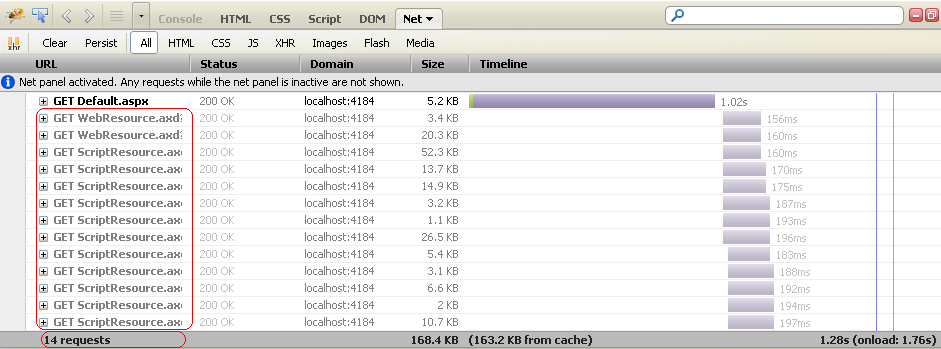
Requests of a Web Page

We can see currently there are 14 requests on every PageLoad. We can reduce the number of request.

So to  use this, first you need to download a ScriptReferenceProfiler. You can download it from here.

Now add the reference in your project and add the profile in the your page.

First register it as


<%@ Register Assembly="ScriptReferenceProfiler" Namespace="ScriptReferenceProfiler"
    TagPrefix="cc2" %>

and add it as a control like


<cc2:ScriptReferenceProfiler ID="ScriptReferenceProfiler1" runat="server" >
</cc2:ScriptReferenceProfiler>

Now when you run you application you will see the page as

Now copy all the link and put it in the CompositSctript tag as


<asp:ScriptManager ID="ScriptManager1" runat="server">
            <CompositeScript>
                <Scripts>
                    <asp:ScriptReference name="MicrosoftAjax.js"/>
	                <asp:ScriptReference name="MicrosoftAjaxWebForms.js"/>
	                <asp:ScriptReference name="AjaxControlToolkit.Common.Common.js" assembly="AjaxControlToolkit, Version=3.0.30930.28736, Culture=neutral, PublicKeyToken=28f01b0e84b6d53e"/>
	                <asp:ScriptReference name="AjaxControlToolkit.Common.DateTime.js" assembly="AjaxControlToolkit, Version=3.0.30930.28736, Culture=neutral, PublicKeyToken=28f01b0e84b6d53e"/>
	                <asp:ScriptReference name="AjaxControlToolkit.Compat.Timer.Timer.js" assembly="AjaxControlToolkit, Version=3.0.30930.28736, Culture=neutral, PublicKeyToken=28f01b0e84b6d53e"/>
	                <asp:ScriptReference name="AjaxControlToolkit.Animation.Animations.js" assembly="AjaxControlToolkit, Version=3.0.30930.28736, Culture=neutral, PublicKeyToken=28f01b0e84b6d53e"/>
	                <asp:ScriptReference name="AjaxControlToolkit.ExtenderBase.BaseScripts.js" assembly="AjaxControlToolkit, Version=3.0.30930.28736, Culture=neutral, PublicKeyToken=28f01b0e84b6d53e"/>
	                <asp:ScriptReference name="AjaxControlToolkit.Animation.AnimationBehavior.js" assembly="AjaxControlToolkit, Version=3.0.30930.28736, Culture=neutral, PublicKeyToken=28f01b0e84b6d53e"/>
	                <asp:ScriptReference name="AjaxControlToolkit.PopupExtender.PopupBehavior.js" assembly="AjaxControlToolkit, Version=3.0.30930.28736, Culture=neutral, PublicKeyToken=28f01b0e84b6d53e"/>
	                <asp:ScriptReference name="AjaxControlToolkit.Common.Threading.js" assembly="AjaxControlToolkit, Version=3.0.30930.28736, Culture=neutral, PublicKeyToken=28f01b0e84b6d53e"/>
	                <asp:ScriptReference name="AjaxControlToolkit.Calendar.CalendarBehavior.js" assembly="AjaxControlToolkit, Version=3.0.30930.28736, Culture=neutral, PublicKeyToken=28f01b0e84b6d53e"/>
                </Scripts>
            </CompositeScript>
        </asp:ScriptManager>

Now lets run the Application. Lets check the firebug.

Combined requests

Here we can see the number of significantly reduced It’s just 4.

But this is sample and its working fine. But when you try to your actual application you might face several issues.
One issue that I faced while using with my Live application and That is

Issue: The resource URL cannot be longer than 1024 characters. If using a CompositeScriptReference, reduce the number of ScriptReferences it contains, or combine them into a single static file and set the Path property to the location of it.

So first I could not understand it and try to find to something on google. But somewhere found it’s a issue and it will be taken care or handle by own for the time being. But during analysis I found one solution.
The problem is the URL length is getting higher than 1024. So for this one has to reduce the number of files getting combined. So you can have more than one group of file and put it in different composit scripts tag.

I have added one script manager proxy and added a compositscript tag it in it and pasted almost half of the scripts in it. And it resoved the issue. As


 <asp:ScriptManager ID="ScriptManager1" runat="server">
            <CompositeScript>
                <Scripts>
                    <asp:ScriptReference name="MicrosoftAjax.js"/>
	                <asp:ScriptReference name="MicrosoftAjaxWebForms.js"/>
	                <asp:ScriptReference name="AjaxControlToolkit.Common.Common.js" assembly="AjaxControlToolkit, Version=3.0.30930.28736, Culture=neutral, PublicKeyToken=28f01b0e84b6d53e"/>
	                <asp:ScriptReference name="AjaxControlToolkit.Common.DateTime.js" assembly="AjaxControlToolkit, Version=3.0.30930.28736, Culture=neutral, PublicKeyToken=28f01b0e84b6d53e"/>
	                <asp:ScriptReference name="AjaxControlToolkit.Compat.Timer.Timer.js" assembly="AjaxControlToolkit, Version=3.0.30930.28736, Culture=neutral, PublicKeyToken=28f01b0e84b6d53e"/>
                </Scripts>
            </CompositeScript>
        </asp:ScriptManager>
        <asp:ScriptManagerProxy ID="ScriptManagerProxy1" runat="server">
            <CompositeScript>
                <Scripts>
                <asp:ScriptReference name="AjaxControlToolkit.Animation.Animations.js" assembly="AjaxControlToolkit, Version=3.0.30930.28736, Culture=neutral, PublicKeyToken=28f01b0e84b6d53e"/>
	                <asp:ScriptReference name="AjaxControlToolkit.ExtenderBase.BaseScripts.js" assembly="AjaxControlToolkit, Version=3.0.30930.28736, Culture=neutral, PublicKeyToken=28f01b0e84b6d53e"/>
	                <asp:ScriptReference name="AjaxControlToolkit.Animation.AnimationBehavior.js" assembly="AjaxControlToolkit, Version=3.0.30930.28736, Culture=neutral, PublicKeyToken=28f01b0e84b6d53e"/>
	                <asp:ScriptReference name="AjaxControlToolkit.PopupExtender.PopupBehavior.js" assembly="AjaxControlToolkit, Version=3.0.30930.28736, Culture=neutral, PublicKeyToken=28f01b0e84b6d53e"/>
	                <asp:ScriptReference name="AjaxControlToolkit.Common.Threading.js" assembly="AjaxControlToolkit, Version=3.0.30930.28736, Culture=neutral, PublicKeyToken=28f01b0e84b6d53e"/>
	                <asp:ScriptReference name="AjaxControlToolkit.Calendar.CalendarBehavior.js" assembly="AjaxControlToolkit, Version=3.0.30930.28736, Culture=neutral, PublicKeyToken=28f01b0e84b6d53e"/>
                </Scripts>
            </CompositeScript>
        </asp:ScriptManagerProxy>

Now it will combine the resource files in two files. You can add more CompositScript tags if required.

Hope all you have enjoyed this and get benefited from it.

Cheers,

Brij
How to store custom objects in web.config

In this Post, I am going to discuss about web.config. Normally in our daily life, we used to have some data in appSettings section of web.config and read it when required. That is in string form. But there are lot more than this. We can update the data in web.config  programmatically as well .

Now another main point is, we can store some object of custom type in web.config as well, which we normally don’t do it. But this can be very useful in several scenarios.

Have anyone tried to update some value or add some value in web.config?  W’ll have brief discussion on this.

First, This is very common to have some constant data at appSettings section of web.config and read it whenever required. So how to read this ( for beginners).

//The data is stored in web.config as
<appSettings>
		<add key="WelcomeMessage" value="Hello All, Welcome to my Website." />
</appSettings>

// To read it
string message = ConfigurationManager.AppSettings["WelcomeMessage"];

Now if we want to update some data of appSettings programatically. One can do like this.

//Update header at config
        Configuration config = WebConfigurationManager.OpenWebConfiguration(Request.ApplicationPath);
        config.AppSettings.Settings["WelcomeMessage"].Value = "Hello All, Welcome to my updated site.";
        config.Save();

Now what do you do,  if you want to add some data in appSettings . You can add some app.config data as below.

//Update header at config
        Configuration config = WebConfigurationManager.OpenWebConfiguration(Request.ApplicationPath);
        config.AppSettings.Settings.Add("ErrorMessage", "An error has been occured during processing this request.");
        config.Save();

The above code is adding one new key value pair in web.config file.  Now this can be read anywhere in the application.

Now, the question is, Can we store some custom data at config?

Yes…

We can store some object. Let’s see how

I have created a sample example. In this example, I have saved an  object of my custom class NewError in web.config file. And also updating it whenever required.

To do this, Follow the below steps.

a) Create a Class that inherit From ConfigurationSection (It is available under namespace System.Configuration ).  Every property must have an attribute ConfigurationProperty, having attribute name and some more parameters. This name is directly mapped to web.config. Let’s see the NewError class

public class NewError:ConfigurationSection
{
    [ConfigurationProperty ("Id",IsRequired = true)]
    public string ErrorId {
        get { return (string)this["Id"]; }
        set { this["Id"] = value; }
    }
    [ConfigurationProperty("Message", IsRequired = false)]
    public string Message {
        get { return (string)this["Message"]; }
        set { this["Message"] = value; }
    }
    [ConfigurationProperty("RedirectURL", IsRequired = false)]
    public string RedirectionPage
    {
        get { return (string)this["RedirectURL"]; }
        set { this["RedirectURL"] = value; }
    }
    [ConfigurationProperty("MailId", IsRequired = false)]
    public string EmailId
    {
        get { return (string)this["MailId"]; }
        set { this["MailId"] = value; }
    }
    [ConfigurationProperty("DateAdded", IsRequired = false)]
    public DateTime DateAdded
    {
        get { return (DateTime)this["DateAdded"]; }
        set { this["DateAdded"] = value; }
    }
}

as you can see every property has attribute ConfigurationProperty with some value. As you can see the property ErrorId has attribute

 [ConfigurationProperty ("Id",IsRequired = true)]

it means ErrorId will be saved as Id in web.config file and it is required value. There are more elements in this attribute that you can set based on your requirement.
Now if you’ll see the property closely, it is bit different.

public string ErrorId {
get { return (string)this["Id"]; }
set { this["Id"] = value; }
}

Here the value is saved as the key “id”, that is mapped with web.config file.

b) Now you are required to add/register a section in the section group to tell the web.config that you are going  to have this kind of data. This must be in <configSections/>  and will be as

<section name="errorList"  type="NewError" allowLocation="true"
     allowDefinition="Everywhere"/>

c) Now one can add that object in your config file directly as

<errorList Id="1" Message="ErrorMessage" RedirectURL="www.google.com" MailId="xyz@hotmail.com" ></errorList>

d) And to read it at your page. Read it as follows.

NewError objNewError = (NewError)ConfigurationManager.GetSection("errorList");

And also a new object can be saved programmatically as

 NewError objNewError = new NewError()
        {
          RedirectionPage="www.rediff.com",
          Message = "New Message",
          ErrorId="0",
          DateAdded= DateTime.Now.Date
        };
        Configuration config =
            WebConfigurationManager.OpenWebConfiguration(Request.ApplicationPath);

        config.Sections.Add("errorList", objNewError);
        config.Save();

Even one can add a custom group and have some custom elements in in this section.

ASP.NET provides very powerfull APIs to read/edit the web.config file easily.

Hope you all must have enjoyed this, and I will appreciate your feedback.

Thanks

Why textbox persists data during postback even if View State set to off

I have seen lots of confusion in various threads, that How and Why a textbox persists data even when View State is set to off. Even I was confused earlier but I tried to discover it and I found the root cause, so sharing it to you all.
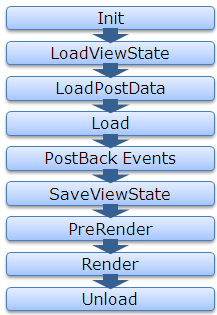
For that, first let’s see the page life cycle on postback.

ASP.NET Page Life Cycle

Now lets first discuss about the View State, How View State works?

If View State is on for any control, during LoadViewstate, the View State data that got saved last time , gets populated in the control. And in last, the SaveViewState method of every controls that are part of the control hiearchy, gets called and combined View State of all the controls gets base64 enocoded and saved.

So as we know the page is recreated every time page makes a trip to the server, the data persistence is done with the help of viewstate.

Now here the point that are we are going to discuss, even if we set off the View State of some controls like textbox, checkbox etc.. the data persists during postback.

Let’s discuss it in bit detail, whenever a page is submitted or posted back to server, the entire form data is posted to the server as a collection with the request. The collection is in the form of NamedValue collection and this collection has the mapping with uniqueid of the control and the value of the control. You can read the data from the form collection by using the following code snippet

	 	 
//Reading textbox value from the form collection	 	 
string textboxvalue = Request.Form[textbox1.UniqueID];	 	 

ASP.NET uses this primitive to update the control’s value. ASP.NET uses IPostBackDataHandler for the controls that load the data from the form collection.

Actually all the controls which implement IPostbackdatahandler, implement the method LoadPostData and RaisePostDataChangedEvent. But here the key method is LoadPostData, which returns true if the posted value is changed from earlier value and updates it with posted value, else it returns false. Lets see the sample code here

	 	 
public virtual bool LoadPostData(string uniqueId,	 	 
NameValueCollection postedCollection) {	 	 
//Getting the current value of control	 	 
String currentValue = this.Text;	 	 
//Getting the posted value from the form collection	 	 
String postedValue = postedCollection[uniqueId];	 	 
//Checks whether the posted value is changed from the current value, if yes updates it with the posted value and return yes	 	 
if (currentValue == null || !currentValue.Equals(postedValue)) {	 	 
this.Text = postedValue;	 	 
return true;	 	 
}	 	 
//else return false	 	 
return false;	 	 
}	 	 

As from the Page Life Cycle, we can see LoadPostData is called after the LoadViewState, whether viewstate is on or not, it gets populated from the posted data. That’s why the data get persisted even if viewstate is set to off for few controls. Following is the complete list of the controls, those implement IPostBackDataHandler.

  • CheckBox
  • CheckBoxList
  • DropDownList
  • HtmlInputCheckBox
  • HtmlInputFile
  • HtmlInputHidden
  • HtmlInputImage
  • HtmlInputRadioButton
  • HtmlInputText
  • HtmlSelect
  • HtmlTextArea
  • ImageButton
  • ListBox
  • RadioButtonList
  • TextBox

I think, this must have helped many of you overcome from this hazzy picture.
Thanks,
Brij

Exploring Client Callback

Download Demo

Client Callback is one of very important features, provided by ASP.NET. Earlier I was not aware on this. In my last application, I implemented this and got a very good result.

This is another way to avoid full post back on the page and can be a great alternative of the Ajax update panel.

Also I was looking for a good article but could not find one, explaining the details. So thought of sharing to you all.

There are various ways, update a part of page without a full page post back, Like update panel, callback etc. But I found callback, is a very useful approach certain times. When we used to display the data.

So here, in this Article I will be discussing the Client Callback, How to implement this, their pros n cons,and how it is handled by the ASP.NET.

What is Client Call back:

We can define the Client Call back like  this “Client Call back provides us a way to call a server side code/method asynchronously and fetch some new data without page refresh.”

So one can initiate Client callback from JavaScript and get the result that can be shown on UI after any required modification. Lets take an pictorial overview.

How to implement Client Callback: To implement call back, one need to follow the below steps.

Things required at Server Side

1 – Implement interface ICallbackEventHandler on any page or control where implemented.

2 – Need to implement two methods RaiseCallbackEvent and GetCallbackResult provided by the interface ICallbackEventHandler.

3 –  RaiseCallbackEvent event is called to perform the Callback on server

4- GetCallbackResult event returns the result of the callback

(Note: There is a property IsCallback of page returns true, if callback is in progress at server.)

Things required at Client Side:

Apart from the above steps, we also require few Client script to complete the Callback functionality. These are

1 – A function that is registered from server and called by any function that want to initiate the callback. It also takes one argument, that can be passed to server.

2- Another function, that is called after finishing the callback, which returns the callback result

3 – On more helper function that performs the actual request to the server. This function is generated automatically by ASP.NET when you generate a reference to this function by using the GetCallbackEventReference method in server code.

Lots more thing written, Not lets jump to code

Here in my example: I have a button and a textbox which is taking Sex type. And on clicking of this button, I am initiating the callback and sending the the type as an argument and accordingly

creating the result and sending it back to the client. And at client side I am displaying in a Client side Div.

So this is a demo, for How to use callback.

Server side code:

I have taken a global variable string, that is used to hold the response, sent to the client as.

string result;

And

public void RaiseCallbackEvent(String eventArgument)
 {
 if (eventArgument == "M")
 {
 result = "You are Male";
 }
 else if (eventArgument == "F")
 {
 result = "You are Female";
 }
 else
 {
 result = "Cannot say";
 }
 }
 

The above method is called at server side, which has one argument, that is passed from the Client. It takes here the textbox value and return the result accordingly.

Another Server side method that is called,

public string GetCallbackResult()
 {
 return result;
 }

It just returned the result that is generated by the method RaiseCallbackEvent.

Also, we need to register some Client side script at Page load.

Here, we need to create a Callback reference, that is the Client side method that is called, after finishing the callback. and assign that reference, in the method that initiate callback from Client.

Lets see the code,

protected void Page_Load(object sender, EventArgs e)
 {
 //Creating a reference of Client side Method, that is called after callback on server
 String cbReference = Page.ClientScript.GetCallbackEventReference(this, "arg",
 "ReceiveServerData", "");

 //Putting the reference in the method that will initiate Callback
 String callbackScript = "function CallServer(arg, context) {" +
 cbReference + "; }";

 //Registering the method
 Page.ClientScript.RegisterClientScriptBlock(this.GetType(),
 "CallServer", callbackScript, true);
 }

We should also write one line at pageload, because no code is required to be executed when call back is in progress

if (Page.IsCallback)
 return;

Client Side ( aspx) code:

There are two javascript function. First is called to initiate the callback.And other one is called after finsihing server side callback events to update the UI.

Let’s see first one

function InitiateCallBack() {
 // gets the input from input box
 var type = document.getElementById('txtType').value;
 //Intiate the callback
 CallServer(type,'');
 }

It is called from when user clicks on button. Now let’s move other function

// Called after the server side processing is done
 function ReceiveServerData(arg, context) {
 //arg: hold the result
 //Updating the UI
 document.getElementById('divCallbacl').innerHTML = arg;
 }

And my aspx code is like this.

<div>
 <span>Enter your Sex(M/F):</span>
 <input id="txtType" type="text" />
 <input id="Button1" type="button" value="button" onclick="InitiateCallBack();"/>
 <div id="divCallbacl">
 </div>

Above are self explanatory.

ClientCallback: Digging deep

As I said, it gives faster response, it actually trim down the page life cycle. Many of events does not execute. We’ll see it. Also to distinguish, at server side, whether it is a normal postback or a Callback. One will find the property isCallback true, which shows that it is a callback request, which I have suggested to use at Pageload earlier. Also the IsPostBack property will also be true.

One more thing, viewstate  information is retireved and available at server but any changes made in it, does not persist. As we’ll see the Callback lifecycle Saveviewstate event doesn’t fire. Which also leads in better performance.

Now lets see the lifecycle comparison between normal postback and a Callback


As above we can see, SaveViewstate and render events does not get fired on server. So it does two things, one we get better performance and on flip side we cannot save viewstate so we should keep in mind while implementing this.

Where to use, where not to:

– Callback is light action and gives us better performance over normal Update Panels.

– One should use Client Callback, for display purpose only. Because we would not get the updated/entered data from the UI on server.

– Also viewstate does not get maintained across during Postback. So one should not rely on it.

Data linking with jQuery

Download Sample

Recently, Microsoft anounced three jQuery plugins as Official plugin.

  • jQuery Client Templating
  • Data linking
  • Globalisation.

In my last article, I discussed about the jQuery Templating. You can view that Article here .

So I think, you all must find Templating article very useful. Because, by the time
web applications development is evolving, we are moving towards Client side
development/scripting, to provide fast and very trendy/flashy look and feel.

So in this article, I am going to discuss another very cool feature, ie
Data linking.This helps us linkling the data and the UI.

What is jQuery:

jQuery is a JavaScript library that works on top of the JavaScript.
jQuery provides a very simple way for HTML document traversing,
DOM manipulation, event handling, animating, and Ajax interactions for
rapid web development. That could have been very complex while working
with normal JavaScript.

jQuery is becoming more and more popular day by day. Even it was integrated
with VS2008 and also available with VS2010.
jQuery is open source. Due to its features,
Microsoft started to support jQuery team and also working with them,
to provide better web based tools to their Clients.

Prerequisite:

  • jQuery library
  • A plugin for datalinking
  • JSON library

jQuery already comes with VS2008/2010. But if you are working VS 2005 then you can
download from the following link.

Download jQuery

To download JSON library,
click here

Data Linking:

Data kinking provides us a way, to link our data/objects to UI controls.
Means, if the controls get updated, the underlying data object would
also be updated. In the same way, if the data objects get updated,
the controls on UI will also get updated (In case of two way linking).

Means once you linked your data with the controls, you don’t need think about
the data object. The syncing between data object and your UI will be taken care
by the jQuery plug in.

So you can imagine, you dont need to get the updated data from the
controls and update the object, which is required at the time
of saving the data at server. Which requires lot more code to be
written and also error prone.

There are several options to link the data.

  • One way Linking
  • Two way Linking

One Way Linking:

One can link the UI controls to some object. Means the object will
always be in sync with UI. Whenever the Data in UI will get changed the underlying
object will also get updated. So one need not worry about the data once it is
done, one can send the object directly to the server for further processing

I have explained it with one sample.

In my example, there is form named as Add Vehicle, where user can enter the
Vehicle name and its price, then click on the Add Vehicle to add the vehicle
at server side.
One can also see the state of the underlying object at any point of time, using
Show Updated Object button.
Now lets go through the code.

Lets see aspx code first

 <table>
            <tr>
                <td colspan="2"><h2>Add Vehicle to Vehicle Store</h2></td>
            </tr>
            <tr>
                <td>Vehicle Name</td>
                <td><input id="txtVName" type="text" /></td>
            </tr>
            <tr>
                <td>Price</td>
                <td><input id="txtVPrice" type="text" /></td>
            </tr>
            <tr>
                <td><input id="btnShow" type="button" value="Show updated object"
                 onclick="ShowUpdatedData();"/> </td>
                <td><input id="btnAdd" type="button" value="Add vehicle to store"
                 onclick="AddVehicle();"/> </td>
            </tr>
        </table>

Here I have two input box to enter the name and price of the vehicle, and two
buttons, one to show the object and other one to add it.

Now lets move to Javascript code,

 var vehicle = {};
 //linking the UI controls with vehicle object
        $(document).ready(function() {
        $(vehicle)
            .linkFrom('Name', '#txtVName', 'val')
            .linkFrom('Price', '#txtVPrice', 'val')
    });

Here I have a global variable vehicle that is linked with the using
linkForm method for the plugin as shown above.

I have also written the code for adding the data at server, using
jQuery Ajax Call as

 function AddVehicle() {
        var inputs = new Object();
        inputs.vehicle = JSON.stringify(vehicle);
        $.ajax({
            type: "POST",
            url: "AddVehcle.aspx/AdVehicle",
            contentType: "application/json; charset=utf-8",
            data: JSON.stringify(inputs),
            dataType: "json",
            success: ShowStatus,
            error: AjaxFailed
        });

    }
    function ShowStatus(result) {
        alert(result.d);
    }
    function AjaxFailed(result) {
        alert('Ajax failed');
    }

    //to show the state of the object
     function ShowUpdatedData() {
        alert([vehicle.Name, vehicle.Price]);
    }
    

Also lets have a look at server side code


public partial class AddVehicle : System.Web.UI.Page
{
public static List lstVehicle = null;
protected void Page_Load(object sender, EventArgs e)
{

}
//This method adds one vehicle
[WebMethod()]
public static string AdVehicle(string vehicle)
{
if (lstVehicle == null)
{
lstVehicle = new List();
}
JavaScriptSerializer ser = new JavaScriptSerializer();
Vehicle objVehicle = ser.Deserialize(vehicle);
lstVehicle.Add(objVehicle);
return "Vehicle added sucessfully";
}
}

public class Vehicle
{
public string Name { get; set; }
public decimal Price { get; set; }
}

The above code is self-explanatory.AdVehicle() is called to add a vehicle using Ajax call.

Now lets run the application,
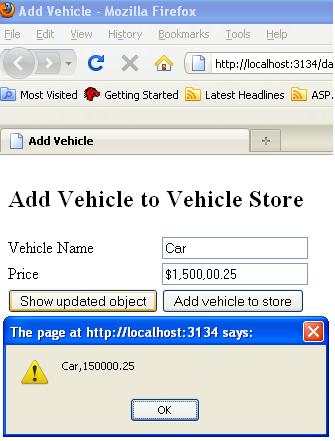
Here I have entered data about one vehicle,

Now when I click to see the updated object, ShowUpdatedData
then get to see the vehicle object as below

Converters:

There is also a good feature provided. We may not
want to save the data as we show at UI. Like if there is some price or quantity,
we may want to format the quantity in some manner before saving. So for that
we can put some converters at the time of linking as

 $(document).ready(function() {
    $(vehicle)
        .linkFrom('Name', '#txtVName', 'val')
        .linkFrom('Price', '#txtVPrice', 'val',
        //Converter that will be called before updating the underlying object
        function(value) { return value.replace(/[^0-9.]/g, "") }
        );
     });

As you can see, I have a converter with Price, that will return only numbers and dot.
Lets see it running

What it is doing, its taking the value from the textbox converting it with the
conerter and the setting to property Price of the vehicle object.

Two way linking:

It also do all the things as above but have one more feature. You can also update the object from code also,  as soon as object will get updated that will also be reflected in the UI.

This feature can be very use full in editing/searching feature.You searched
some data and now want to update it. Now you can update UI as well as underlying
object, both UI and data will always be in sync.

I have discussed it with one sample

In my example, Lets we have a list of person at server. One can fetch the
details of an existing person.One also update the existing person or can add a
new person.

So I have created one class person as

public class Person
{
    public string Name { get; set; }
    public int Age { get; set; }
    public string SSN { get; set; }
    public string Gender { get; set; }
    public string ContactNo { get; set; }

}

My aspx page is as

<table>
            <tr>
                <td> Name </td>
                <td>
                    <input id="txtPersonName" type="text" />
                    <input id="Button1" type="button" value="GetPersonDetails"
                    onclick="PopulatePersonDetails();"/>
                </td>
            </tr>
            <tr>
                <td colspan="3"> <b>Person Details</b></td>
            </tr>
            <tr>
                <td>Name</td>
                <td><input id="txtName" type="text" /></td>
            </tr>
            <tr>
                <td>Age</td>
                <td><input id="txtAge" type="text" /></td>
            </tr>
            <tr>
                <td>SSN</td>
                <td><input id="txtSSN" type="text" /></td>
            </tr>
            <tr>
                <td>Gender</td>
                <td><input id="txtGender" type="text" /></td>
            </tr>
            <tr>
                <td>Contact Number</td>
                <td><input id="txtCNo" type="text" /></td>
            </tr>
            <tr>
                <td colspan="2">
                    <input id="Button3" type="button" value="Show Updated JS Object"
                     onclick="ShowUpdatedData();"/>
                    <input id="Button2" type="button" value="Add/Update Person"
                     onclick="UpdateorAddData();"/>
                </td>
            </tr>
        </table>

As you can see, in my page I have put the input boxes for every property of
person.

At the start of the page I have also, provided a input box to enter the person name and
a button to fetch the requested person from the server.

I have provided two more buttons, One to see the updated objects in javascript alert
and another one to update the data at the server. It actually looks the list for the SSN if it found then update the existing record else add the new
person. We’ll see the code in a moment.

Now lets move the Javascript code that is written.
The code that is used to link the data

First I have declared one global object that object will be linked to the UI controls
as
var person = {};

and the code for linking the data is

//Linking the controls from the object
 $(document).ready(function()
    {
        $(person)
        .linkBoth('Name','#txtName','val')
        .linkBoth('Age','#txtAge','val')
        .linkBoth('SSN','#txtSSN','val')
        .linkBoth('Gender','#txtGender','val')
        .linkBoth('ContactNo','#txtCNo','val');

    });

As from the above you can see, that person object is used and
linked using linkBoth method, which takes three parameters
first the name of the property of the object,
second the id of the control with sign #
third val
Now, after this you don’t need to worry about the data, all things will be taken care the
plugin itself.

Rest javascript method, I have used

// To fetch the detail from the server of the entert person name
 function PopulatePersonDetails() {

        var inputs = new Object();
        inputs.name = document.getElementById('txtPersonName').value;

        $.ajax({
            type: "POST",
            url: "EditPerson.aspx/GetPerson",
            contentType: "application/json; charset=utf-8",
            data: JSON.stringify(inputs),
            dataType: "json",
            success: AjaxSucceeded,
            error: AjaxFailed
        });

        // To be called when ajax call succeeded
        //If no object will be found, it'll show an error message as
        //'Person Not found' else call update the person object
         function AjaxSucceeded(result) {
            if (result.d == 'null')
                alert('Person Not found');
            else
                $(person).attr(JSON.parse(result.d));
        }

        //Will be called, if ajax call gets failed somehow.
        function AjaxFailed(result) {
            alert('Ajax failed');
        }
    }

For the functionality of the updating or adding the person
object at server we have following methods

    //This function get the global variable person object
    //which is always sync with with UI and sends it
    //to server to add/update
    function UpdateorAddData() {

        var inputs = new Object();
        inputs.person = JSON.stringify(person);
        $.ajax({
            type: "POST",
            url: "EditPerson.aspx/AddUpdatePerson",
            contentType: "application/json; charset=utf-8",
            data: JSON.stringify(inputs),
            dataType: "json",
            success: ShowStatus,
            error: AjaxFailed
        });

        }

        //This function is to show the status whether a new person is added or updated
         function ShowStatus(result) {
            alert(result.d);
        }

As I have linked the object to the UI controls, so I am just picking or updating
the person object, that always gives the most updated and synced data.

Also lets have a look to server side code

public partial class EditPerson : System.Web.UI.Page
{
public static List lstPerson = null;
protected void Page_Load(object sender, EventArgs e)
{
}

//This method will return the searched person.
[WebMethod()]
public static string GetPerson(string name)
{
InitializePersons();
JavaScriptSerializer ser = new JavaScriptSerializer();
// ser.Serialize(persons);
return ser.Serialize(lstPerson.Find(p => p.Name == name));
}

//This method will add or update a person based on SSN
[WebMethod()]
public static string AddUpdatePerson(string person)
{
string status;
JavaScriptSerializer ser = new JavaScriptSerializer();
Person obj = ser.Deserialize(person);
InitializePersons();
Person per = lstPerson.Find(p => p.SSN == obj.SSN);
if (per == null)
{
lstPerson.Add(obj);
status = "New person added";
}
else
{
// Updating the person
lstPerson.Remove(per);
lstPerson.Add(obj);
status = "Person updated";
}

// ser.Serialize(persons);
return status;
}

public static void InitializePersons()
{
if (lstPerson == null)
{
lstPerson = new List()
{
new Person { Age = 27, Name= "Brij",
Gender="Male", ContactNo="123456789",
SSN="CC123456"},
new Person { Age = 18, Name = "Ravi",
Gender = "Male", ContactNo = "987654321",
SSN="AB654321"}
};
}
}
}

Lets see the runing application,

I have few person data at server.When I am entering and clicking
for getting the person details, UI gets updated. While actually I am making
an Ajax call, to get the person data and updating the underlying object
as discussed in above code.

Rest things as per the Vehicle Store example

I have also to added a button, which one can click to see the state of the person
object at any point of time, when one wants.

Please find the full sample in attachment

Conclusion:

I found this feature very useful, while using ajax and jQuery
as I discussed in above example. One should go for the one way or two way linking
based on their requirements.

Hope you all must have enjoyed my above article. Please share your valuable
feedback, that will help me a lot for better writing.

Feedback and Suggestions:

Hope you all must have enjoyed my above article. Please share your valuable
feedback, that will help me a lot for better writing.

Also lets have a look at server side code

Client Templating with jQuery

jQuery templating is becoming a new buzzword for the new Web applications. One cannot avoid jQuery in web applications. Currently most of the applications are using jQuery heavily. It provides very good look & feel and better performance.

There are a lot of plugins are also available for jQuery, they provides really cool feature. We can provide a very new and trendy look and feel with the help of jQuery. Also, as we are making very rich application, performance is also becoming a key point for our applications. jQuery helps a lot in this regard also. We will be discussing mainly jQuery Templating in this article

What is jQuery:

jQuery is a JavaScript library that works on top of the JavaScript. jQuery provides a very simple way for HTML document traversing, DOM manipulation, event handling, animating, and Ajax interactions for rapid web development. That could have been very complex while working with normal JavaScript.

jQuery is becoming more and more popular day by day. Even it was integrated with VS2008 and also available with VS2010. jQuery is open source. Due to its features, Microsoft started to support jQuery team and also working with them, to provide better web based tools to their Clients.

Prerequisite:

  • jQuery library
  • A plugin for templating
  • JSON library

jQuery already comes with VS2008/2010. But if you are working VS 2005 then you can download from the following link.

Download jQuery

To download plugin for templating feature, click here
Relax guys!! you won’t need this plugin after jQuery 1.5. This would integrated with the main library itself Smile

To download JSON library, click here

jQuery Templating:

As we are working on Client server architecture, most of the things are done by the server itself. Server sends the HTML response to the Browser and browser just display it. Earlier, we were not doing lot of things at client side, Normally, some validation and little bit more at client side. With the help of Ajax call from Client side and retrieving data in a very convenient format in JSON, it really becomes easy, to start moving server side code to Client side. Means the data travelling from server to Client, is not the whole HTML response but it is just data that we have to show in different HTML controls.

Lets see an pictorial overview

jQuery and Ajax

Templates :

To use the client templating. You need the following

  • First, data at client side
  • Client side template
  • Now with the help of jQuery, make the HTML elements and adding it to the DOM. Now I am explaining one example. In my example, I am displaying list of Persons. And also adding a person later.Displaying Data:So here, first I am showing the details of Persons. The data is coming in JSON format with the help of Ajax call, in document.ready function.Lets move step by step:I have created a Client template to display the person data.The template is:
<br />
 <script type="text/html" id="personTemplate">
<div>
<div style="float:left;"> ID : </div>
<div>${UId} </div>
<div style="float:left;"> Name : </div>
<div>${Name} </div>
<div style="float:left;"> Address : </div>
<div>${Address} </div>

       </div>

   </script></p>
<p>

But, why have I put it in script tag? Because we don’t want to render it. We will
be using this as a template for displaying the data. Also see, I have made the
type as text/html.

Here, in the template, ${UId}, ${Name} and ${Address}
are replaced by the actual values from the data provided. The name of the properties in provided class is same.

At server side, I made a WebMethod that will be called from the
client to fetch all the person data. As

My Person class is as

<br />
public class Person<br />
{<br />
    public int UId { get; set; }<br />
    public string Name { get; set; }<br />
    public string Address { get; set; }<br />
}<br />

My WebMethod is as

<br />
[WebMethod()]<br />
public static string GetPersons()<br />
{<br />
    List persons = new List()<br />
    {<br />
        new Person { UId = 1, Name = "Brij", Address = "Noida"},<br />
        new Person { UId = 2, Name = "Rahul", Address = "New Delhi" },<br />
        new Person { UId = 3, Name = "John0", Address = "Chris"}<br />
    };</p>
<p>    JavaScriptSerializer ser = new JavaScriptSerializer();<br />
    return ser.Serialize(persons);</p>
<p>}<br />

I created the static data in the code, one can fetch from where s/he wants,
either some database or some file or some other datasource.

Here I have used the namespace System.Web.Script.Serialization
for JavaScript serialization.

I have made a Ajax call at document.ready to get all the persons data.And ,
displayed the data on UI.

//It gets called as soon as Dom gets loaded

<br />
 $(document).ready(function() {<br />
           PopulatePersons();<br />
       });</p>
<p> //Creating the ajax call, and if succeeded then display the result on UI<br />
 function PopulatePersons() {<br />
     $.ajax({<br />
         type: "POST",<br />
         url: "Default.aspx/GetPersons",<br />
         contentType: "application/json; charset=utf-8",<br />
         data: "{}",<br />
         dataType: "json",<br />
         success: AjaxSucceeded,<br />
         error: AjaxFailed<br />
     });</p>
<p>        }<br />
        function AjaxSucceeded(result) {<br />
            Display(result);<br />
        }<br />
        function AjaxFailed(result) {<br />
            alert('no success');<br />
        }</p>
<p>

After fetching the data, from the server, we are rendering the data using jquery
templatng feature

<br />
function Display(result) {</p>
<p>            var persons = eval(result.d);<br />
            personCount = persons.length;<br />
                $("#personTemplate").tmpl(persons).appendTo($("#divPerson"));<br />
        }<br />

Here , what I am doing,I am parsing the data that is returned by webservice.
After that, I am passing it to the tmpl function.
This line of code

$("#personTemplate").tmpl(persons).appendTo($("#divPerson"));

means use the template personTemplate for rendering the
persons data and add it to the container div divPerson

Adding/Updating Data:

For adding more person on UI, I have added a HTML button on my page, to add a person. As

<br />
<input id="Button1" type="button" value="AddMorePerson"        onclick="AddPerson();"/><br />

Onclick of Add button, I am fetching the data from server using Ajax call.

<br />
function AddPerson() {</p>
<p>            var inputs = new Object();<br />
            inputs.count = personCount;</p>
<p>            $.ajax({<br />
                type: "POST",<br />
                url: "Template.aspx/AddPerson",<br />
                contentType: "application/json; charset=utf-8",<br />
                data: JSON.stringify(inputs),<br />
                dataType: "json",<br />
                success: AjaxSucceeded,<br />
                error: AjaxFailed<br />
            });</p>
<p>        }<br />

After fetching the data, display it with the help of client templating., As

<br />
 function DisplayChildren(result) {</p>
<p>            var persons = eval(result.d);<br />
            personCount = persons.length;<br />
                $("#personTemplate").tmpl(persons).appendTo($("#divPerson"));<br />
        }<br />

It just append the a person detail in the existing div as above.

Note: One should keep in sync the name of the properties
of the class and used in template one.

Nested Templates also works same as above but here we’ll be using one template
in the other.This type of requirement is very common, when we need to show
the details of any item one to many or many to many mapping.

So here, I have discussed it with a sample example.

Here i have an employee class which has a list of address, Means an employee can
belong to multiple addresses. My employee and address class are like

<br />
public class Address<br />
{<br />
    public string Street { get; set; }<br />
    public String AddressLine1 { get; set; }<br />
    public String AddressLine2 { get; set; }<br />
    public string City { get; set; }<br />
    public string Zip { get; set; }<br />
}<br />
 

and Employee class

<br />
public class Employee<br />
{</p>
<p>    public int EmployeeId { get; set; }<br />
    public String Name { get; set; }<br />
    public int Age { get; set; }<br />
    public List Addresses { get; set; } }<br />

now the webmethod that is returning the data

[WebMethod()]
    public static string GetEmployees()
    {
        List persons = new List()
        {
            new Employee { EmployeeId = 1000, Age=34, Name ="Rahul",
                Addresses = new List()},
            new Employee { EmployeeId = 1001, Age=29, Name ="Atul",
                Addresses = new List()},
            new Employee { EmployeeId = 1002, Age=32, Name ="Rohan",
                Addresses = new List()}

        };
        persons[0].Addresses.Add(new Address() { Street = "Street 5", AddressLine1 = "New Bay Area", AddressLine2 = "Near Roma Hospital", City = "Kolkata", Zip = "221001" });
        persons[0].Addresses.Add(new Address() { Street = "Bahadur marg", AddressLine1 = "Kailash Colony", AddressLine2 = "Near Public School", City = "Lucknow", Zip = "226001" });
        persons[0].Addresses.Add(new Address() { Street = "Ali Crossing", AddressLine1 = "Republic Colony", AddressLine2 = "Silk Garden", City = "Ahamedabad", Zip = "221021" });

        persons[1].Addresses.Add(new Address() { Street = "Street No 2", AddressLine1 = "Pocket Gama", AddressLine2 = "Near Appollo Hospital", City = "G Noida", Zip = "201301" });
        persons[1].Addresses.Add(new Address() { Street = "1634", AddressLine1 = "Sector 15", AddressLine2 = "Near Nirulas", City = "Noida", Zip = "201301" });

        persons[2].Addresses.Add(new Address() { Street = "Street 10", AddressLine1 = "Sector 18", AddressLine2 = "Near Mosaic", City = "Noida", Zip = "201301" });
        persons[2].Addresses.Add(new Address() { Street = "Gol Marg", AddressLine1 = "New Era Colony", AddressLine2 = "Pitambaram", City = "Alllahabad", Zip = "221001" });

        JavaScriptSerializer ser = new JavaScriptSerializer();
        return ser.Serialize(persons);
    }
}

Now as above at client side, this data is displayed using templating feature.

Now at client side, My client side templates woulld be

Parent Template:

<br />
<script type="text/html" id="empTemplate">
<div>
<div style="float:left;font-weight:bold;"> ID : </div>
<div>${EmployeeId} </div>
<div style="float:left;font-weight:bold;"> Name : </div>
<div>${Name} </div>
<div style="float:left;font-weight:bold;"> Age : </div>
<div>${Age} </div>
<div style="font-weight:bold;">Addresses:</div>
<div style="margin-left:10px;">{{tmpl($data) "#AddressTemplate"}}</div>
</div>

 </script><br />

Child Template:

<br />
<script id="AddressTemplate" type="text/html">
      {{each Addresses}}
<div style="float:left;font-weight:bold;"> Street : </div>
<div>${Street} </div>
<div style="float:left;font-weight:bold;"> AddressLine1 : </div>
<div>${AddressLine1} </div>
<div style="float:left;font-weight:bold;"> AddressLine2 : </div>
<div>${AddressLine2} </div>
<div style="float:left;font-weight:bold;"> City : </div>
<div>${City} </div>
<div style="float:left;font-weight:bold;"> Zip : </div>
<div>${Zip} </div>

      {{/each}}
   </script><br />

As here you can see in child template, I have put the template in the tags
{{each Addresses}}{{/each}}. It just render the inside template for every
address. It works like foreach.

Now inside the parent template, the line code

{{tmpl($data) "#AddressTemplate"}}
indicates
it gets the data ie here list of Addresses and apply the templating on the template
AddressTemplate

Now lets run the application:

Nested Templates

Microsoft Announcements:

Around a month back, Microsoft announced three plugins as new official plugin for jQuery.
– Templating
– Datalinking
– Globalisation
New Official jQuery Plugins Provide Templating, Data Linking and Globalization

In upcoming version of jQuery ( jQuery 1.5) , we would not require to add a plugin for Templating fetaure. This will be part of jQuery 1.5.

In my this article, I discussed Templating and in my upcoming articles I will be talking about Datalinking and Globalization.

Conclusion:

As I already discussed in Introduction section, that jQuery templating provides us a very rich feature to generate the UI without writing much code and in efficient manner. So one should use templateing feature wherever possible. This feature may be very good, where we display the lot of data and also it may get updated. I used it in my application, in almost every page and found it very efficient than server side code.

Feedback and Suggestions:

Hope you all will this Article and will give your valuable feedback which will be very helpful for me to write better content next time.

ViewState: Various ways to reduce performance overhead

Introduction
In this Article, I am going to explore the Viewstate. View state is one thing that always I liked to use. It makes our life easier. As we all know that Viewstate is one way of maintaining the states in the web applications.

As we know, a web page is created every time when a page is posted to the server.It means The values that user entered in the webpage is going to be vanished after the poastback or submit. To get rid of this problem, ASP.NET framework provides a way to maintain these values by virtue of Viewstate. When we enable the viewstate of any control, the value is going to be maintained on every postbacks or server roundtrips.

But how these values get maintained? It doesn’t come free.View state uses hidden valriable that resides on the page to store the controls values. It means that if a page have lots of controls with viewstate enabled the page size would become heavy, in several of kilobytes ie it will take longer time to download.And also on every postback all the data is posted to the server i e increasing the network tarffic as well.

As in new era application, we use lots of heavy controls like gridview etc, on our page which makes page size exponetially heavy.It is always recommended to use viewsate judiciously and even some programmers try to to avoid using this cause of performace overhead.

Here , I am going to discuss how we can reduce the performance overhead caused by viewstate.

Problems with viewstate:
n our new era application, we generally have lots of rich and heavy controls on our page and also provide lots of functionality on the page with the help of few latest technology AJAX etc. To accomplish our task we use Viewstate a lot but as we know it doesn’t come free it has a performance overhead.

As we know viewstate is stored on the page in form of hidden variable. Its always advised to use viewstate as less as possible. we have also other ways to reduce the performance overhead. So we have several ways,here I am going to discuss the following ways

* By compressing decompressing the viewstate
* Aanother way to store the view state at some other server say on web server.

ViewState Compression/Decompression
We can compress the viewstate to reduce the pagesize. By compressing the viewstate we can reduce the viewstate size by more than 30%. But here the question arises, where to compress and decompress the viewstate. For that we have to dig into the Page life cycle. As we know, viewstate is used by the ASP.NET to populate the controls. So we should compress the viewstate after all the changes are done in the viewstate and saving it after compression and we have to decompress the viewstate just before it is used by asp.net to load all the controls from viewstate . So lets jump to thepage life cycle and see our we can fit our requirement.
Page Life Cycle
As we can see there are two methods,One SaveViewState that is responsible for collecting the view state information for all of the controls in its control hierarchy in this method and persist it it in __viewstate hiddenform field. The view state is serialized to the hidden form field in the SavePageStateToPersistenceMedium() method during the save view state stage, and is deserialized by the Page class’s LoadPageStateFromPersistenceMedium() method in the load view state stage. So here in these methods we can compress and decompress the viewstate. Lets take a pictorial view.
Flow
So here, we need to override the methods SavePageStateToPersistenceMedium()for compressing the viewstate and SavePageStateToPersistenceMedium() for decompressing the viewstate. Here I am going to use GZip for compression that is provided by the .NET itself.And this is available in th namespace System.IO.Compression….
Complete article has been published on CodeProject. To view Click here

A walkthrough to Application State

A walkthrough to Application State

As we all know,web is stateless .A Web page is recreated every time it is posted back to the server.In traditional web programming, that all the information within the page and control gets wiped off on every postback.To overcome this problem,ASP.NET framework provides various ways to preserve the states at various stages like controlstate,viewstate,cookies,session etc.These can be defined in at client side and server side state management.Please see the image below.

Various ways to maintain the state
Application LifeCycle
First I am going to explain ASP.NET Application Lifecycle.One need to really understand the application Lifecycle, so that one code efficiently and use the resources available.Also it is very important to discuss, as we are going to Application level events, objects etc.

ASP.NET uses lazy initialization technique for creating the application domains ie Application domain for an application is created only when the first request is recieved by the web server. We can categorise Application life cycle in several stages.These can be

Stage 1: User first requests any resource from the webserver.

Stage 2: Application recieves very first request from the application.

Stage 3: Application basic Objects are created

Stage 4: An HTTPapplication object is assigned to the request.

Stage 5: And the request is processed by the HTTPApplication pipeline

I’ll explain the points one by one.

Stage 1: The Application life cycle starts when a user hits the URL by typing it to on browser.The browser sent this request to the webserver.When webserver recieves the request from browser, it examines the file extension of the requested file and checks which ISAPI extension is required to handle this request and then passes the request to approriate ISAPI extension.
Application state flow

Note 1: If any extension is not mapped to any ISAPI extension, then ASP.NET will not recieve the request and request is handled by the server itself and ASP.NET authentication etc.. will not be applied.

Note 2: We can also make our own custom handler, to process any specific file extension.

Stage 2: When ASP.NET recieves first request, the Application manager creates an application domain for it,Application domain are very important because they provide the isolation amongst various applications on the webserver and every application domain is loaded and unloaded separately and in application domain an instance of class HostingEnvironment is created which provides access to information about all application resources.
Application Lifecycle

Stage 3: After creating the application domain and hosting environment, asp.net initializes the baisc objects as HTTPContext, HTTPRequest and HTTPResponse. HTTPContext holds objects to the specific application request as HTTPRequest and HTTPResponse.HTTPRequest contains all the informaion regarding the current request like cookies, browser information etc. and HTTPResponse contains the response that is sent to client.

Stage 4: Here all the basic objects are being initialized and the application is being started with creation of HTTPApplication class, if there is Global.asax(It is derived from HTTPApplication class) is there in the application then that is instantiated.
Application Life Cycle

Note: When first time the application is accessed the HTTPApplication instance is created for further reqests it may be used other requests as well.

Stage 5
: There are a lot of events are executed by the HTTPApplication class.Here I have listed down few important ones.These events can be used for any specific requirement.

Page Life Cycle

Complete article has been published on CodeProject. To view Click here