How to enable HTTPCompression at IIS6

Last week, I was working on performance improvement of one of my projects. So I read several Articles on Internet and found that we can configure HTTPCompression on IIS. It compress the response sent to the browser and the size of the response get reduced dramatically i e major improvement in performance. So I wanted to share you all.

I’ll discuss it point wise.

1: Why do we need HTTP compression?

Nowadays, we are building Rich Internet Applications, which is increasing the size of  Pages heavily. Means the more page size, more time it’ll take to load. But, IIS provides a feature to compress the responses and most common browsers support the HTTP Compression.

Means you can configure, HTTP compression at your web server, and browsers will understand it.

2: How much page size will be reduced.

Normally there are two algorithm supported. One is gzip and other one is deflate. I used Gzip in my website and found that the Page size was reduced by 60 to 70%.

3: When we don’t need compression.

If your page size are very less by default less than 60 to 70k. Then I think you don’t need this. Also if your users are having very high speed Internet then also you can ignore it. Because obviously the compression/decompression is a overhead if you are not gaining much.

4: How HTTPCompression works:

When a browser send a request to IIS, it also the send the information that what all kind of encoding supports. You can see the request header by many tools (One is Firebug that is available as a plugin for Firefox). You will be able to see following line in the request header.

Accept-Encoding: gzip,deflate

It says that this browser accepts gzip and deflate encoding

Now when IIS receives the request and find that that the requester can understand the given encoding. Based on the configuration, it encodes the response.

Now you can see the Response header. There it is mentioned, in what encoding is done on response as you can see it in header as

Content-Encoding: gzip

It means the response was encoded with gzip.

Here I am showing you all an example of Gmail.

Here I am showing the request header sent by the Firefox 3.5

It says it can accept encoding : gzip,deflate

Now let’s see the  response header

As you can see, the response is sent is gzipped format

5: What will happen if Browser does not understand any encoding?

Actually when browser sends a request to the server it tells the server what all encoding it supports and that is available in Request Header. If it does not support,  it may not send the Accept-Encoding tag.

Now when IIS receives the request and if it does not find any encoding mechanism supported by Requester, It does not apply any compression/encoding mechanism and the response is not encoded and sent it in normal format.

So you don’t need to worry about, it any browser does not understand gzip or deflate, then what will happen. IIS takes care, IT only encodes when it is supported by the requester.

6: How to configure HTTPCompression at IIS,

There are two types of Compression that can be configured.

First one: Static ( for static files like some css, javascript file etc.)

Other one: Dynamic (means for for dynamic generated page/response) .

There is no console available to configure to Configure HTTPCompression.

So there are two ways to configure HTTP compression at IIS.

First: Update the IIS metabase files directly.

Second: Use some commands to update it.

Here I’ll discuss the second one and will discuss the commands that can be used to configure it.

Here you need to do two things.

First: Configure the IIS for HTTPCompression

Second: Configure what all types/extension will be encoded

So for that you need to run the following commands at your web server:

Configure the IIS6 for HTTP Compression-

First Open command prompt and go to your IIS root folder, normally it would be “c:\inetpub\adminscripts\” then follow the below steps.

Static Compression:

To see whether Compression is enabled or not:

cscript adsutil.vbs get w3svc/filters/compression/parameters/HcDoStaticCompression

Enable/Disable Static Compression

adsutil.vbs set w3svc/filters/compression/parameters/HcDoStaticCompression true/false

To view what all files will be encoded:

cscript adsutil.vbs get W3SVC/Filters/Compression/gzip/HcFileExtensions (for gzip)

cscript adsutil.vbs get W3SVC/Filters/Compression/deflate/HcFileExtensions (for deflate)

To add more files for Compression

cscript adsutil.vbs set W3SVC/Filters/Compression/gzip/HcFileExtensions “js” “css” “png” “bmp” “swf” “doc” “docx” (for gzip)

cscript adsutil.vbs set W3SVC/Filters/Compression/deflate/HcFileExtensions “js” “css” “png” “bmp” “swf” “doc” “docx” (for deflate)

Dynamic Compression:

To see whether Compression is enabled or not:

cscript adsutil.vbs get w3svc/filters/compression/parameters/HcDoDynamicCompression

Enable/Disable Dynamic  Compression

cscript adsutil.vbs set w3svc/filters/compression/parameters/HcDoDynamicCompression true/false

To view what all files will be encoded:

cscript adsutil.vbs get W3SVC/Filters/Compression/gzip/HcScriptFileExtensions (for gzip)

cscript adsutil.vbs get W3SVC/Filters/Compression/deflate/HcScriptFileExtensions (for deflate)

To add more file extension

cscript adsutil.vbs set W3SVC/Filters/Compression/deflate/HcScriptFileExtensions “asp” “exe” “dll” “aspx” “asmx” (for gzip)

cscript.exe adsutil.vbs set W3Svc/Filters/Compression/GZIP/HcScriptFileExtensions “asp” “exe” “dll” “aspx” “asmx” (for deflate)

Now reset the IIS. Now you web server is ready to compress the responses based on incoming Requests.

I’ll suggest to all configure it at IIS6 and see/analyze the performance.

Note: I have explained above the settings for IIS6.

Please share you feedback:

Thanks,

Brij

Javascript Dictionary

Might be some of you already know about Dictionaries in JavaScript. But recently I, worked on JavaScript dictionary. And that was really interesting and helpful for me. So I wanted to share my findings to you all. Please share your feedback for my posting.

JavaScript provides us a way to make a Dictionary object and use it as a C# dictionary. Although we would not be having all the properties that is supported by C# dictionary, but we will be able to use it as a normal dictionary i.e. in key value format.

Let’s see one simple example:

I have stored list of all week days as keys and assigned some numbers to these as values. Let’s see the code.

function CreateDayDictionary() {
var days = new Array();
days['Sunday'] = 1;
days['Monday'] = 2;
days['Tuesday'] = 3;
days['Wednesday'] = 4;
days['Thursday'] = 5;
days['Friday'] = 6;
days['Saterday'] = 7;
}

Now to fetch the values at any point of time, we can fetch as per the code given below. Here I have made a function to alert some data. It can be as

 function ShowDays() {
        alert(days['Sunday']);
        alert(days['Thursday']);
        alert(days['Saterday']);
    }

It will show three alerts, first 1 then 5 and lastly 7.

So we can store some global data in our page. And this data we can access, at different events, we require.

Similarly we can store objects in the dictionary in same way. Let’s see the code

 function CreateDictionarywithObject() {
        var objDictionary = new Array();
        // Creating a dictionary which is holding five objects
        for (var i = 0; i < 5; i++) {

            var obj= new myClass();
            obj.member1 = 'member1data' + i;
            obj.member2 = 'member2data' + i;
            obj.member3 = 'member3data' + i;

            objDictionary['Obj' + i] = obj;
        }
        //Fetching third Object
        var fetchedObj = objDictionary['Obj3'];
        alert(fetchedObj.member1);
        alert(fetchedObj.member2);
        alert(fetchedObj.member3);

    }

Now, one more thing if you want to pass the data from server to client as a JSON data, you can serialize a C# dictionary at server side, and again when you will desterilize at client side you will be getting the dictionary as we discussed above. Let’s see the magic.

Here I have made one class Employee as

public class Employee
{
    public int Id { get; set; }
    public string Name { get; set; }
    public decimal Salary { get; set; }
    public int Age { get; set; }
}

Now, on the page load, I created a dictionary with some data, like below

List<Employee> employees= new List<Employee>()
        {
            new Employee{ Id=1000, Name="Brij", Age=27, Salary=800000},
            new Employee {Id=1001, Name = "Rahul", Age=28,Salary=500000},
            new Employee {Id=1002, Name = "Anoop", Age= 29 ,Salary = 60000}
        };
Dictionary<string, Employee> employeeData = employees.ToDictionary(em => em.Id.ToString(), emp => emp);

Now serialize the data using JavaScriptSerializer and assigned it in a hidden variable

JavaScriptSerializer ser = new JavaScriptSerializer();

hfData.Value = ser.Serialize(employeeData);

Now I have a textbox and a button to show employee details. My aspx code looks like this

<body>
    <form id="form1" runat="server">
    <div>
        <span>Id: </span> &nbsp;<input id="idName" type="text" /><br  />
        <input id="Button2" type="button" value="Displaydetail" onclick="show();"/>
        <asp:HiddenField ID="hfData" runat="server" />
    </div>
    </form>
</body>

Here I will be entering the Id of the employee, and on clicking the button “Show details”, I am displaying the data as JavaScript alerts. So let’s see the JavaScript code

function parseEmployeeData() {
        //for parsing the data
        employees = JSON.parse(document.getElementById("<%= hfData.ClientID%>").value);

    }

    function show() {
        parseEmployeeData();
        var key = document.getElementById('idName').value;
        var emp = employees[key];
        if (typeof (emp) != 'undefined') {
        // If key is found then dispaly the details
            alert(emp.Name);
            alert(emp.Age);
            alert(emp.Salary);
        }
        else {
        // key not found
            alert('No data found');
        }
    }

As you can see, first I am parsing the data using JSON, and then finding the value in the dictionary using some key and displaying the details as a JavaScript alert.
This sample is just for an example, to show how we can use JavaScript dictionary in our daily life.

Here, I have used namespace System.Web.Script.Serialization for serializing the data at C#. Also, I have included JSON JavaScript file in my application to parse the data at Client Side.

Happy Client Scripting

Thanks,

Brij

Looking in Func Delegates

This is an extension of my earlier blog post. I myself, find delegates as one of  the most powerful type to use in C#. It helps in writing very flexible and scalable program.

As I already discussed in my last blog that in the traditional way, we need to write more code.There I also discussed, One predefined delegate Action delegate that is provided by the framework.There are four flavors of Action delegate is provided.

One more type of predefined delegate that is provided by .NET that is counterpart Action delegate  . As we saw that it always returns void. But Func returns a value instead of void as Action does.

There is also 5 flavours of the Func delegate is provided.These are

– Public delegate TResult Func<TResult>()

— Public delegate TResult Func<TResult>()  // Take no parameter and returns a value

–  Public delegate TResult Func<T, TResult>(T t)  // Take one input parameter and returns a value

– Public delegate TResult Func<T1, T2, TResult>(T1 t1, T2 t2)  // Take 2 input parameter and returns a value

– Public delegate TResult Func<T1, T2, T3, TResult>(T1 t1, T2 t2, T3 t3)  // Take 3 input parameter and returns a value

– Public delegate TResult Func<T1, T2, T3, T4, TResult>(T1 t1, T2 t2, T3 t3,T4 t4)  // Take 4 input parameter and returns a value

If we see the declaration, TResult is put at last, this is just a convention. One can put it wherever s/he wants.

First lets see first one , with no parameter and returning a value

public class Program
{
static void Main(string[] args)
{
//Creating the Func variable and assigning it a function
Func<string> myFunc = SayHello;

//Calling function using Func Delegate
string returnedString = myFunc();

Console.WriteLine(returnedString);

Console.ReadKey();
}

private static string SayHello()
{
return "Hello Dude!!";
}
}

Now lets move to code to another overload of Func Delegate. It takes two input parameter and resturns a value.

public class Program
{
static void Main(string[] args)
{
//Creating the Func variable (which takes two input parameters and returns a value) and assigning it a function
Func<double, double, double> myFunc1 = Add;

//Calling function using Func Delegate
double sum = myFunc1(3.5, 4.5);

Console.WriteLine(sum);

Console.ReadKey();
}

private static double Add(double first, double second)
{
return first + second;
}
}

It is also same as Action delegate. i e It can also be used with Anonymous functions and Lambda functions. Lets have a quick look on both

Anonymous Function:

public class Program
{
static void Main(string[] args)
{
//Creating the Func variable (which takes three input parameters and returns a value) and assigning it an Anonyomus function
Func<double, double, double, double> myFunc1 = delegate(double d1, double d2, double d3)
{
return d1 + d2 + d3;
};

//Calling function using Func Delegate
double sum = myFunc1(3.5, 4.5, 5.5);

Console.WriteLine(sum);

Console.ReadKey();
}
}

Lambda Function:

public class Employee
{
public int Id { get; set; }
public string Name { get; set; }
}
public class Program
{
static void Main(string[] args)
{

Func<Employee,string> checkEmployee = s=>{
if (s.Id > 11)
return s.Name;
else
return "Employee is not with the given Criteria.";
};

Console.WriteLine(checkEmployee(new Employee() {Id=12, Name="Brij"}));
Console.WriteLine(checkEmployee(new Employee() {Id=10, Name="Abhijit"}));

Console.ReadKey();
}
}

Hope you all must have enjoyed the delegates.

We use delegates a lot. But most of us, use the traditional way in programs. When I learnt first these Action and Func delegates few weeks back, I found it very useful. It helps us writing better and well organised code, also less error prone code. I talked to lot of developers, they didn’t have any idea about these predefined delegates. So I thought of sharing to you all.

Please share your valuable feedback.

Cheers,

Brij

Exploring Action Delegate

We used delegate a lot in some or other way. Like as we know, the event base model that we use in windows as web programming, is based on delegate only. I am in the habit of using delegates often. In last few days, I found a very elegent way to use the delegate.I was in the habit of of using only generic delegates that allows us type safety and lot more flexibility.

In our traditional programming, we use the delegate as in the following steps.

  1. Declaring the delegate
  2. Creating object of the delegate and assigning it to appropriate function
  3. Calling the delegate

Lets see the code

 public class Program
    {
        //Declaring an delegate
        public delegate void MyDelegate<R, S>(R r, S s);
        public static void Main(string[] args)
        {
            //Creating an Action variable and assigning it to a function
            MyDelegate<int, int> m1 = Multiply;
            //Calling the method
            m1(3, 4);
            Console.ReadKey();
        }

        public static void Multiply(int i, int j)
        {
            Console.WriteLine(i * j);
        }
    }

.NET 2.0 introcuced one generic delegate Action which takes a single parameter and returns nothing. Its declaration is
Public delegate void Action<T1>(T1 t1) // Takes 1 parameter and returns nothing
This is a very much elegatent way to use the delegate.

And C# 3.0, introduced 4 delegates which are as

  1. Public delegate void Action() // Takes no parameter and returns nothing
  2. Public delegate void Action<T1,T2>(T1 t1,T2 t2) // Takes 2 parameters and returns nothing
  3. Public delegate void Action<T1,T2,T3>(T1 t1,T2 t2,T3 t3) // Takes 3 parameters and returns nothing
  4. Public delegate void Action<T1,T2,T3,T4>(T1 t1,T2 t2,T3 t3),T4 t4) // Takes 4 parameters and returns nothing

Lets see them running

public class Program
{
public static void Main(string[] args)
{
//Creating an Action variable and assigning it to a function
Action myAction = Multiply;
//Calling the method
myAction(3, 4);

//Also can be called as
myAction.Invoke(3, 4);
}

public static void Multiply(int i,int j)
{
Console.WriteLine(i * j);
}
}

As from the code, we can also see that Action delegate also provide a method invoke to call the method.

These Action delegate also can be used with Anonymous Methods as

public class Program
{
public static void Main(string[] args)
{
//Creating an Action variable and assigning it to a function
Action myAction = delegate(int i, int j) { Console.WriteLine(i * j); };
//Calling the method
myAction(3, 4);

Console.ReadKey();
}
}

Also can be used with lambda function. Lets see

public class Program
    {
        public static void Main(string[] args)
        {
            //Creating an Action variable and assigning it to a function
            Action<int> myAction = s => Console.WriteLine(s * 5);
            //Calling the method
            myAction(3);

            Console.ReadKey();
        }
    }

So code delegently and efficiently.

Note: The ForEach and ForEach<T> methods each take an Action<T> delegate as a parameter. The method encapsulated by the delegate allows us to perform an action on each element in the array or list.

Happy .Neting….

Cheers,
Brij

Client Ids generation with ASP.NET 4.0

From last sometimes, I started exploring ASP.NET 4.0 webforms enhancement. I really found some exciting enhancements in ASP.NET 4.0 and am sure, this all going to be make web development simple and will provide more flexibility to us.So I started picking the most exciting features of the ASP.NET 4.0 one by one.Earlier I wrote on URL Routing, you can go through to the link as below.

URL Routing with ASP.NET 4.0 [^]

As form the Title, you know that here I am going to discuss how we can control over generation of Client Ids of ASP.NET Server controls in ASP.NET 4.0. This Client Ids was another thing that was earlier mystery for me but later I identified the algorithm that is used to generate the the ClientIds for the server controls by the .NET engine,but they never been user friendly.

Why Client Ids:

Client Ids were always been problem for us.But as now a days, in new age application we are moving more towards the client side programming in new Rich Interent applications. Many new technologies and the way of programming has been evolved in last few years to make very rich UI like JQuery,JSon,Dojo.

In DOM, to access a a control client id play pivotal role.So Microsoft also trying to make our life easier by providing the capability to control over the client id generation which will ensure easy simple and less error prone RIA development.

Client Ids earlier:

So lets discus, how the ClientIds were generated earlier. First I’will statrt with normal control say textbox control or a label. So here the client Ids that are generated, was starting with prefix of all the naming containers from top to bottom with separated as underscore. And actually this was a good idea to generate the unique id at client side. But as I discussed ClientIds are key part of new age development. Lets look at the example for a simple textbox server control.My aspx looks like

So from the above picture we can see that my label and textbox are inside a contentplaceholder. Now lets look at the ClientId

Now here client Id is ctl00_ContentPlaceHolder1_myTextBox.If we go one by one the ctl00 is the counter ,next one is ID of contentplaceholder and next id of textbox.

So one thing as you move the control to some other part the Client Id will get changed as well.

So although we know the ID is going to be unique on the page but still you dont have any control over itFrown . .Net engine will generate the ClientIds according to its algorithm for you ).

So this all about of the simple controls, Now lets talk about some data controls, like gridview listwiew, dropdown etc. Here in these control what we do, we just bind the datasource to the control. And at runtime based on the data, the number of rows(controls) are generated. So what about the client Ids here. Here also the Client Ids are being generated in the same way as I already discussed with prefix of rownumber. So lets have a look to the example.

My aspx code for GridView. Here I am showing ID,Book Name and Price

So in the above example, I have taken a gridview. And in this I have three label in different ItemTemplates. The gridview is in contentplaceholder.

Now look to the ClientIds

You can see the id is like ctl00_ContentPlaceHolder1_gridviewBooks_ctl02_lblID. So here if we go one by one first the counter the contentplaceholder id again rowcounter generated in sequence for every row by .Net engine to make it unique and last lebel ID.

So  it becomes very uneasy to use.

But as new era web development, when we doing lots of work at client side the Client ids become a key part in web development.

Control Client Ids generation with ASP.NET 4.0:

ASP.NET 4.0 provides the power to control Client Ids generation. For that it provide the new property ClientIDMode property to handle this.This property enables us to to specify that, how the Client Ids will be generated for the controls . This provides four options:

  • AutoID
  • Static
  • Predictable
  • Inherit

We’ll discuss one by one.

AutoID:  this property is same as earlier version of .NET.Specify this value if you dont want any changes in the Client Id genration from the earlier version.As I discussed in ClientIDs in earlier versions.

Static: Means the you want the static id of your control.You should use this property when you know the ID will be going to be unique on the page. Here .net engine will generate the Client Ids as it is, without adding any suffixes or prefixes in it. This mode is mainly used for normal single control. Lets look at the example.

Here as you seen in the picture,I set the ClientIDMode for Label AutoID and for TextBox I set it Static. Now lets see the generated Client Ids

Now if you see the client ID of Label it is same as earlier one because here I set it Auto.

But for the TextBox I set it static. So here the Client Id is same as the ID that we set it on aspx page.This is the beauty of ASP.NET 4.0 . So if we set it static the .net engine wont generate a new client id for the control it will use the ID of the control as Client ID.

Note: One thing need to make sure here, if we set the mode static then there should be no control on the page with the same id because it will have the same client id on the page and it may be disastrous when we access it from Clientside.

Predictable: This is one another mode that I liked for the ClienId generation. When you exactly dont know whether the Id is unique on the page or not, then you can use this property.This value enables us the predict the client ids on the rendered page.When you set mode to this, you need to set some more proprties according to your own choice.

Now I will take the example as above.Now here the aspx code would be like

Here One thing we are using datacontrol then we can not set it static because there going to be multiple controls generated based on the data.

So here we will be using mode as Predictable so that we can predict what will be the id of the contrl. One more property ClientIDRowSuffix we need to set it here. I set it ID meand the ID column.

Now lets look at the generated Client Ids

Now here if we look at the ClientID . So here it is MainContent_gridviewBooks_lblName_1. So if look it deeply the we find that here there is no conter like thing. Here we have first id of contentplaceholder the id of gridview the id of label the the suffix id that we set. So its really predictable Smile and similarly for other rows.
Inherit: This is also value to set the to this property.As the name suggests,it means the Id genration of the contrl will be same as parent cpntrol. This is the default behavior of the control.

Setting the property at various levels:

There are various places where we can set the ClientIDMode property.This can be set at control level, page level as well as application. The behavior will be same. We can set it at page directive as below.

To set it at Application level, we need to set it in config file as

and that will be applied across all the pages in the application.

Feedback and Suggestions:

Feedback is key for improvement. I would request to you all to share your feedback and give me some suggestions, which which would encourage and help in more and quality writing.

Failed to access IIS metabase

Few days back, I formatted my system due to some virus.. Then again installed OS and VS2008 for my learning.I am in habit of using integrated webserver with Visual studio.

But later,I thought of deploying one WCF service. So when I deployed my service and tried to access, It started barfing me.This was running smoothly prior to formatting my system.

I kept trying to resolve this issue but it took a lot of time.Finally it started running as earlier.

Root Cause: Acually after installation of my OS Windows XP, I installed .net framework and Visual studio.Then when I needed IIS, I installed it.

Cause was, ASPNET user does not had sufficient rights over IIS

Solution:Install aspnet using command aspnet_regiis -i as

C:\WINDOWS\Microsoft.NET\Framework\v2.0.50727>aspnet_regiis -i

then reset iis using iisreset command in command propmpt..

it should work now..

Happy .neting

Article selected as “Artcle of the day” at Microsoft Official website (www.asp.net)

It is really a great pleasure for me that one of my article got a place at Microsoft Official website (www.asp.net).My Article  is selected as “Article of the day” at http://www.asp.net.

In this Article, I have explained the common and mostly used web.config tags, their different sections and also discussed about securing the the config file.

You can view complete article at http://www.Dotnetfunda.com here.

Thanks to dotnetfunda for their support.

You can find the complete listing of my article of My articles section in right pane.

Cheers,

Brij

ViewState: Various ways to reduce performance overhead

Introduction
In this Article, I am going to explore the Viewstate. View state is one thing that always I liked to use. It makes our life easier. As we all know that Viewstate is one way of maintaining the states in the web applications.

As we know, a web page is created every time when a page is posted to the server.It means The values that user entered in the webpage is going to be vanished after the poastback or submit. To get rid of this problem, ASP.NET framework provides a way to maintain these values by virtue of Viewstate. When we enable the viewstate of any control, the value is going to be maintained on every postbacks or server roundtrips.

But how these values get maintained? It doesn’t come free.View state uses hidden valriable that resides on the page to store the controls values. It means that if a page have lots of controls with viewstate enabled the page size would become heavy, in several of kilobytes ie it will take longer time to download.And also on every postback all the data is posted to the server i e increasing the network tarffic as well.

As in new era application, we use lots of heavy controls like gridview etc, on our page which makes page size exponetially heavy.It is always recommended to use viewsate judiciously and even some programmers try to to avoid using this cause of performace overhead.

Here , I am going to discuss how we can reduce the performance overhead caused by viewstate.

Problems with viewstate:
n our new era application, we generally have lots of rich and heavy controls on our page and also provide lots of functionality on the page with the help of few latest technology AJAX etc. To accomplish our task we use Viewstate a lot but as we know it doesn’t come free it has a performance overhead.

As we know viewstate is stored on the page in form of hidden variable. Its always advised to use viewstate as less as possible. we have also other ways to reduce the performance overhead. So we have several ways,here I am going to discuss the following ways

* By compressing decompressing the viewstate
* Aanother way to store the view state at some other server say on web server.

ViewState Compression/Decompression
We can compress the viewstate to reduce the pagesize. By compressing the viewstate we can reduce the viewstate size by more than 30%. But here the question arises, where to compress and decompress the viewstate. For that we have to dig into the Page life cycle. As we know, viewstate is used by the ASP.NET to populate the controls. So we should compress the viewstate after all the changes are done in the viewstate and saving it after compression and we have to decompress the viewstate just before it is used by asp.net to load all the controls from viewstate . So lets jump to thepage life cycle and see our we can fit our requirement.
Page Life Cycle
As we can see there are two methods,One SaveViewState that is responsible for collecting the view state information for all of the controls in its control hierarchy in this method and persist it it in __viewstate hiddenform field. The view state is serialized to the hidden form field in the SavePageStateToPersistenceMedium() method during the save view state stage, and is deserialized by the Page class’s LoadPageStateFromPersistenceMedium() method in the load view state stage. So here in these methods we can compress and decompress the viewstate. Lets take a pictorial view.
Flow
So here, we need to override the methods SavePageStateToPersistenceMedium()for compressing the viewstate and SavePageStateToPersistenceMedium() for decompressing the viewstate. Here I am going to use GZip for compression that is provided by the .NET itself.And this is available in th namespace System.IO.Compression….
Complete article has been published on CodeProject. To view Click here

A walkthrough to Application State

A walkthrough to Application State

As we all know,web is stateless .A Web page is recreated every time it is posted back to the server.In traditional web programming, that all the information within the page and control gets wiped off on every postback.To overcome this problem,ASP.NET framework provides various ways to preserve the states at various stages like controlstate,viewstate,cookies,session etc.These can be defined in at client side and server side state management.Please see the image below.

Various ways to maintain the state
Application LifeCycle
First I am going to explain ASP.NET Application Lifecycle.One need to really understand the application Lifecycle, so that one code efficiently and use the resources available.Also it is very important to discuss, as we are going to Application level events, objects etc.

ASP.NET uses lazy initialization technique for creating the application domains ie Application domain for an application is created only when the first request is recieved by the web server. We can categorise Application life cycle in several stages.These can be

Stage 1: User first requests any resource from the webserver.

Stage 2: Application recieves very first request from the application.

Stage 3: Application basic Objects are created

Stage 4: An HTTPapplication object is assigned to the request.

Stage 5: And the request is processed by the HTTPApplication pipeline

I’ll explain the points one by one.

Stage 1: The Application life cycle starts when a user hits the URL by typing it to on browser.The browser sent this request to the webserver.When webserver recieves the request from browser, it examines the file extension of the requested file and checks which ISAPI extension is required to handle this request and then passes the request to approriate ISAPI extension.
Application state flow

Note 1: If any extension is not mapped to any ISAPI extension, then ASP.NET will not recieve the request and request is handled by the server itself and ASP.NET authentication etc.. will not be applied.

Note 2: We can also make our own custom handler, to process any specific file extension.

Stage 2: When ASP.NET recieves first request, the Application manager creates an application domain for it,Application domain are very important because they provide the isolation amongst various applications on the webserver and every application domain is loaded and unloaded separately and in application domain an instance of class HostingEnvironment is created which provides access to information about all application resources.
Application Lifecycle

Stage 3: After creating the application domain and hosting environment, asp.net initializes the baisc objects as HTTPContext, HTTPRequest and HTTPResponse. HTTPContext holds objects to the specific application request as HTTPRequest and HTTPResponse.HTTPRequest contains all the informaion regarding the current request like cookies, browser information etc. and HTTPResponse contains the response that is sent to client.

Stage 4: Here all the basic objects are being initialized and the application is being started with creation of HTTPApplication class, if there is Global.asax(It is derived from HTTPApplication class) is there in the application then that is instantiated.
Application Life Cycle

Note: When first time the application is accessed the HTTPApplication instance is created for further reqests it may be used other requests as well.

Stage 5
: There are a lot of events are executed by the HTTPApplication class.Here I have listed down few important ones.These events can be used for any specific requirement.

Page Life Cycle

Complete article has been published on CodeProject. To view Click here

URL Routing with ASP.NET 4.0

One thing, that was always pinched me , the long URLs that I used to see in my several projects.Due to better managebility, I used to have several folders ie folder hierarchy for maintainability of my application. But the thing that I didn’t like ever that full physical path of pages in URL.There are other ways, which allow us to get rid of it like URL rewriting but that I didn’t like.
Also we could have our own custom URL route handler or some third party
solution
, but they never been strong enough for an application.

Frankly speaking, One of my Client asked me several times , “Why this .aspx extenstion displays in URL” and also told me that he dont like this long urls. I used to tell him, this is the normal behavior of ASP.NET application.But we can change it with our own custom solution but that will require bit time and also require lot of testing.
But when Microsoft releases ASP.NET MVC 2 with .Net framework 3.5 SP1, and provided
this Routing feature with it. I became very happy and started to explore it. In the meantime ,I thought that It should also be provided with ASP.NET, because every time you may not require to follow MVC architecture and also found that MVC has nothing special to do with URL Routing.So I was expecting and waiting
for ASP.NET Webform Routing.
Now Microsoft introduced URL Routing with ASP.NET 4.0.URL routing is fully integrated, very powerful and straight forward.

So What is URL Routing:

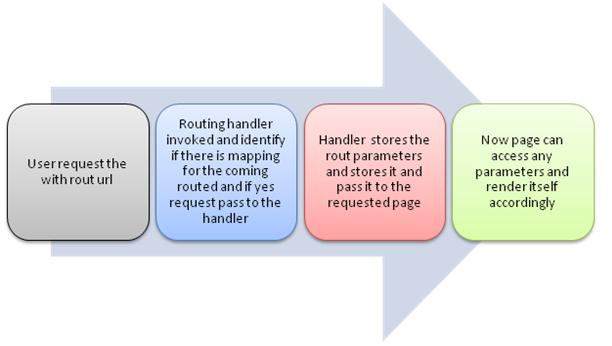
We access our webapplication using some URL that is normally the physical path of the of pages.So URL Routing is a way to provide our own URL in lieu of the physical path of the page. One other way, Routing allows us a way to configure our application to accept a requested URL which actually doesn’t map to physical
files. In terms of security perspective of the application, its important because one can easily know the solution structure of the application.

URL Routing

URL Routing


Complete article has been published on CodeProject. To view Click here