How to access the input control’s data at Server side during Client Callback : A useful trick

Client callback is one way to update the webpage without performing the full page postback. It maintains the Client state while updating the Webpage. During Client callback the webpage runs through modifies version of Page Life Cycle.

The LifeCycle of a page in Client Call Back is  as

Page Lifecycle iin Callback

If you want to learn  more about Client Callback, click here.

But the main drawback of  Client Callback, The input data is not posted from Client to Server. Also,  It does not maintain the view state during partial postback as you can see the Page life cycle of Client callbak it is not saved or SaveViewState event is not fired.

Lets see it with an example.

I have created a simple form to collect some information of an person data. And it has a submit button, which initiates a Callback. As

 <table>
 <tr><td><asp:Label id="lblFName" runat="server" Text="First Name" /> </td>
 <td><asp:TextBox ID="tbFName" runat="server"></asp:TextBox></td></tr><tr>
 <td><asp:Label id="lblMName" runat="server" Text="Middile Name" /> </td>
 <td><asp:TextBox ID="tbMName" runat="server"></asp:TextBox></td></tr><tr>
 <td><asp:Label id="lblLName" runat="server" Text="Last Name" /></td><td><asp:TextBox ID="tbLName" runat="server"></asp:TextBox></td></tr><tr>
 <td><asp:Label id="lblAge" runat="server" Text="Age" /></td><td><asp:TextBox ID="tbAge" runat="server"></asp:TextBox></td></tr><tr>
 <td><asp:Label id="lblMailId" runat="server" Text="Email" /></td><td><asp:TextBox ID="tbEMail" runat="server"></asp:TextBox></td></tr><tr>
 <td><asp:Label id="lblSex" runat="server" Text="Sex" /></td><td><asp:TextBox ID="tbSex" runat="server"></asp:TextBox></td></tr><tr>
 <td colspan="2"><input id="btnCallBack" type="button" value="Submit" onclick="InitiateCallBack();"/></td></tr>
</table>

Server side code is as

public partial class Callback : System.Web.UI.Page,ICallbackEventHandler
{
    string result;
    protected void Page_Load(object sender, EventArgs e)
    {
        if (Page.IsCallback)
            return;
        //Creating a reference of Client side Method, that is called after callback on server
        String cbReference = Page.ClientScript.GetCallbackEventReference(this, "arg",
            "ReceiveServerData", "");

        //Putting the reference in the method that will initiate Callback
        String callbackScript = "function CallServer(arg, context) {" +
            cbReference + "; }";

        //Registering the method
        Page.ClientScript.RegisterClientScriptBlock(this.GetType(),
            "CallServer", callbackScript, true);
    }
    public void RaiseCallbackEvent(String eventArgument)
    {
        string firstName = tbFName.Text;
        //Read other data as well

    }
    public string GetCallbackResult()
    {
        return result;
    }
}

And the client side method is

function InitiateCallBack() {
     //Intiate the callback
     CallServer("",'');
}

// Called after the server side processing is done
function ReceiveServerData(arg, context) {
    //arg: hold the result
    //Updating the UI
    document.getElementById('divCallbacl').innerHTML = arg;
}

After filling this form, I submitted it. Now if you try to access the entered using control’s property, you would not get it.

Let’s dig it more and check the form collection, whether the data is passed from Client to server or not

So as you can see that the data is not passed in form collection

But let’s put the following lines of code in java-script, just before initiating the call for Callback as

 function InitiateCallBack() {
	__theFormPostCollection.length = 0;
        __theFormPostData = "";
        WebForm_InitCallback();

        //Intiate the callback
        CallServer("",'');
}

Now let’s run the code and submit the form as earlier.

Now let’s check the form collection.
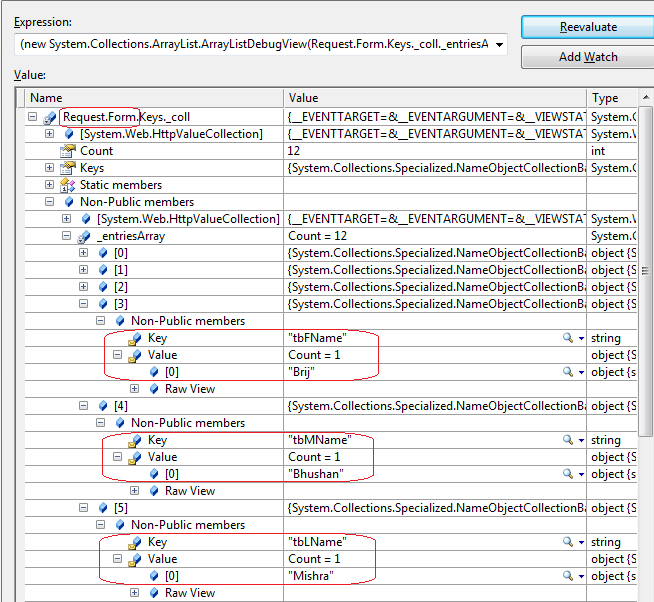
What a surprise, we got all the input data in form collection. That’s nice.

Now access the data using control’s property.

and you got it.

Now let’s try to see, what does the extra lines of code does

//This Clear the earlier the old data in form collection.
__theFormPostCollection.length = 0;
//It sets the forms data to empty
__theFormPostData = "";
//This method builds the body of the POST request when the page loads. The body of the page is a string 
//(that is __theFormPostData) filled with the contents 
of the view state and all of the input fields in the form.
WebForm_InitCallback();

But I would suggest to use these line at caution. Use only when you need to collect the update from Page during Callback. If you don’t need to get some data or it is in readonly page, don’t use it it introduce extra overhead to your page and costs at performance point of view.

Hope you  all have enjoyed the post.

Asynchronous HTTPHandlers with ASP.NET 4.5

In my last post, I discussed about writing Asynchronous HTTPModule with ASP.NET 4.5. You can check the link Below.
Writing asynchronous HTTP Module in ASP.NET 4.5

In last post, I also briefly discussed about the enhancement made in .NET 4.0 and .NET 4.5, that made our life very easy to write asynchronous code. And in ASP.NET 4.5, we can use these features easily.

I also discussed, why at certain situations Asynchronous HTTPModules are important. In the same way, Asynchronous HTTPHandlers can play a vital role in site performance. The working of Asynchronous Handler can be shown as

Asynchronous HTTPHandler

Asynchronous HTTPHandler

As we know if we need to create a normal custom HTTPHandler. We need to implement IHTTPHandler interface and if we want to create a custom Asynchronous HTTPHandler, we need to implement IHttpAsyncHandler.

In this post, I will be discussing, How we can write Asynchronous HTTPHandlers with the help of new features introduced in .NET 4.5 framework.

In the example, I’ll create an asynchronous HTTPHandler with the help of asp.net 4.5 that downloads rss feed.

To create Asynchronous HTTPHandler in asp.net 4.5, we need to implement the method ProcessRequestAsync of new abstract class HttpTaskAsyncHandler that got newly introduced.

For that I created a class library named AsyncHandlerLibrary , which has a Handler class CustomAsyncHandler which implements HttpTaskAsyncHandler.

So the class CustomAsyncHandler  will be as

   public class CustomAsyncHandler : HttpTaskAsyncHandler
    {

        public override async Task ProcessRequestAsync(HttpContext context)
        {
            string url = context.Request.QueryString["rssfeedURL"];
            if (string.IsNullOrWhiteSpace(url))
            {
                context.Response.Write("Rss feed URL is not provided");
            }
            WebClient webClient = new WebClient();

            //It starts downloading the rss asynchronously and the asp,net thread become free
            //and become available in threadpool
            //once the the it load the rssfeed loading completes it get assigned to another ASP.NET thread from the threadpool
            var rssfeed = await
                webClient.DownloadStringTaskAsync(url);

            // Writing the rss on the screen
            context.Response.Write(rssfeed);
        }

        public override bool IsReusable
        {
            get { return true; }
        }

        public override void ProcessRequest(HttpContext context)
        {
            throw new Exception("The ProcessRequest method has no implementation.");
        }

    }

Now if you see the above code, I have implemented ProcessRequestAsync , in which I read the rss url from query string. And asynchronously downloaded the rss feed and later wrote it in response.

Now you can see, with help of new keywords async keyword and await operator of .NET 4.5, it is extremely easy to write asynchronous code. It also got ensured that same can be used in asp.net with the introduction of new APIs.

Now build the project and add the reference in your web application. Also add this in your web.config file as

 <system.webServer>
  <handlers>
     <add name="myHandler" verb="*" path="*.rss"  type="AsyncHandlerLibrary.CustomAsyncHandler"/>
  </handlers>
</system.webServer>

Now you need to run you application with the url with query string say as http://brijbhushan.net/feed/. And in a while the rss feed would be downloaded as

Now you can seen it has never been so easy to write Asynchronous HTTPHandler. Now enjoy coding with ASP.NET 4.5

Hope you all have enjoyed the above post.

Writing asynchronous HTTP Module in ASP.NET 4.5

Today again, I am going to discuss , one of the new features that got enhanced in ASP.NET 4.5. And It is Asynchronous HTTP Module . And it’s going to be very useful if used meticulously.

First Just to give a brief Idea, why Asynchronous HTTPModules are important ?

As we all know, web is stateless. A Web page is created from scratch every time whenever it is posted back to the server. In traditional web programming, all the information within the page and control gets wiped off on every postback. Every request in ASP.NET goes through a series of events.

Every request is served by am HTTP handler and it goes a series of HTTPModules (HTTPPipeline) which can be read, update the request. A lot of features of ASP.NET like Authentication, Authorization, Session etc are implemented as HTTP Module in ASP.NET. Let’s have a view on the Request Processing

ASP.NET Request Processing : HTTPPipeline and HTTPHandler


Now as you can see the request is assigned to a thread T1 from the available threads is thread pool. And the request is passed through several HTTPModules and finally served my HTTPHandler and response is send back with the same thread (T1).

During the entire processing, same thread is engaged in serving  the same request and cannot be used by any another request till request processing completes.  During the request processing if any HTTPModules depends on some entities like I/O based operations, web services, Databases queries etc then it takes long to complete which makes the thread busy for long which makes asp.net thread will not do anything during that duration and will be useless.  In this kind of scenarios the throughput goes down rapidly.

In the above scenario, synchronous HTTPModule can degrade the site performance a lot. So if we can make  HTTPModules as asynchronous  that can increase the through put a lot.  In asynchronous mode, ASP.NET thread get released as soon as the control get passed to another component/module, it does not wait. And the thread becomes available in thread pool and can be used to serve another request. When the component completes its assigned task then it got assigned to new ASP.NET thread which completes the request. The flow can be graphically presented as

Working of an asynchronous HTTPModule

In the above picture, An asp.net thread T1 is assigned from threadpool to server the request. When the control got passed to File System to log message, asp.net thread got  released and when essage logging got completed, control passed to asp.net and it is assigned to another thread say T2 from thread pool.
In .NET Framework 4.o, there was some major enhancement made for asynchronous programming model. Any asynchronous operation is represents a Task and it comes under the namespace System.Threading.Tasks.Task.

In .NET 4.5, there are some new operator and keyword introduced that makes the life easy for implement Asynchronous feature. One is async keyword and await operator.

These two enables us to write the asynchronous code is similar fashion as we write for synchronous mode.

And these features can be easily used while writing HTTPModules and HTTPHandlers. We’ll be using these enhancements in writing our custom asynchronous HTTPModule.

In my sample as depicted in image, I am creating a module that writes some log messages in a text file for every request made.

So to create a Custom HTTPModule, Create a class library project. And create a class  say named LogModule which implements IHttpModule. For this you need to add a reference of Assembly System.Web.

LogModule would contains the methods discussed below.

We need to implement two methods Init and Dispose that are part of IHTTPModule interface.

Here first , I have written an asynchronous method that actually reads the information from the request and writes in the log file asynchronously . For this I have used WriteAsync of FileStream

private async Task WriteLogmessages(object sender, EventArgs e)
{
	HttpApplication app = (HttpApplication)sender;
        DateTime time = DateTime.Now;

        string line = String.Format(
        "{0,10:d}    {1,11:T}    {2, 32}   {3}\r\n",
        time, time,
        app.Request.UserHostAddress,
        app.Request.Url);
        using (_file = new FileStream(
            HttpContext.Current.Server.MapPath(
              "~/App_Data/RequestLog.txt"),
            FileMode.OpenOrCreate, FileAccess.Write,
            FileShare.Write, 1024, true))
        {
            line = line + "  ," + threaddetails;
            byte[] output = Encoding.ASCII.GetBytes(line);

            _file.Seek(_position, SeekOrigin.Begin);
            _position += output.Length;
            await _file.WriteAsync(output, 0, output.Length);
        }

}

Here you can see the await key word, what it means..

As per msdn “An await expression does not block the thread on which it is executing. Instead, it causes the compiler to sign up the rest of the async method as a continuation on the awaited task. Control then returns to the caller of the async method. When the task completes, it invokes its continuation, and execution of the async method resumes where it left off.

await is used with some asynchronous method that returns task and is used suspend the execution of the method until the task completes and control is returned back to the caller to execute further. await should be used with the last expression of any code block.

And Init method would be like

public void Init(HttpApplication context)
{
        // It wraps the Task-based method
        EventHandlerTaskAsyncHelper asyncHelper =
           new EventHandlerTaskAsyncHelper(WriteLogmessages);

        //asyncHelper's BeginEventHandler and EndEventHandler eventhandler that is used
        //as Begin and End methods for Asynchronous HTTP modules
        context.AddOnPostAuthorizeRequestAsync(
        asyncHelper.BeginEventHandler, asyncHelper.EndEventHandler);

}

So apart from above these methods, we need to implement the dispose method.

Now compile your class library and use the reference in your ASP.NET website . Now as you must be knowing that we need to need to add the entry in the config file. So it’ll be as

<system.webServer>
<modules>
<add name="MyCustomHTTPModule" type="MyCustomHTTPModule.LogModule, MyCustomHTTPModule"/>
</modules>
</system.webServer>

Now when you run your application, you will see the logs are created in a text file in App_Data folder as mentioned path in the code.

Hope you all have liked this new feature.

Request Validation with ASP.NET 4.5 : A deep dive

DownLoad Sample

Security is always the one of the greatest concerns of Applications and when it comes to web applications, they are more prone to security breach. All the web technologies provides many features that are used to write secured web applications.

Here In this post, I am going to discuss Request Validation feature, mainly focusing ASP.NET 4.5 version.

Request validation introduced since ASP.NET 1.1 is available. By default it is enabled and it prevents to accept un-encoded HTML/XML etc from Client to server. It validates all the data that is passed from client to server. It can be any form like

  • Cookies
  • Form Collection
  • Querystring
  • Server variables

This helps to avoid script injection attacks. So it is always recommended to validate all the data that is passed from client to server because it can be malicious code and can be harmful the application.

Although, if we are sure that this situation would not arise, it can be disabled at application level or page level so no request will get validated. But this is not the case every time. On some occasions, we may need to allow users to enter some html, xml etc.. data . In this case, we need to partially validate the request.

There are several scenarios where we need to turn off the request validation just because of some specific data we don’t need to get validated. It leads us to write less secure code because we are the whole request goes to unvalidated. There are scenarios like in blog sites where we normally allow the user to write html , xml etc as input

Till ASP.NET 4.0, we have option to disable the request validation in the entire application or can be done page by page. But till now we did not have option to partially validate the page. ASP.NET 4.5 enables us to validate some specific part of the request.

ASP.NET 4.5 provides us two features.

  • Selectively un-validate the request
  • Deferred or lazy validation

How to allow partially unvalidated request in asp.net 4.5

(Note : I have VS11 beta version for this post)

I have created a sample application and have two textboxes – txtValidate and txtunValidate, with a submit button.

Let’s have a use case that I want to validate txtValidate but not txtunValidate. You must remember that this was not possible with earlier version of ASP.NET.I’ll also discuss it in detail later. To use this feature , you must set requestValidationMode as 4.5 in web.config like

            <httpruntime requestvalidationmode="4.5" />
 

Apart from this, ASP.NET 4.5 added one more property ValidateRequestMode with input controls. And it can have the following values

  • Enabled: Request validation is enabled for the control. Bydefault it is enabled
  • Disabled: Input values for this control would not be validated
  • Inherit: Property value will be inherited from parent

So let’s proceed with sample, and as I don’t want to validate txtunValidate so I need to set ValidateRequestMode attribute as disabled like

Sample aspx code

Now Let’s run the code.

sample runningAnd as you can see I’ve put some script tag in txtunValidate and it worked fine. But let us remove the requestValidationMode from web.config and try to submit the same input again.

Request Validation error

and see it gave the HttpRequestValidationException exception and got the above screen. Now lets again put the attribute requestValidationMode in web.config and try to put some script in txtValidate and submit. It’ll show you the same exception again as expected. So here you can see, ASP.NET 4.5 enables us to selectively validate the request.

Deferred or lazy validation

This is also introduced in asp.net 4.5 and I’ll say that above feature is just a corollary of this feature.

To provide these features, Microsoft has done some major changes in the way Request Validation feature got implemented in earlier version of ASP.NET. As we know, to process a request, ASP.NET creates an instance of HTTPContext which holds the instance of HTTPRequest and HTTPResponse with other required data. All the input data that is passed from client to server, it is posted in form collection, querystring etc.. ASP.NET validates every data that is passed from client to server.

Actually in ASP.NET 4.5, whenever the data is accessed from the request it gets validated. Like when we access the form collection to some input as Request.Form[uniqueId] the validation triggers. To provide selective validation, Microsoft has introduced a new collection property named as Unvalidated in the HTTPRequest class. This contains all the data that is passed from client to server like cookies, form collection, querystring etc as

UnValidated collection

Now the same data is available at two places. In UnValidated collection and normal in HTTPRequest. When we set the ValidateRequestMode is disabled, the data is accessed from UnValidated collection else normal request. UnValidated collection don’t trigger any validation while other one triggers. I’ll show you a demo later.

In earlier version of ASP.NET 1.1/2.0/3.5, Request validation is done at earlier level of page processing. There were also some good amount of changes took place in ASP.NET 4.0, which provides us the feature to validate the non-ASP.NET resources as well which was not available earlier.

Under the hood

I have the same application and I have removed the requestValidationMode attribute from web.config and putting some html tags as I did above example and pressed submit. So I got the HttpRequestValidationException as

Validation exception in earlier versions of ASP.NET

Now let’s put the requestValidationMode as 4.5 and try the same as above. I have removed the disable attribute. Again I got the same exception as below

Validation error in ASP.NET 4.5

But if we examine the circled part of the stacktrace, we can easily Identify that in 4.5, the validation exception got thrown from TextBox’s LoadPostData method.

Let’s do some experiment to examine this. I have made two case studies for this.

Case Study 1

As we all know the ASP.NET Page LifeCycle as

ASP.NET page life cycleAs you can see, here LoadPostData is a part of PageLife Cycle and comes after LoadViewState. All of the Input control’s data don’t get wiped off during postback even if viewstate is not enabled for that control. I have written a post on it. You can view this here.

So this is the LoadPostData method that is responsible to get the data from Form collection and assign it to the control. As I said, Now asp.net 4.5, validates the input only when you access the data from form collection. That’s why if you look the stacktrace then it is visible that the exception is thrown from LoadPostData method only and page life cycle is the last stage of ASP.NET Request Processing.

Now lets try to have an clarification using a demo. As I mentioned, in ASP.NET 4.5, the validation triggers only when the data is accessed and the data is accessed at LoadPostData for input controls. So lets create a custom textbox. For this I’ll override LoadPostData method and will do nothing in that. It means that the data would not be accessed for the customTextBox at LoadPostData. So even if the ValidationMode is enabled for the CustomtextBox, it wont be fired. Lets see this

I have created a CustomtestBox and overridden the LoadPostData method as

   public class CustomTextBox : System.Web.UI.WebControls.TextBox
    {
        protected override bool LoadPostData(string postDataKey, NameValueCollection postCollection)
        {
            return false;
        }
    }
 

You can see, I have just returned false in the LoadPostData method. Now I have used my CustomTextBox at my aspx page as

CustomtextboxNow set the requestValidationMode as 4.5 in web.config and enter some script tag and submit.

You would not get any error even RequestValidation is enabled. This proves the validation fires only when data is accessed from the form collection.

Case Study 2

Here I’ll also try to prove the same as above. I have already shown above that How the new UnValidated property of Context holds all the data including form collection, querystring, cookies etc. So whenever the data is accessed from the UnValidated collection, the validation is not fired. But when it is accessed from the normal form collection, validation gets fired.

So here I am going to use again the earlier sample. In that example I had two textboxes and a submit button. Here the change is that at server side, instead of accessing the data form txtValidate.Text, I’ll be accessing the data from FormCollection. So I’ll set the the ValidateRequestMode as disabled for both the textbox and will try to get the data one will be form normal Form Collection and another is from Unvalidated’s form collection as

   protected void Button1_Click(object sender, EventArgs e)
    {
        string textValidated = this.Context.Request.Unvalidated.Form[txtValidate.UniqueID];
        string textUnValidated = this.Context.Request.Form[txtunValidate.UniqueID];
    }
 

Now lets enter some html tags in both the textboxes and submit the page using debugger as

Exception using debuggerOh!! see even we have disabled the validation, even in that situation when data is accessed from normal Form collection the validation is fired.

This again proves the validation is fired only when the data is acessed and when the ValidateRequestMode is set as disabled it is accessed from the UnValidated property.

Hope you all have enjoyed the post. Do share your precious feedback.

Cheers,
Brij

A starter guide to Page Inspector

There is a very exciting tool that was launched by Microsoft with Visual Studio 11 Developers Preview. That is Page Inspector.

Web development has always not been a very simple job. Every web developer must have spent lots of time to give a better look to the web page and have worked a lot with HTML syntax.

There are a lots of tools that helped the web developers a lot and became a lingua franca in web development community. Some of these tools are

Browser diagnostics tools

Browser diagnostics tools

Continue reading

Limiting the accessibility- Another way of Friend Assemblies

In my last post, I discussed, how to access internal class of one assembly in another assembly and that is easily achieved with the help of a C# feature called Friend Assemblies. It allows us to call the internal methods of another assembly. It is very much required at several occasions like the one I discussed in my last post, Unit Testing. It is often required to test the internal classes of the assembly in another project of Unit testing and It can be done easily via Friend Assembly.

To see my last post Please click here How to access internal class of one assembly to other assembly

But in some other scenarios Friend assemblies solution may not work. Like if you have two assemblies and one assembly accesses other assembly using Friend assembly. It’ll be fine as long as both assembly are compatible and shipped at same point of time. And if it does not happen on regular basis or in every release/update of assembly this may be hazardous.

To avoid it, we should implement it in another way. Here we declare the method as public but will limit to its accessibility to some specific assembly. It can be achieved by using LinkCommand with StrongNameIdentityPermission.

Continue reading

How to access internal class of one assembly to other assembly.

It’s been long since I made a new Post. I was missing it a lot. But now I’ll be here with my normal way..
Today I am sharing a small but useful learning with you all..

As we all know,  Internal classes are visible in the same assembly.  And we make it internal based on our requirement. i e when we make a class internal, it means we don’t want that code written outside the assembly, able to access it.

Normally in our projects, we have a separate project for Unit Tests. And obviously we may require to test that internal class. There may be some other requirement where you may need to expose your internal classes to some assembly. But how to access the internal classes here.

There is a concept of Friend Assembly in C#. It allows us to access the internal classes in other assembly.
Note : Only Internal classes can be exposed to other assembly. Private classes can not be made available outside the assembly.

Continue reading

A Very Happy New Year to all

Hello All,

I just want to wish all my blog readers and their family A very Happy New Year. It was really a very good year for Me. I received Microsoft MVP and Code Project MVP as well. It would not have been possible without all of you. Thanks to all for your kind support and valuable feedback.

Last few weeks I was not able to give enough time to community because of work and some other personal priorities. But I’ll be back very soon with more blogs..

At last again, I want to Wish that May The New Year Bring for You, Happiness,Success and filled with Peace,Hope & Togetherness of your Family.

Cheers,
Brij

TechCon 2011 in NCR

Hello All,

Just wanted to share all my blog Readers that a fantastic event is going to take place in Delhi. This will be a unique experience to all Microsoft Technologies Developers and Professionals.

Lot of new technologies and latest trends would be discussed and Many technology specialist would be speaking at the Event. And above all, the event is taking place on weekends. So spend a weekend to learn and discuss all the new Technologies and networking with stalwarts.

So got excited?

The brief details are:

When :

For Developers
Saturday, 17 December, 2011
Time: 9.00 AM- 7.00 PM
For IT Pros
Sunday, 18 December, 2011
Time: 9.00 AM- 7.00 PM

Where:  Auditorium 3, Siri Fort Auditorium, New Delhi

Want to know more details..
Click here

So enjoy the event.

Cheers,

Brij

Claim based Authentication and WIF : Part 3

This is third part of the Series on Claim based Authentication and WIF. In the first part we discussed the basics of Claim based Authentication and in the second part we explored the WIF and also discussed an example and made a Custom Identity Provider (IP) and ASP.NET application(RP). This ASP.NET application uses the Identity provider for authentication.

You can view earlier post in the series from the following links

Now in this post we will discuss the problems of the model that we discussed in our earlier Articles

Continue reading
